
 Need help?
Do you have a question about the Craftsman 26462_0 and is the answer not in the manual?
Instructions for attaching a router to the router table.
Steps for assembling the fence components.
Steps to attach the overhead guard to the fence assembly.
Instructions for assembling the push block.
General overview of the power switch box features.
Details on grounding and electrical safety for the switch box.
Instructions on how to safely operate the switch box.
Explains how to turn the router ON and OFF using the switch box.
Steps to align the fence with the miter bar slot for accuracy.
Instructions for setting the depth and height of the router bit.
How to perform routing operations using the fence.
Guide for performing edge cuts with non-piloted router bits.
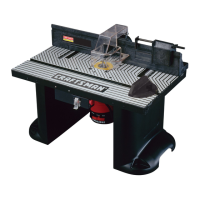
This manual describes the Sears Craftsman Professional Mid-Sized Router Table, Model No. 264620, a woodworking tool designed to enhance the functionality and safety of a router for various routing operations. The router table provides a stable and secure platform for mounting a router upside down, allowing the workpiece to be moved across the router bit rather than moving the router over the workpiece. This configuration is particularly beneficial for achieving greater accuracy, control, and versatility in routing tasks, especially when working with smaller or irregularly shaped pieces that would be difficult to handle with a handheld router.
The primary function of the router table is to facilitate precise and repeatable cuts, including edge shaping, grooving, fluting, veining, and joinery operations like tenons, sliding dovetails, and tongue and groove joints. It transforms a handheld router into a stationary tool, offering increased stability and a larger work surface compared to freehand routing. The table is designed to accommodate various Craftsman router models, as well as other brands with appropriate adapter plates, ensuring broad compatibility for users.
Key usage features of the Craftsman Professional Mid-Sized Router Table include its unique 4-inch high unitized fence with fence guides, which provides parallel movement for accurate and consistent cuts. Rulers molded into the tabletop allow for fast and precise fence adjustments, crucial for operations such as creating tenons, sliding dovetail joints, tongue and groove joints, and face cuts. The fence's design also supports additional routing operations like veining, fluting, and making crown molding, and allows for cuts up to 2-1/2 inches from the edge of the workpiece toward the center.
A specially designed push block with a quick clamp is included, capable of clamping workpieces up to 4 inches wide. This push block is essential for end grain or edge routing, providing a safe and controlled method for feeding material across the router bit. The table also features an accurate jointing fence that is quickly adjustable to the proper depth of cut, enabling users to true edges for joining boards. For dust management, a dust collector port is integrated into the fence, designed to accommodate most 2-1/2 inch wet/dry vacuum hoses, helping to keep the work area clean and improve visibility during operation.
The router table's design emphasizes safety, incorporating several features and instructions to minimize risks. The switch box, located at the front of the table, provides convenient "ON-OFF" control, eliminating the need to reach underneath the table to operate the router. This switch box also offers optional simultaneous "ON-OFF" control for an additional accessory, such as a light or vacuum, and includes an internal, resettable circuit breaker for overload protection. A clear plastic switch box cover prevents inadvertent switching, and a safety key can be removed to disable the switch box in the "OFF" position, preventing unauthorized use.
For stability, the router table must be firmly and securely mounted to a workbench or work surface before use. The manual provides detailed instructions for both direct mounting and an alternate method using a baseboard. The table comes with three tabletop inserts of different hole sizes (1-1/4", 1-7/8", and 2-1/8" diameter) to accommodate various router bit sizes. For larger bits (between 2" and 2-3/4"), no insert is used. It is crucial to select the correct insert to minimize the opening around the bit, reducing the risk of small workpieces falling into the router cavity.
Maintenance features primarily revolve around ensuring the table's structural integrity and cleanliness. Users are instructed to periodically check all fasteners to ensure they are tight and secure, as vibrations from router operation can cause them to loosen over time. Cleaning the router table after use, preferably with a wet/dry vacuum, is recommended to remove dust, chips, and foreign particles that could interfere with cuts or the function of the fence assembly and overhead guard. The router bits themselves should be kept sharp and clean for best and safest performance, with instructions for lubricating and changing accessories provided in the router's owner's manual.
The manual also highlights the importance of proper electrical grounding for the switch box, detailing the use of three-wire extension cords and appropriate outlets to prevent electrical shock. In case of an overload situation, the internal circuit breaker will trip, and users are guided through steps to clear the workpiece, correct the cause of the overload, and restart the router. The overhead guard is a critical safety component, designed to be assembled to the fence and never removed, as its absence can lead to unsafe operating conditions and potential bodily injury. When making adjustments or changing bits, the router must always be unplugged, and the router bit must be removed before handling tabletop inserts.
Overall, the Craftsman Professional Mid-Sized Router Table is presented as a versatile and safety-conscious tool that significantly enhances the capabilities of a router, making it suitable for a wide range of woodworking projects requiring precision, control, and efficiency. Its design focuses on user convenience, accuracy, and robust safety measures to ensure a productive and secure routing experience.
 General
| Brand | Craftsman |
|---|---|
| Category | Power Tool |
| Voltage | 120V |
| Type | Angle Grinder |
| Arbor Size | 5/8" |
| Tool Length | 12.5 in. |



 To Next Page