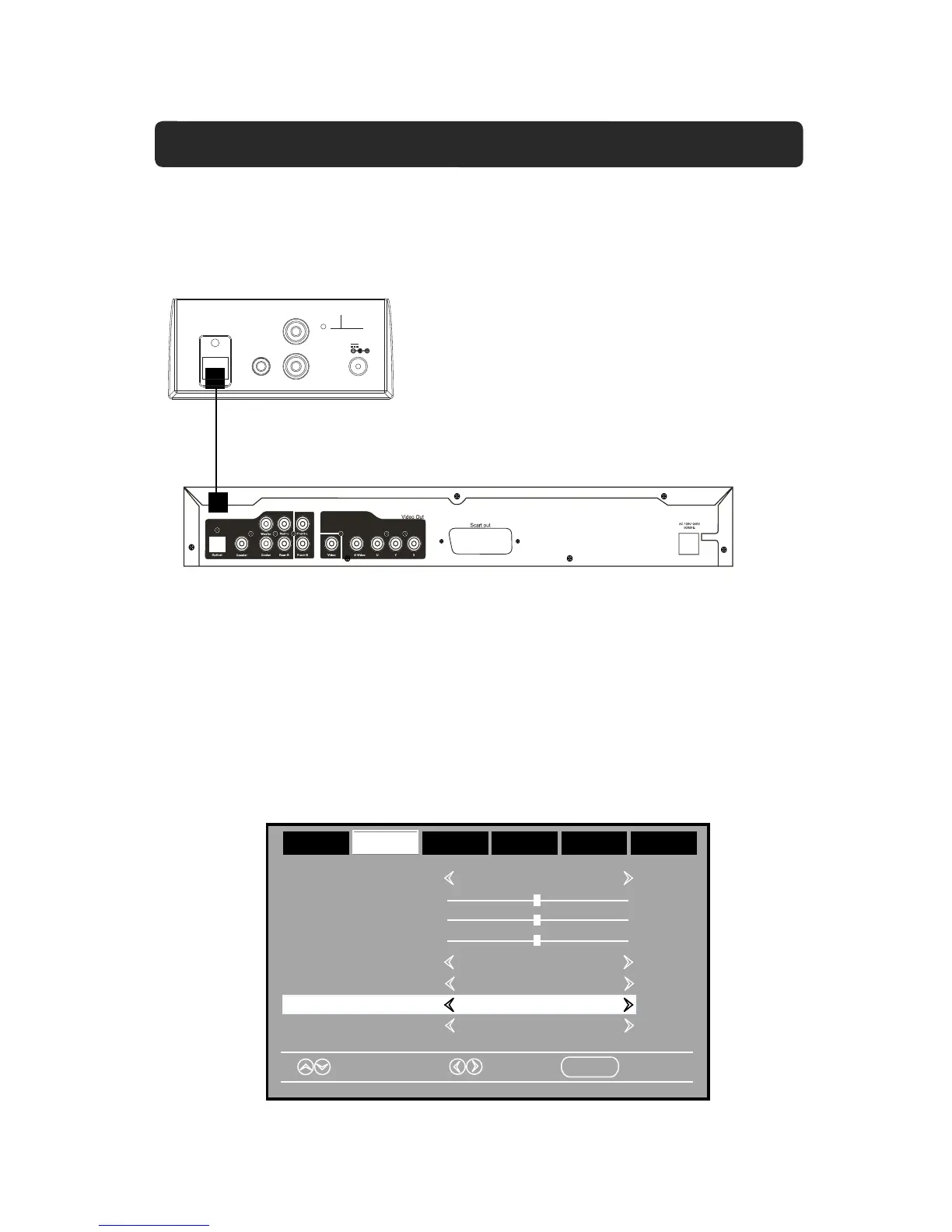
…etc.) to the OPTICAL IN jack on the top of unit by the Optical Connection Cable as the
figure below:
NOTE:
13
CONNECTION THROUGH OPTICAL
Top view of the unit
DC I N
DC 1 6V, 3A
AU X IN 1
AU X IN 2
L
R
FM AN T
OP TICAL IN
DVD Player
Bass
Treble
Balance
Select
Move
MENU
Exit
Sound Mode Standard
Surround Off
AVL Off
Audio Language English
Picture
Time
Setup
Lock
Off
AudioAudio
Digital Output PCMDigital Output PCM
1. Connect the Optical out jack from the external audio/video player (such like TV, DVD
2. Power on the unit as previous procedures.
3. Press the POWER/SOURCE Button on unit or press the SOURCE Button on
remote control repeatedly until "OPTI" appears on display.
4. Power on the connected external player and start playback the Video/Music as usual.
If there is no audio output (only picture) when your TV or DVD player is connected to the
unit, please check the digital audio output settings of the connected TV/DVD, and set it
Optical Cable
to PCM format as the example picture below.


 To Next Page