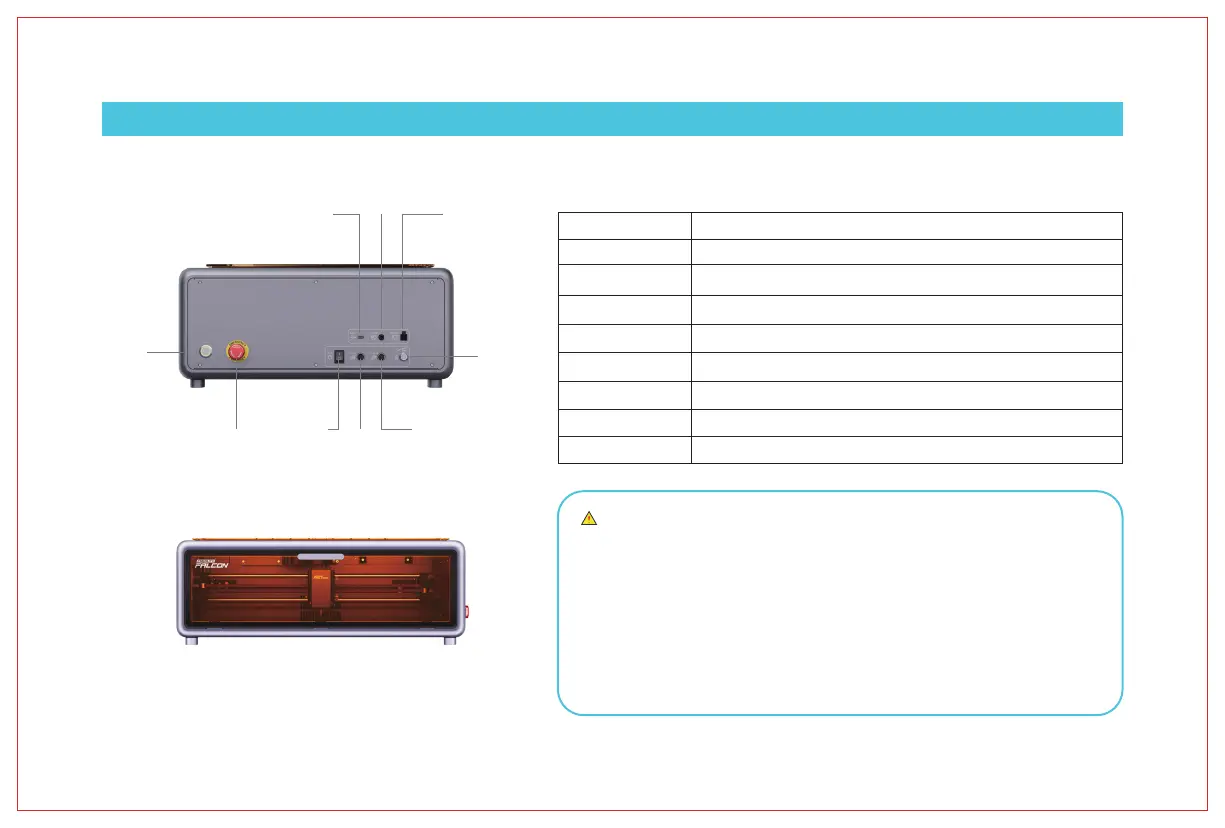
Safety Lock
Emergency Stop Switch
Power Switch
Type-C Port
Power Port
Start
Air Pump Port
Air Tube Connection
Rotary Kit Port
One of the three safety switches.
One of the three safety switches -- for emergency power cut-off.
One of the three safety switches -- for daily operation.
Connects the computer and device.
Connects to power supply for electricity.
Connects the air pump to the device for power supply.
Connects the air pump to the device for air flow transmission.
Connects the rotary kit to the device for operation.
1. Light off: The machine is powered off or has an abnormal power-on. Please check
the triple safety switch.
2. Breathing light effect (gradual brightening and dimming): The machine is in
standby mode. Press the micro switch to enter preview mode or engraving mode.
3. Light flashing: The machine is in upgrade mode or abnormal mode. The buzzer
emits rapid beeps. Wait for the upgrade to complete or the abnormality to clear,
then it will automatically enter standby mode.
4. Light constantly on: The machine is in preview mode or engraving mode. At this
time, the laser head is emitting light. Extra caution is required for safety.
Start switch
Emergency stop switch
Power switch
Power socket
Air pump port
Safety lock
Rotary kit port
Air tube connector
Type-C port
Indicator Light Status
IV. Product Structure
After placing the material and adjusting the focus,
press Start once to enter frame preview, then press a second time to begin.
13



 To Next Page