Software Operation
Right Click on Model
3
4
Red represents "outer shell"
Green represents "inner shell"
Yellow represents "infill"
Purple represents "bottom and top shell"
Blue represents "support"
Toolpath Structure
Drag layer indicator can browse different
level paths, Ctrl + arrow keys to browse layer by
layer. 3D printing is the superposition of these
different layers and built layer by layer.
4
6
5
2
3
1
Right-click on the model pop-up shortcut
menu, here are more features:
[1] "Centered" make the model back to the
center position of the platform. "Delete" to [2]
remove the currently selected model. "Multiply" [3]
to copy the currently selected model and
automatically position, which is useful for printing
more than one model at a time. "Split" multi-[4]
component model can be split into its separate components, this process more time-
consuming, try to split the model in the modeling software, models splited can be
printed individually and then assembled together . "Delete All" to delete all the [5]
models loaded. "Reload all" Reload all models, same as F5.[6]
- 26 -
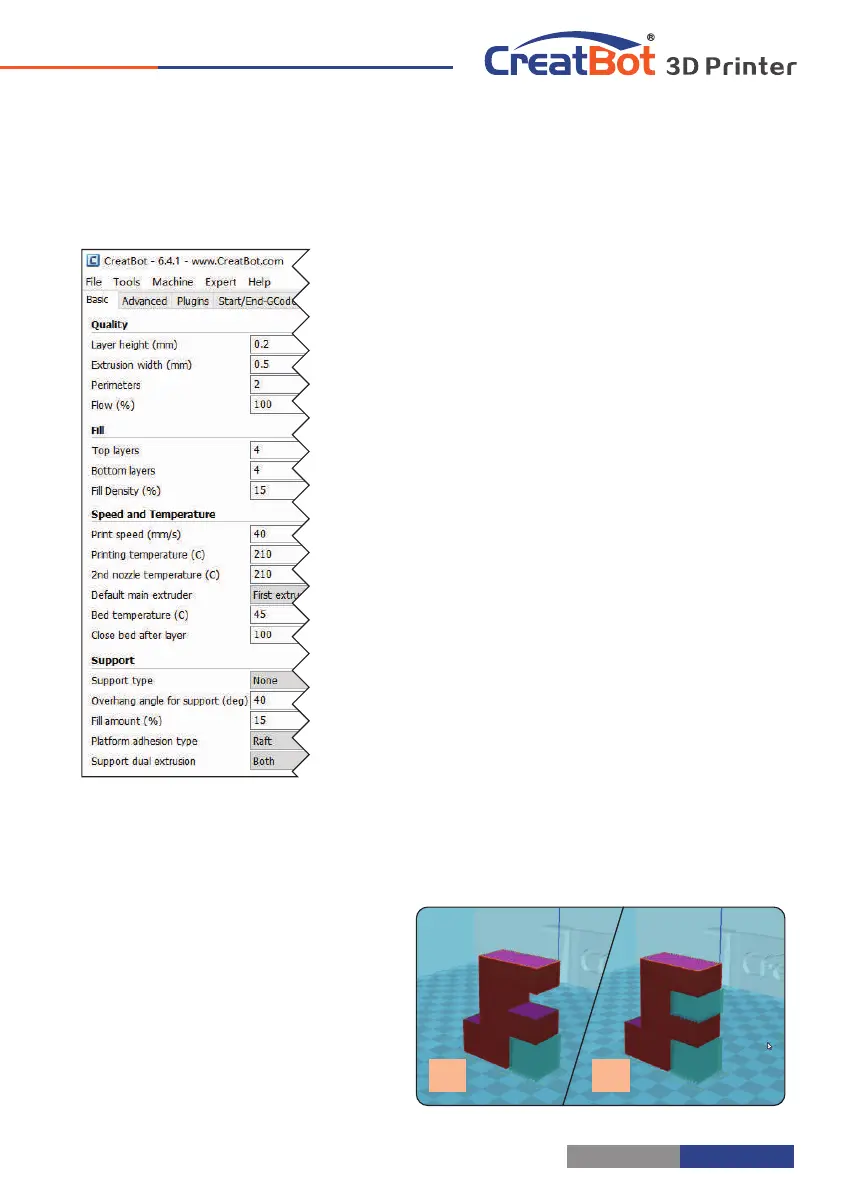
Basic Setting
Software Operation
Layer height: This is the most important setting to determent the
quality of your print, maximum value not exceed 80% of the
nozzle diameter.
Shell thickness: Refers to the total thickness of the inner and
outer walls, the outer wall is only one, the inner wall can be
more, set this value to an integer multiple of the diameter of
the nozzle.
Flow: Refer to the amount of printing material, 100% standard
dosage, the more material the model prints more plump.
top/bottom thickness: Is the thickness of the upper and lower
models, usually a multiple of layer height.
Fill density: Control how density filled the insides of your print will
be, a value around 20% is usually enough, 0% for hollow.
Print speed: Speed at which printing happens. Print speed is
affected by many factors, it is recommended to use low
speed for complex model, high speed will cause the feed
shortage, need improve nozzle temperature to compensate.
Nozzle temperature: Is the melting temperature of filament,
general use 200 ℃ for PLA and 240 ℃ for ABS.
Bed Temperature: General use 45 ℃ for PLA and 70 ℃ for ABS.
Default main head: The default is the first nozzle, can also be set
to other nozzles, this can reduce the times of changing
filament.
Support type: The touching build plate support type is shown in
figure , everywhere support is shown in figure [A] [B].
Support angle: The larger the angle, the more support generate.
Fill amount: The larger the fill, the more support generate.
Platform adhesion type: The model which is not easy adhesion
on the platform please use Brim, which easy to warped or ABS filament please use Raft.
Support Type
A B
- 27 -



 To Next Page