ENGLISH
12
In compliance with the directives: 2012/19/EU and 2015/863/EU on the restriction of the use of hazardous substances in
electrical and electronic equipment, as well as their waste disposal. The crossed bin symbol shown on the packaging indicates
that the product at the end of its useful life will be collected as separate waste. Therefore, any product that has reached the
end of its useful life should be delivered to waste disposal centers specialized in the separate collection of waste electrical
and electronic equipment, or returned to the retailer when purchasing similar new equipment, in one for a base. Proper sepa-
rate collection for subsequent commissioning of equipment sent for recycling, treatment and disposal in an environmentally
compatible manner helps prevent possible negative effects on the environment and health and optimizes recycling and reuse
of waste. the components that make up the device. The abusive disposal of the product by the user implies the application of
administrative sanctions in accordance with the laws.
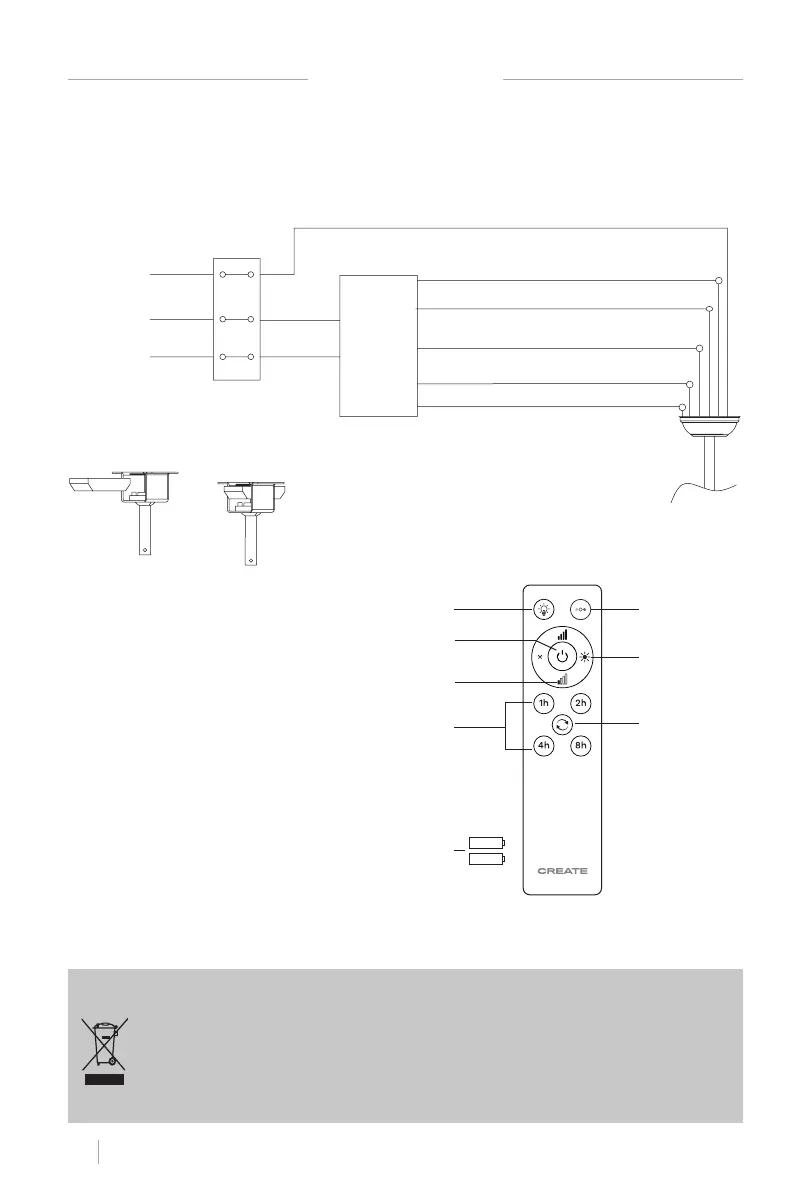
REMOTE CONTROL CONNECTION
Grounding
L
N
DC
L (black)
Input N
(white)
Remote
control
receiver
Neutral N (white)
Grounding
CC Motor Gray L
CC Motor Pink L
CC Motor Red L
Receiver Placement:
Make the connection between the receiver wires and the fan motor wires following the color
indications. Make sure the connection is tight.
L light (blue)
1. Light
2. ON/OFF button
3. Fan intensity control
4. Timer
5. Batteries (2xAAA)
6. **Color temperature control
7. **Light intensity control
8. Reverse function
1
3
2
4
5
8
7
6
REMOTE CONTROL


 To Next Page