Connecting Related Peripherals
Your Sound Blaster Audigy 5 will give you endless hours of karaoke singing and listening pleasure.
To connect related peripherals, refer to the corresponding sections.
l Enjoying Online Karaoke
l Creating Music
l Listening to Music
l Watching DVDs
The cables shown here are available separately.
Enjoying Online Karaoke
With Sound Blaster Audigy 5 you can go to your favorite karaoke websites and have an enhanced
karaoke singing experience.
Swiftly switch from Sing Mode to Chat Mode with a couple of clicks and effortlessly adjust your pitch and
volume while singing. Chatting with your friends and singing with them is just a breeze.
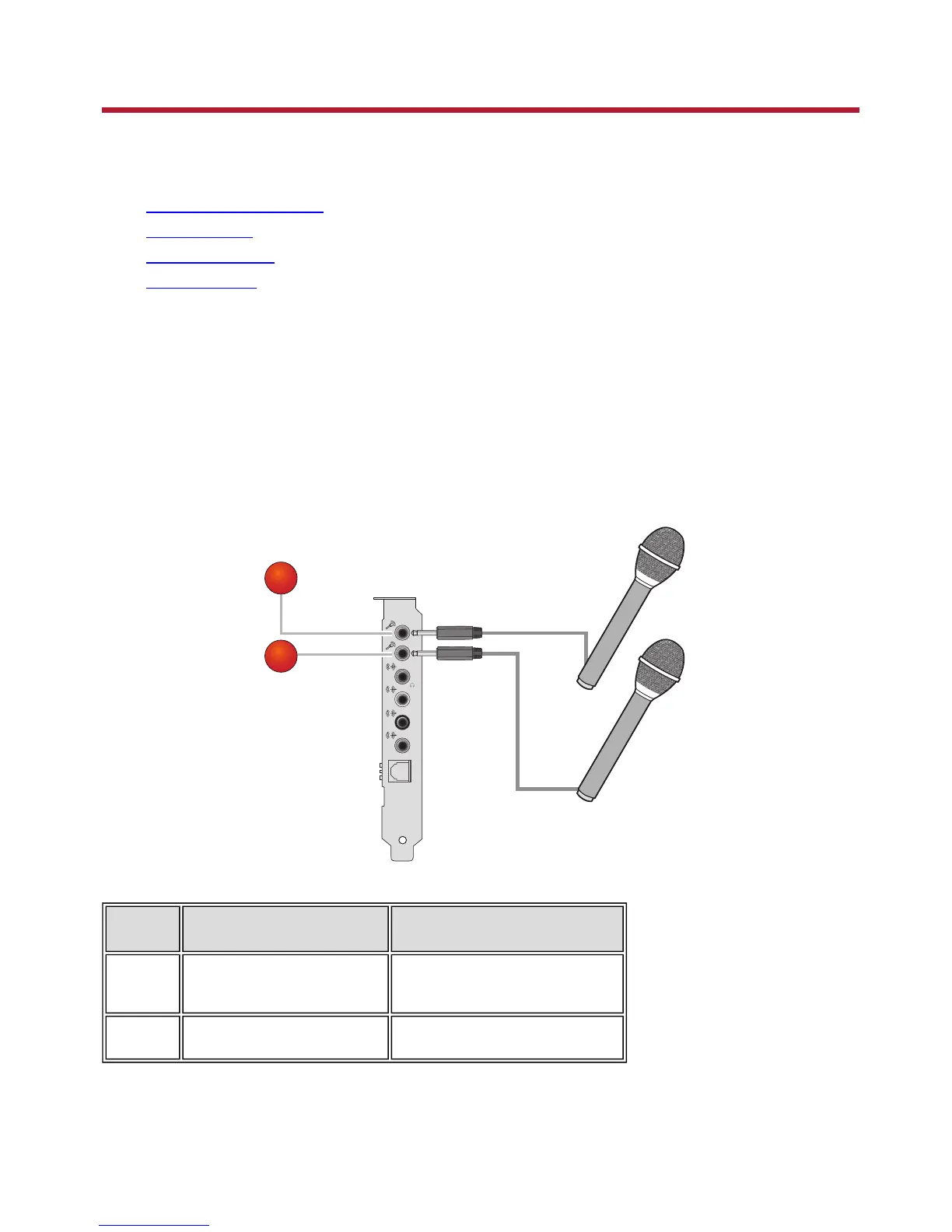
You may connect to more than one microphone with your Sound Blaster Audigy 5 to enjoy singing in
duet.
Jack, Connector or Cable Description
1. Mic In jack
Connects to a microphone.
2. Mic In jack Connects to a second microphone
Connecting Related Peripherals 8









 To Next Page