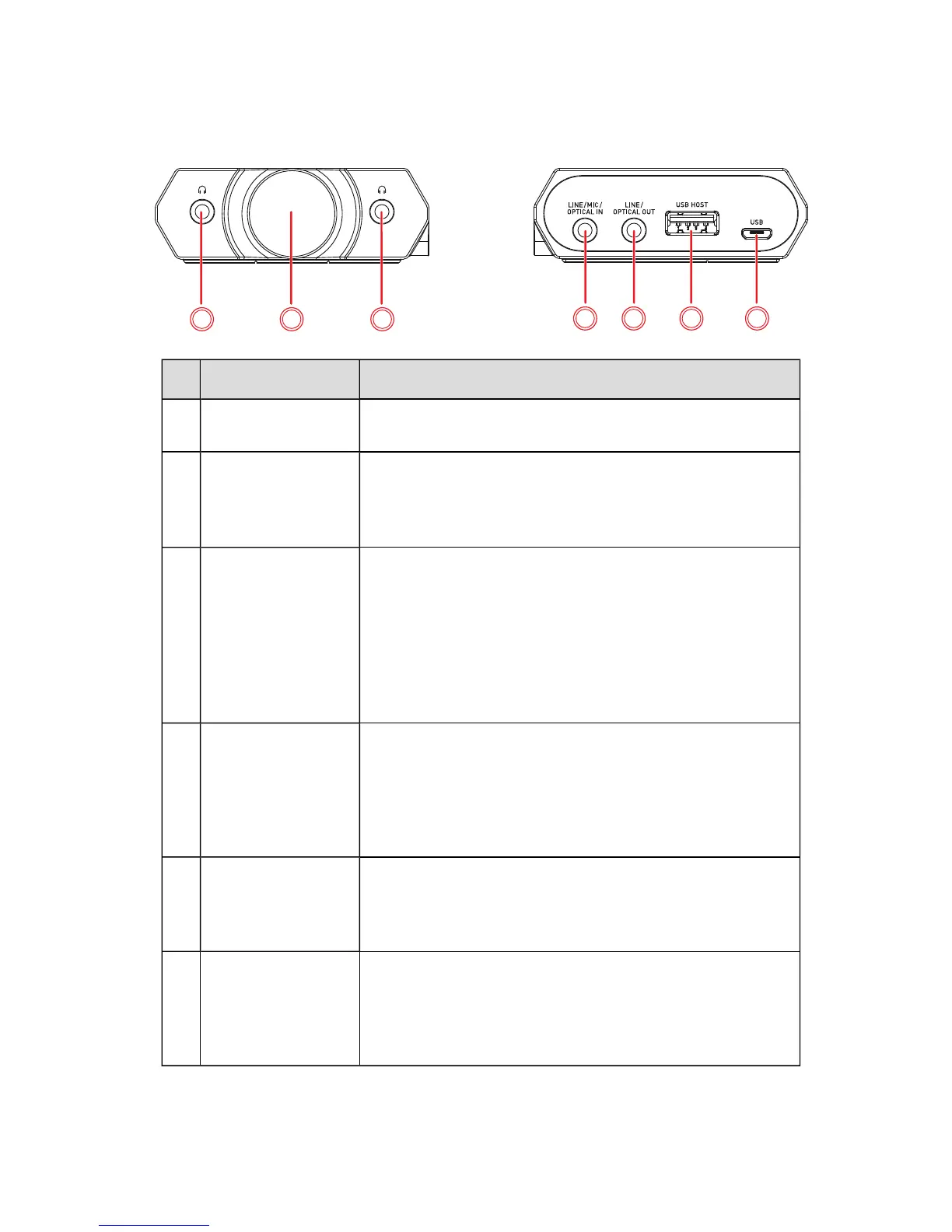
Jack / Control Description
7
Headphone jacks
Connects to stereo headphones with a 3.50 mm (1/8-
inch) plug.
8 Volume control
knob
Adjusts the audio output volume.
Increase volume: Turn clockwise
Decrease volume: Turn anti-clockwise
Mute or unmute the volume: Press once
9
Line / Mic / Optical In
jack
Connects to line-level sources (smartphones, tablets,
MP3 players) with a 3.50 mm (1/8-inch) plug.
OR
Connects to microphones with a 3.50 mm (1/8- inch)
plug.
OR
Connects to optical digital sources (video game consoles,
DVD players, AV receivers) with a Mini-TOSLINK cable.
10
Line / Optical Out
jack
Connects to powered analog speakers with a 3.50 mm
(1/8-inch) plug.
OR
Connects to optical digital devices (video game consoles,
DVD players, AV receivers) with a 3.50 mm (1/8-inch)
Mini-TOSLINK cable.
11
USB Host port
Connects to an iPhone/iPad for audio playback or
recording.
OR
Connects to an Android phone/tablet for audio playback.
12
USB port
Connects to USB ports of PC/Mac for audio playback or
recording.
OR
Alternatively, you may connect it to the power socket via
a USB power adapter (DC 5V, 1A) to charge it.
Sound Blaster E5 – About Your Hardware 5



 To Next Page