Using the Software 17
Equalizer Settings
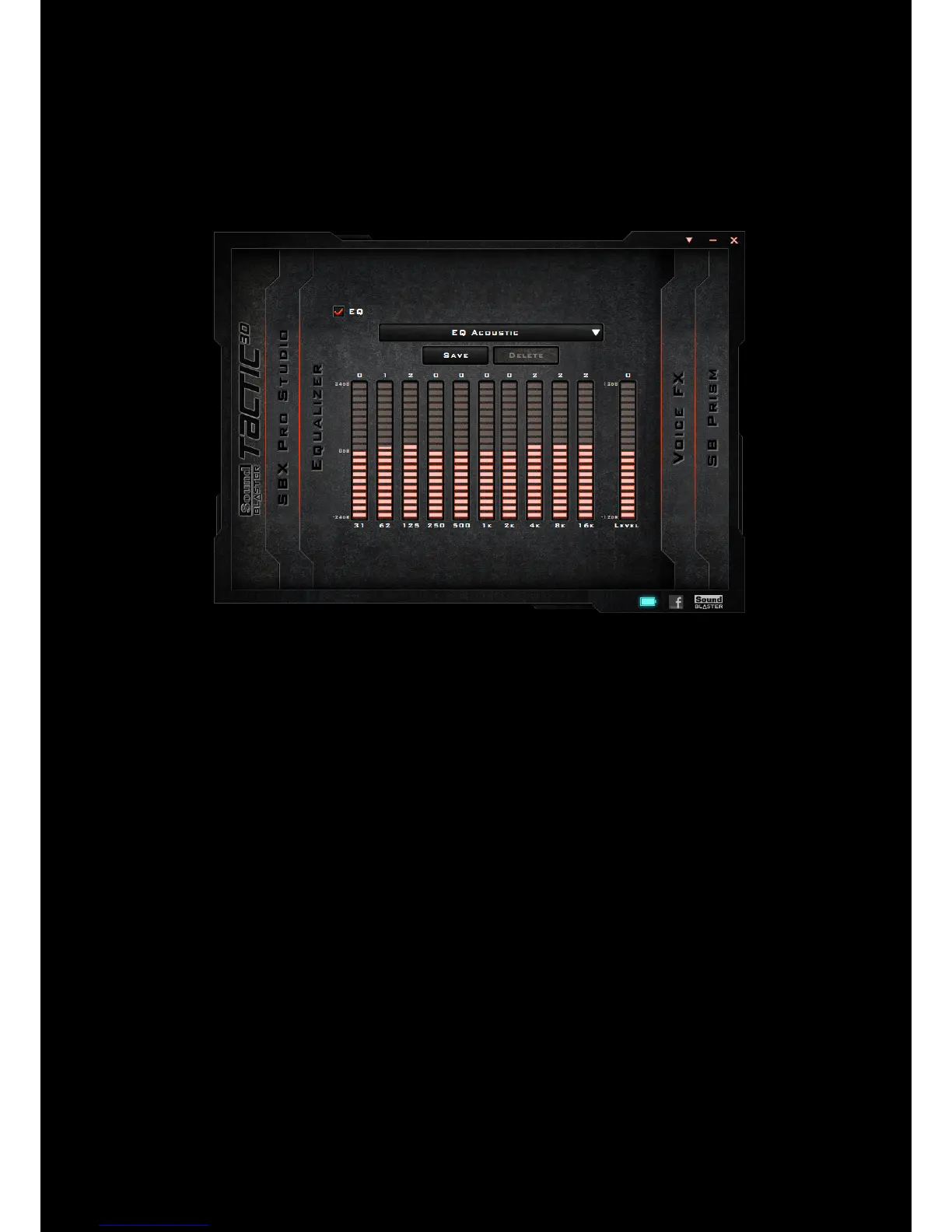
Equalizers allows you to filter various audio frequency, thus controlling the tone of your audio output.
TheSound Blaster Tactic(3D) Control Panel comes equipped with a range of preset equalizer settings,
helping you to select different audio tones easily. You can also manually modify or add equalizer
presets.
To view the Equalizer Settings interface, select "Equalizer" from the menu. To apply and adjust an
equalizer preset,
1. Check the EQ checkbox to enable the use of the equalizer.
2. From the drop down menu, select the preset to use.
3. Adjust the vertical slider bars to achieve your desired level.
4. Click [Save] to save the changes to the active preset or to a new preset.
You can also delete any user created equalizer presets by selecting the preset from the drop down
menu and clicking [Delete].
Notes:
All default equalizer presets cannot be deleted.










 To Next Page