Contents [ hide
1 Overview
2 IR Remote Control
3 Source Selection and Display
4 Bluetooth Mode / Power-saving
Mode
5 TV (ARC) / Optical / AUX
Connectivity
6 Wall Mount
7 Technical Specification
8 Other Information
9 File Downloads
10 References
11 Related Manuals
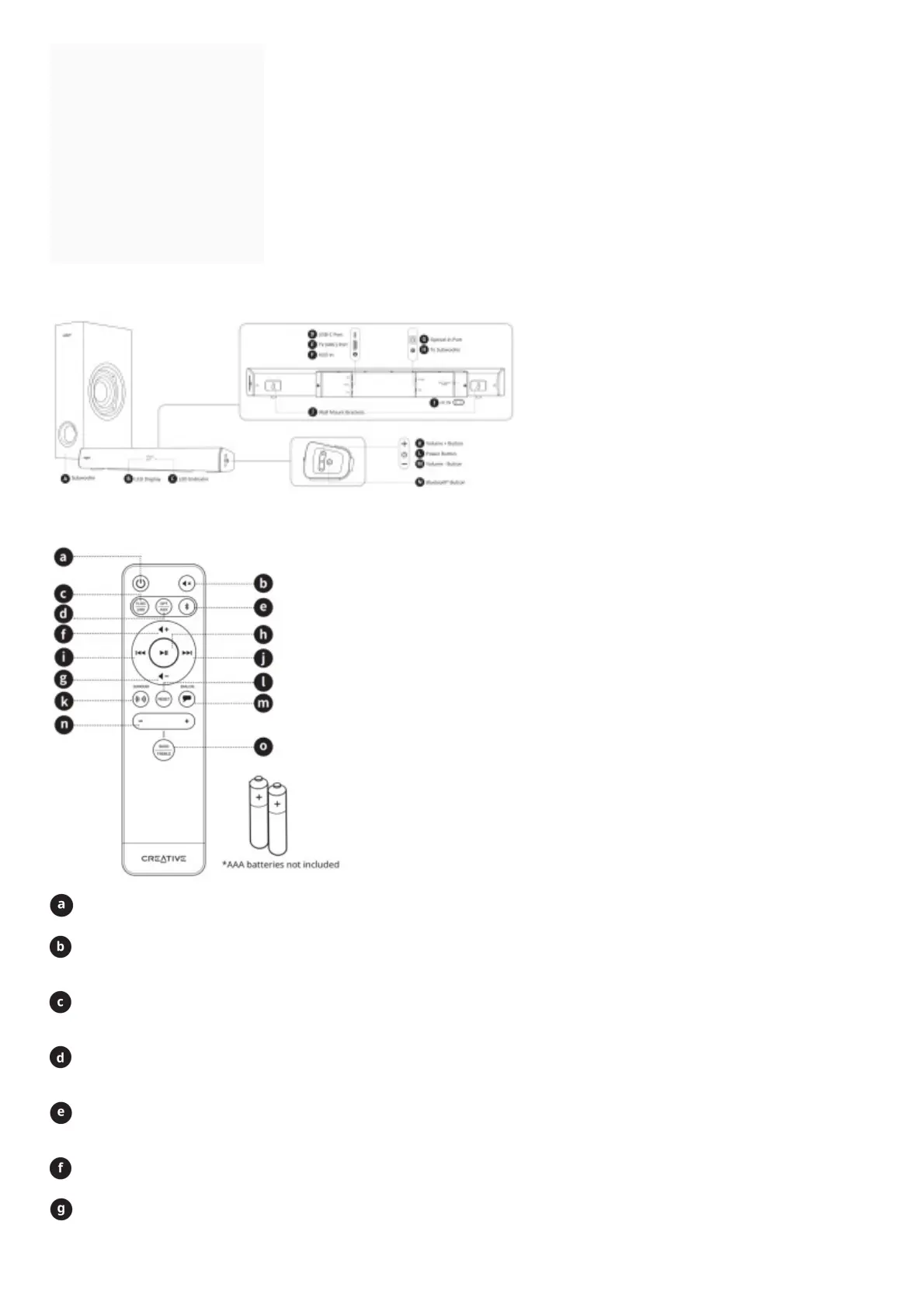
Overview
IR Remote Control
Power Button
Press and hold 2s to power off soundbar
Mute Button
Press once to mute volume
Press once again to unmute volume
TV (ARC) Source Button
Press once to toggle to TV (ARC)-out source
Press once again to toggle to USB-out source
OPT Source Button
Press once to toggle to Optical-out source
Press once again to toggle to AUX-out source
Bluetooth Source Button
Press once to enter Bluetooth Mode
Press and hold for 2s to enter Bluetooth Pairing mode
Volume + Button
Press to increase volume
Volume – Button
Press to decrease volume






 To Next Page