Operational Details
Charging headset
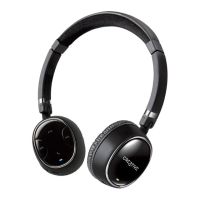
• Connect the Right earpiece to your laptop or computer using the supplied USB cable
• The indicator lights up in Red. It will be fully charged in about 2 hours
• You can listen and operate the headset while charging
Pairing new Bluetooth devices
• Press and hold the Multifunction button for more than 5 seconds on the Right earpiece until
the indicator lights up in Blue and blinking rapidly
• Turn on Bluetooth search function on your audio or mobile device
• Select “Creative WP-250 Headset” and if prompted for a Passcode, key in “0000”
• Once paired, the Blue indicator on the Right earpiece blinks slowly
• Note that when pairing with a computer, connect the headset as a Hands-free Audio or
Headset device instead of a Stereo Audio device in order to make use of the microphone
function. If microphone function is not needed, it is recommended to connect as a Stereo
Audio device for better playback performance. Certain Bluetooth solution detects the
application that you are using and configures the microphone automatically. You are
recommended to update your computer’s Bluetooth drivers to the latest.











 To Next Page