Operational Details
Playback from audio devices
• Turn on Bluetooth function on your paired audio device
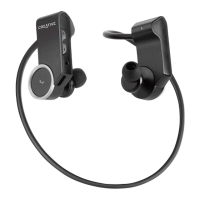
• Press and hold the Multifunction button on the Right earpiece until the indicator lights up in
Blue and blinks slowly. Press the Play button to establish connection
• You can now Play or Pause music playback, skip forward or reverse tracks, and make volume
adjustments
Call functions with mobile phones
• Turn on Bluetooth function on your paired mobile device
• Press and hold the Multifunction button on the Right earpiece until the indicator lights up in
Blue and blinks slowly. Press the Multifunction button to establish connection
• To activate voice dialling when no call is in progress, press the Multifunction button for about
1 second until the mobile phone starts voice dialling, and proceed as described in your mobile
phone’s user guide.
• To redial the number you last called when no call is in progress, press the Multifunction
button for 2 seconds and release
• To answer or end a call, press and release the Multifunction button. To reject a call, press the
Multifunction button for 2 seconds and release













 To Next Page