DO GUIDE
HD-DAx-4KZ-E Series
4K60 4:4:4 HDR Distribution Ampliers
DO Connect the Device
Connect the device as required for the application.
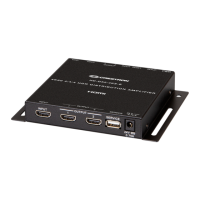
Front Panel Connections (HD-DA2-4KZ-E Shown)
DO Select the EDID Mode
Select the EDID (Extended Display Identication Data) mode by moving the EDID switch to either
of the following positions:
• DEFAULT: (Default setting) The device sends a predened Crestron EDID to the
input device. The Crestron EDID supports 2-channel LPCM audio and
4K60 444 non-HDR video.
• COPY 1ST: The device copies the EDID of the display connected to OUTPUT 1 and
sends the EDID to the input device.
NOTE: If the display that is connected to OUTPUT 1 is disconnected, the current EDID
is retained. Connecting a different display to OUTPUT 1 does not automatically update
the EDID at the input device. To update the EDID, move the EDID switch to the DEFAULT
position and then back to the COPY 1ST position.
EDID Selection Switch (HD-DA2-4KZ-E Shown)
DO Install the Device
The Crestron
®
HD-DAx-4KZ-E Series consists of the HD-DA2-4KZ-E, HD-DA4-4KZ-E, and
HD-DA8-4KZ-E. The devices can be mounted onto a at surface or onto a rack rail.
Mount onto a Flat Surface
Using four mounting screws (not included), mount the device onto a at surface such as a wall.
Wall Mounting (HD-DA2-4KZ-E Shown)
Mount onto a Rack Rail
Mount the device onto a front or rear rail of a rack. Position either the left or right mounting ange of
the device so that the holes align with the holes in the rack. Then, secure the device to the rack using
two rack mounting screws (not included).
Rail Mounting (HD-DA2-4KZ-E Shown)
DO Check the Box
QTY ITEM PART NUM.
1 Power Pack, 24 Vdc 0.75 A, 100-240 Vac 2037209
INPUT:
From HDMI®
audio/video
source
OUTPUT 1:
To HDMI
display
OUTPUT 2:
To HDMI
display
SERVICE:
For rmware
loading
24 V 0.75 A:
From included
power pack

 Need help?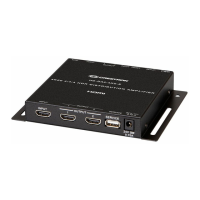





 To Next Page
 General