Crestron PSPHD PROCISE™ Surround Sound Processor
Connectors, Controls & Indicators
# CONNECTORS*,
CONTROLS &
INDICATORS
DESCRIPTION
1
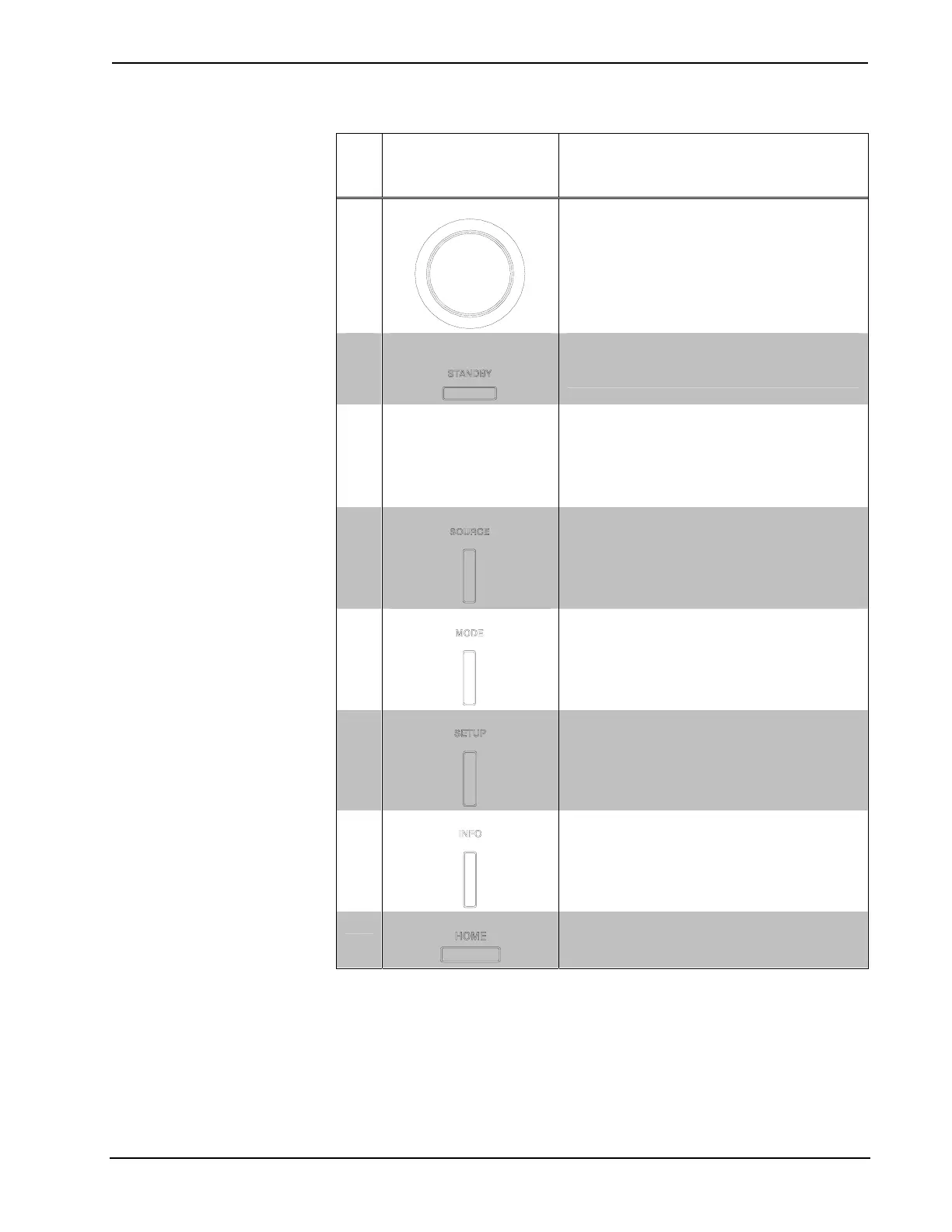
SELECTION KNOB
Rotary encoder with integral pushbutton, used
to navigate and select various menu options
and adjust values
2
STANDBY BUTTON &
LED
(1) pushbutton and red LED, places PSPHD
(and PROAMP if connected) into “Standby”
mode (all outputs turned off)
3 DISPLAY (LEFT)
The left side of the PSPHD contains a
Vacuum Fluorescent Display (VFD) that
shows information such as the selected
source and decoding method. It is also used
to display and configure the PSPHD’s
settings.
4
SOURCE BUTTON
(1) pushbutton, enters the source selection
menu
5
MODE BUTTON
(1) pushbutton, enters the decoding mode
selection menu
6
SETUP BUTTON
(1) pushbutton, enters the compression and
equalization setup menu
7
INFO BUTTON
(1) pushbutton, enables display of source
information
8
HOME BUTTON
(1) pushbutton, returns both displays to their
default screens showing the current source
and decoding mode (left) and volume (right)
(Continued on following page)
Operations Guide – DOC. 6837B PROCISE™ Surround Sound Processor: PSPHD • 19


 To Next Page