5”/7”10.1” Touch Screens Crestron TSW-550/750/1050
8 • 5”/7”/10.1” Touch Screens: TSW-550/750/1050 Configuration Guide – DOC. 7366C
The “Standby Timeout” screen provides controls to adjust standby timeout from 0 to
120 minutes.
Touch
to return to the “Setup” menu.
Diagnostics
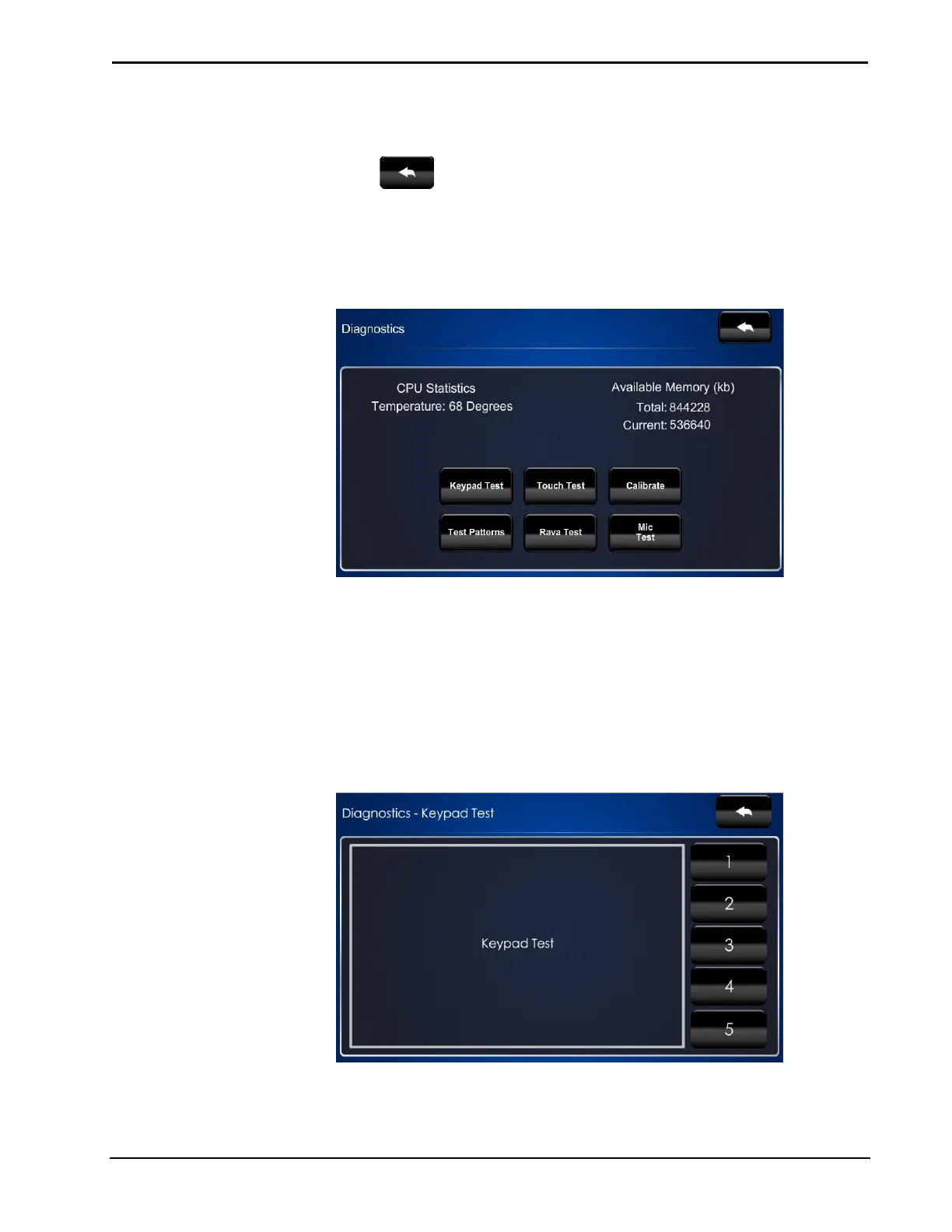
On the “Setup” menu, touch Diagnostics to display the “Diagnostics” menu.
“Diagnostics” Menu
The “Diagnostics” menu displays the CPU temperature, Available Memory and
contains controls to run a Keypad Test, Touch Test, Rava Test and Mic Test. In
addition there are controls to initiate touch screen calibration and to open various test
screens. These are explained in the paragraphs that follow.
Keypad Test
On the “Diagnostics” menu, touch Keypad Test to display the “Diagnostics –
Keypad Test” screen.
“Diagnostics – Keypad Test” Screen


 To Next Page
 Loading...