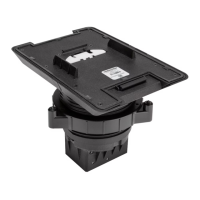
MounttheSwivel MountAccessory
Whendeterminingthemountinglocation,considerwhereusers willbe
seatedandtheir proximitytotheswivelmountaccessoryandthe
tabletopconferencingsystem.Themountinglocationmust
accommodatea170°swivelrange.Additionally,theUCA-SMKR-UC2-3
requiresa27.42in.(696 mm)clearancefor thecableretractor bodybelow
thetable.
A4 in.holesaw,ajigsaw,a3/32in.Allenwrench(included),andthecutout
template(included)arerequiredtomounttheswivelmountaccessory.
1. Securethecutouttemplatetothemountinglocation.Thenotchon the
templateandtheswivelmountaccessoryindicates thefrontofthe
swivelmountaccessory.
2. Useaholesaw(notincluded)to drilla4 in.holeinthetable.
3. Useajigsaw(notincluded)tocutthefrontnotch.
4. Insertthebody oftheswivelmountaccessoryintothemountinghole.
Matchthenotchonthefrontof theswivelmountaccessorywiththe
notchinthetable.
5. Beneaththetable,twisttheincludedlockingringontothebodyof the
swivelmountaccessory.
NOTES:
l Makesurethesurfaceof thelockingringlabeledTOPfaces the
bottomofthetable.
l Leavea1/8in.(4 mm)gapbetweenthelockingringandthe
bottomofthetable.
3
UCA-SMK-UC2 and UCA-SMKR-UC2-3
QuickStart
Swivel MountAccessory for Crestron Flex Tabletop Small Room ConferenceSystems


 To Next Page