20 Cricut DesignStudio™ • www.cricut.com
Shortcut Keys
There are a few keystrokes available to you that can enhance your designing experience.
Arrow Keys: Moves the cursor or selected shape group around the on-screen cutting mat.
Use this while pressing the CTRL key down and each move goes from 1/8" to 1/32".
Shift Key and the Up/Down Arrow Keys: Adjusts the default size.
Enter Key: As you are typing in characters, you can hit the Enter key to close the current
shape group and start another.
File Menu
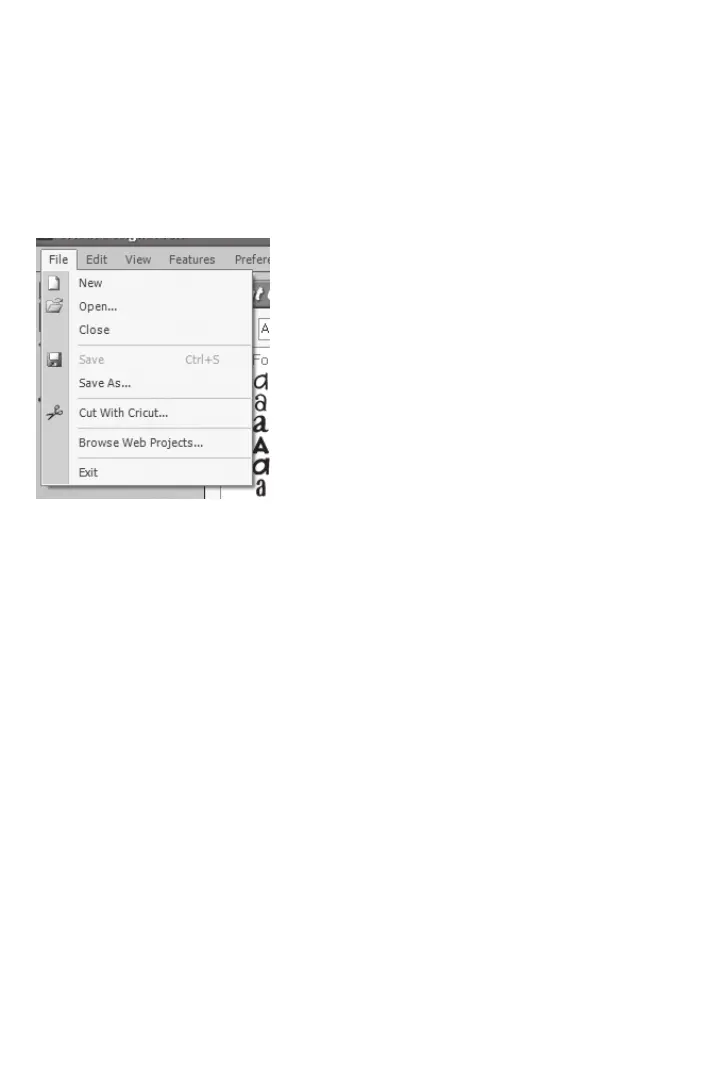
The File menu options are as follows:
New
Use New to open a new project.
Open
Use Open to open any saved project.
Close
Use Close to close any open project.
Note; Simply closing a project does not save it.
Save
Use Save to save any progress, updates, or adjustments you have made to your proj-
ect. The rst time you save your project, you will be asked to name your project le and
choose where you’re going to save it on your computer. Remember to save your work
often. The shortcut key for Save is Ctrl+S.
Note: Using Save overwrites your original project with the current, modied project. If you
don’t want to lose the project in its original state, use Save As instead of Save and give the
modied project a different le name.
Save As
Use Save As whenever you want to choose the le name for your project and the location
you want to save it in.












 To Next Page