54
EN
Use caution and follow instructions when
replacing blade. For instructions, see blade
packaging or help.cricut.com/blades
Included How to power on
Before operating machine, read enclosed
Important Safety Instructions
• Connect included power adaptor to machine
• Make sure to only plug other end into
compatible wall outlet
• Connect machine to compatible device via
Bluetooth
®
• Activate your machine at cricut.com/setup
• Cricut Maker™ 4 smart cuing machine
• Premium Fine-Point Blade + Housing
• Light Grip Machine Mat
• Mini Weeder
• Fine Point Pen (0.4 mm)
• Free trial subscription to Cricut Access™
(for new subscribers)
• Power adapter
• USB cable
• Materials to get started
Important Safety Instructions
PLEASE READ THIS ENTIRE DOCUMENT PRIOR TO
SETTING UP, OPERATING AND SERVICING YOUR
CRICUT™ SMART CUTTING MACHINE. PLEASE
FOLLOW THE ENCLOSED INSTRUCTIONS, ONLINE
INSTRUCTIONS AND OTHER OFFICIAL CRICUT
INSTRUCTIONAL MATERIALS. FOR MORE SAFETY
AND COMPLIANCE INFORMATION, GO TO
CRICUT.COM/PRODUCTDOCUMENTATION
In these instructions the term “Machine” means Cricut
Maker™ 4.
WARNING: Risk of Injury, Fire and Electric
Shock.
Operating Machine in a manner not prescribed
in the enclosed instructions, online instructions
and other official Cricut materials may result
in damage to the Machine, property damage, injury or
even death.
Machine is only intended to be operated by an
adult. Not intended for use by children
12 years or under. Always supervise children
around Machine.
Only use Machine for its intended crafting purpose.
Indoor Use Only. Machine is only intended for
indoor use in dry locations. Do not use
in or near water. Do not immerse in water or any other
liquid.
Machine is not intended for use by persons with
reduced physical, sensory or cognitive capabilities,
or lack of experience and knowledge, unless they are
supervised by a person responsible for their safety and
familiar with the safe operation of Machine.
Disconnect the electrical power by unplugging
machine when not in use and before any servicing or
cleaning.
Only clean Machine with a soft cloth dampened
with glass cleaner or water. Never use any kind of
flammable liquid to clean Machine. Do not use solvents
such as acetone or nail polish remover to clean
Machine as these will permanently damage Machine’s
surfaces.
Always unplug Machine before replacing the cutting
blade. Blades are extremely sharp and should be
handled with caution and extreme care. Prevent blade
contact with hands and body to avoid injury. Do not
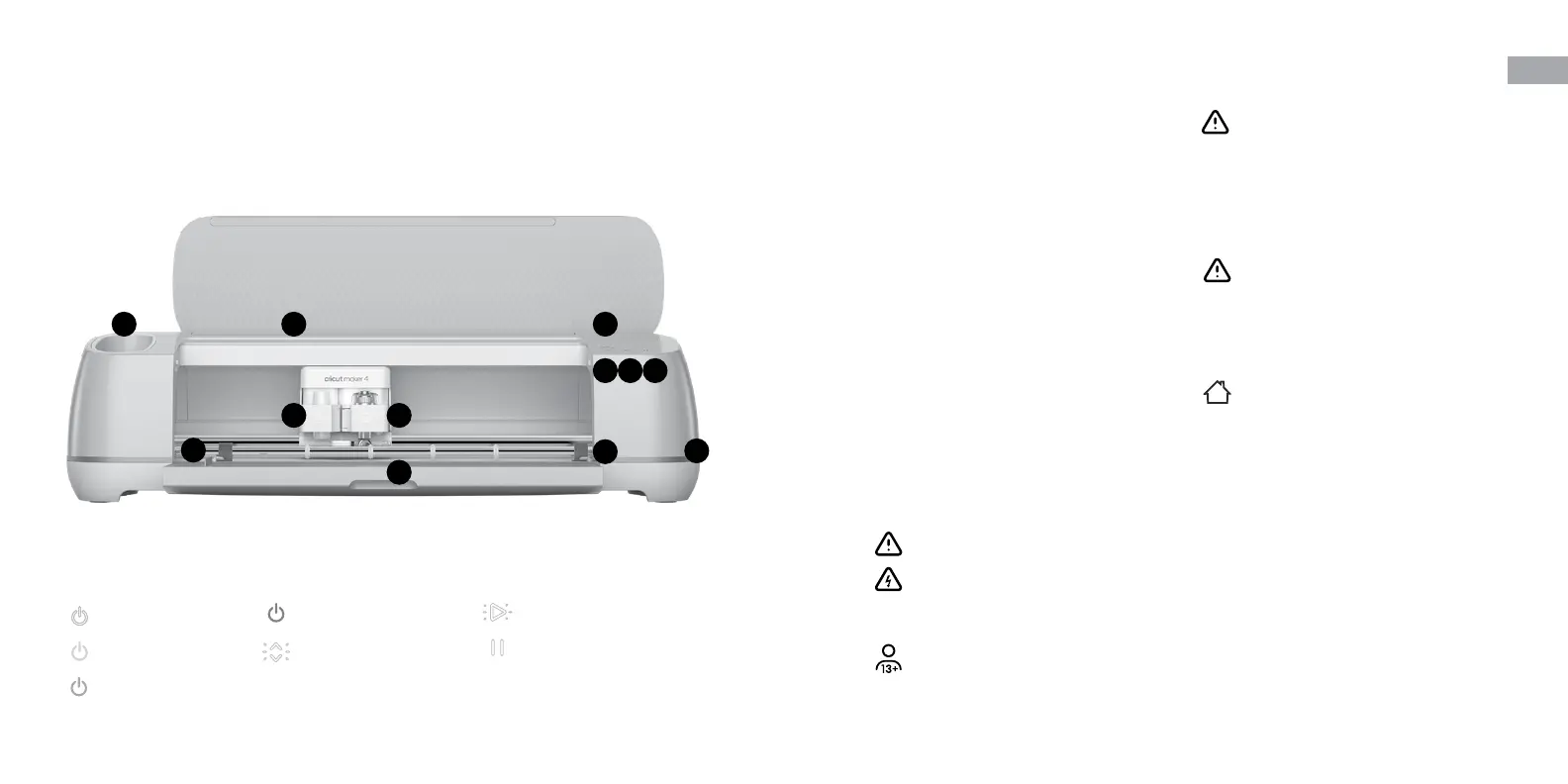
Get to know your Cricut Maker
™
4
1
2 3
4
5
6
7
8
9
10
11
11
Indicator Lights
1 Slot for mobile device
2 Clamp A
3 Clamp B
4 Storage cup
5 Storage
6 Power buon
7 Load/Unload buon
8 Go buon
9 Pause buon
10 USB port
11 Material guides
Power Button: White
Machine on
Power Button: Blue
Connected to Bluetooth
®
Power Button: Red
Error
Power Button: Purple
Update in progress
Load Button: Flashing White
Ready to Load/Unload
Go Button: Flashing White
Ready to Go
Pause Button: White
Ready to Pause/Unpause


 To Next Page