EasyManua.ls Logo

Crosley Tech Series - Page 11

Crosley Tech Series
16 pages
Print Icon
To Next Page IconTo Next Page
To Previous Page IconTo Previous Page
Loading...
Basic
Operation
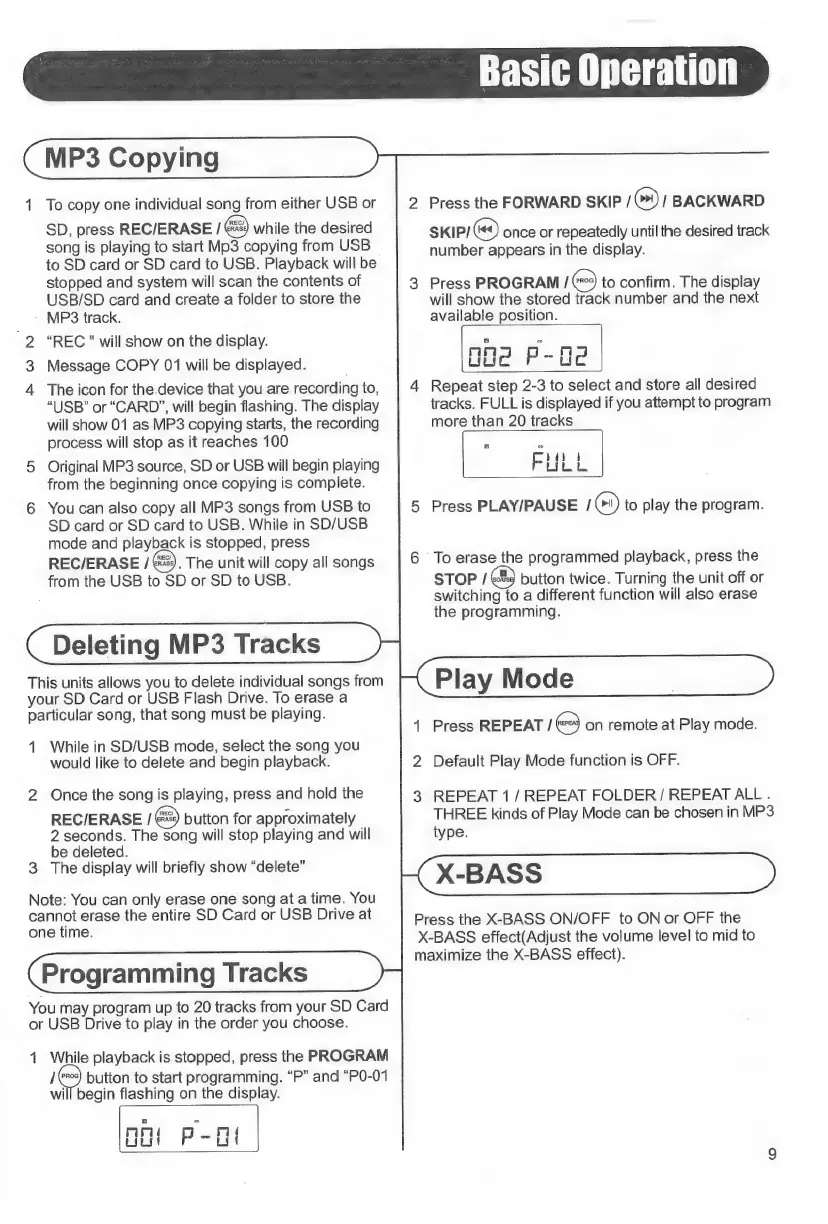
MP3
Copying
1
To
copy
one
individual
song
from
either
USB
or
SD,
press
REC/ERASE
/
while
the
desired
song
is
playing
to
start
Mp3
copying
from
USB
©
to
SD
card
or
SD
card
to
USB.
Playback
will
be
stopped
and
system
will
scan
the
contents
of
USB/SD
card
and
create
a
folder
to
store
the
-
MP3
track.
-2
“REC
"
will
show
on
the
display.
Message
COPY
01
will
be
displayed.
The
icon
for
the.
device
that
you
are
recording
to,
“USB”
or
“CARD”,
will
begin
flashing.
The
display
will
show
01
as
MP3
copying
starts,
the
recording
process
will
stop
as
it
reaches
100
Original
MP3
source,
SD
or
USB
will
begin
playing
from
the
beginning
once
copying
is
complete.
R
©
Oi
o
You
can
also
copy
all
MP3
songs
from
USB
to
SD
card
or
SD
card
to
USB.
While
in
SD/USB
mode
and
playback
is
stopped,
press
REC/ERASE
/
.
The
unit
will
copy
all
songs
from
the
USB
to
SD
or
SD
to
USB.
Deleting
MP3
Tracks
This
units
allows
you
to
delete
individual
songs
from
your
SD
Card
or
USB
Flash
Drive.
To
erase
a
particular
song,
that
song
must
be
playing.
1
While
in
SD/USB
mode,
select
the
song
you
would
like
to
delete
and
begin
playback.
N
Once
the
song
is
playing,
press
and
hold
the
REC/ERASE
168)
button
for
approximately
2
seconds.
The
song
will
stop
playing
and
will
be
deleted.
3
The
display
will
briefly
show
“delete”
Note:
You
can
only
erase
one
song
at
a
time.
You
cannot
erase
the
entire
SD
Card
or
USB
Drive
at
one
time.
Programming
Tracks
You
may
program
up
to
20
tracks
from
your
SD
Card
or
USB
Drive
to
play
in
the
order
you
choose.
1
While
playback
is
stopped,
press
the
PROGRAM
je
button
to
start
programming.
“P”
and
“P0-01
will
begin
flashing
on
the
display.
Tn
ND
P-L
2
Press
the
FORWARD
SKIP
/
(*)
/
BACKWARD
SKIP/
Q)
once
or
repeatedly
until
the
desired
track
number
appears
in
the
display.
3
Press
PROGRAM
/
(moe)
to
confirm.
The
display
will
show
the
stored
track
number
and
the
next
available
position.
4
Repeat
step
2-3
to
select
and
store
all
desired
tracks.
FULL
is
displayed
if
you
attempt
to
program
more
than
20
tracks
co
FULL
5
Press
PLAY/PAUSE
16)
to
play
the
program.
6
To
erase
the
programmed
playback,
press
the
STOP
/
ER
button
twice.
Turning
the
unit
off
or
switching
to
a
different
function
will
also
erase
the
programming.
Play
Mode
|
1
Press
REPEAT
/
on
remote
at
Play
mode.
2
Default
Play
Mode
function
is
OFF.
3
REPEAT
1
/
REPEAT
FOLDER
/
REPEAT
ALL
.
THREE
kinds
of
Play
Mode
can
be
chosen
in
MP3
type.
X-BASS
Press
the
X-BASS
ON/OFF
to
ON
or
OFF
the
X-BASS
effect(Adjust
the
volume
level
to
mid
to
maximize
the
X-BASS
effect).
o

Related product manuals