EasyManua.ls Logo

Crosley Tech Series - Getting Started; Ig Drol; Power Source

Crosley Tech Series
16 pages
Print Icon
To Next Page IconTo Next Page
To Previous Page IconTo Previous Page
Loading...
Getting
Started
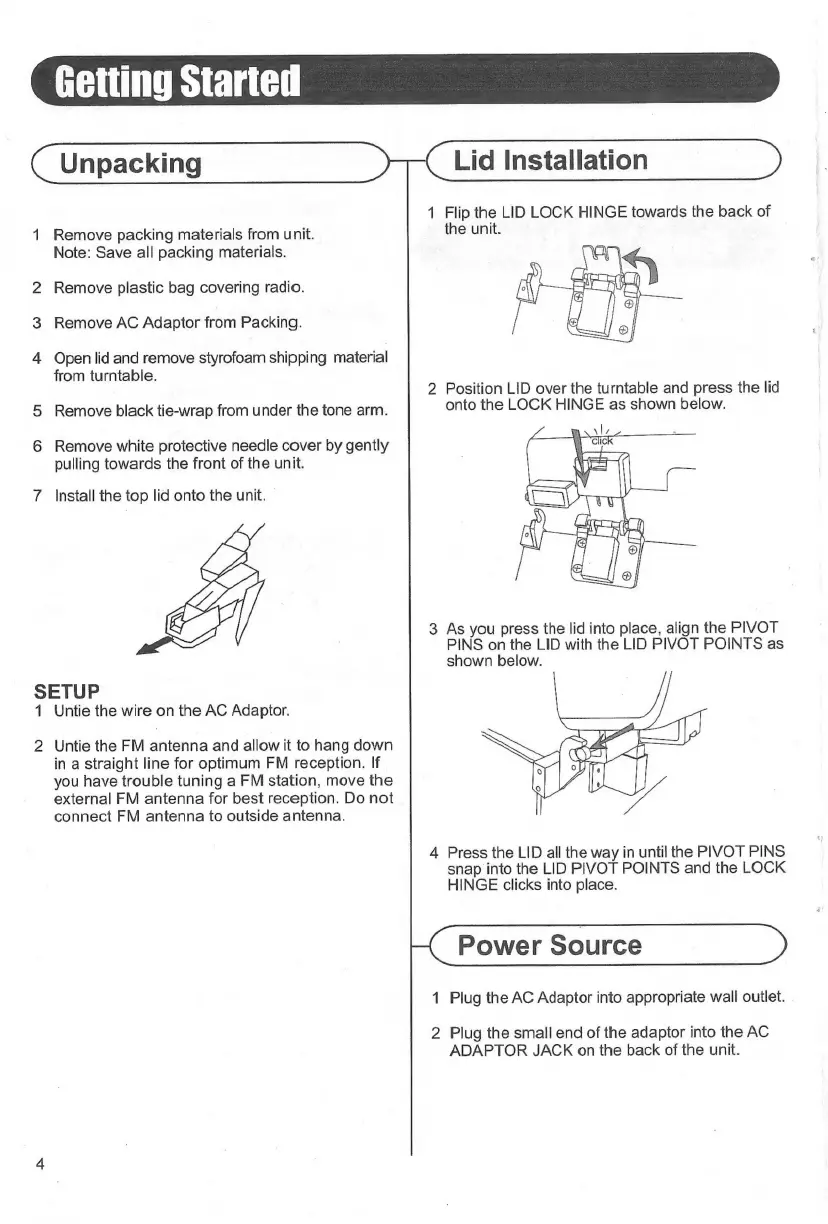
(Unpacking
>
1
Remove
packing
materials
from
unit.
Note:
Save
all
packing
materials.
2
Remove
plastic
bag
covering
radio.
3
Remove
AC
Adaptor
from
Packing.
4
Open
lid
and
remove
styrofoam
shipping
material
from
turntable.
5
Remove
black
tie-wrap
from
under
the
tone
arm.
6
Remove
white
protective
needle
cover
by
gently
pulling
towards
the
front
of
the
unit.
7
Install
the
top
lid
onto
the
unit.
SETUP
1
Untie
the
wire
on
the
AC
Adaptor.
2
Untie
the
FM
antenna
and
allow
it
to
hang
down
in
a
straight
line
for
optimum
FM
reception.
If
you
have
trouble
tuning
a
FM
station,
move
the
external
FM
antenna
for
best
reception.
Do
not
connect
FM
antenna
to
outside
antenna.
Lid
Installation
1
Flip
the
LID
LOCK
HINGE
towards
the
back
of
the
unit.
2
Position
LID
over
the
turntable
and
press
the
lid
onto
the
LOCK
HINGE
as
shown
below.
3
As
you
press
the
lid
into
place,
align
the
PIVOT
PINS
on
the
LID
with
the
LID
PIVOT
POINTS
as
shown
below.
4
Press
the
LID
all
the
way
in
until
the
PIVOT
PINS
snap
into
the
LID
PIVOT
POINTS
and
the
LOCK
HINGE
clicks
into
place.
Power
Source
1
Plug
the
AC
Adaptor
into
appropriate
wall
outlet.
2
Plug
the
small
end
of
the
adaptor
into
the
AC
ADAPTOR
JACK
on
the
back
of
the
unit.

Related product manuals