9
Heat Alarm Features and Functions
Selecting the Fixed Temperature Setting
The CFH10 has three selectable fixed temperatures
available, 117°F (47°C), 135°F (57°C) and 175°F
(79°C). They can be selected as follows:
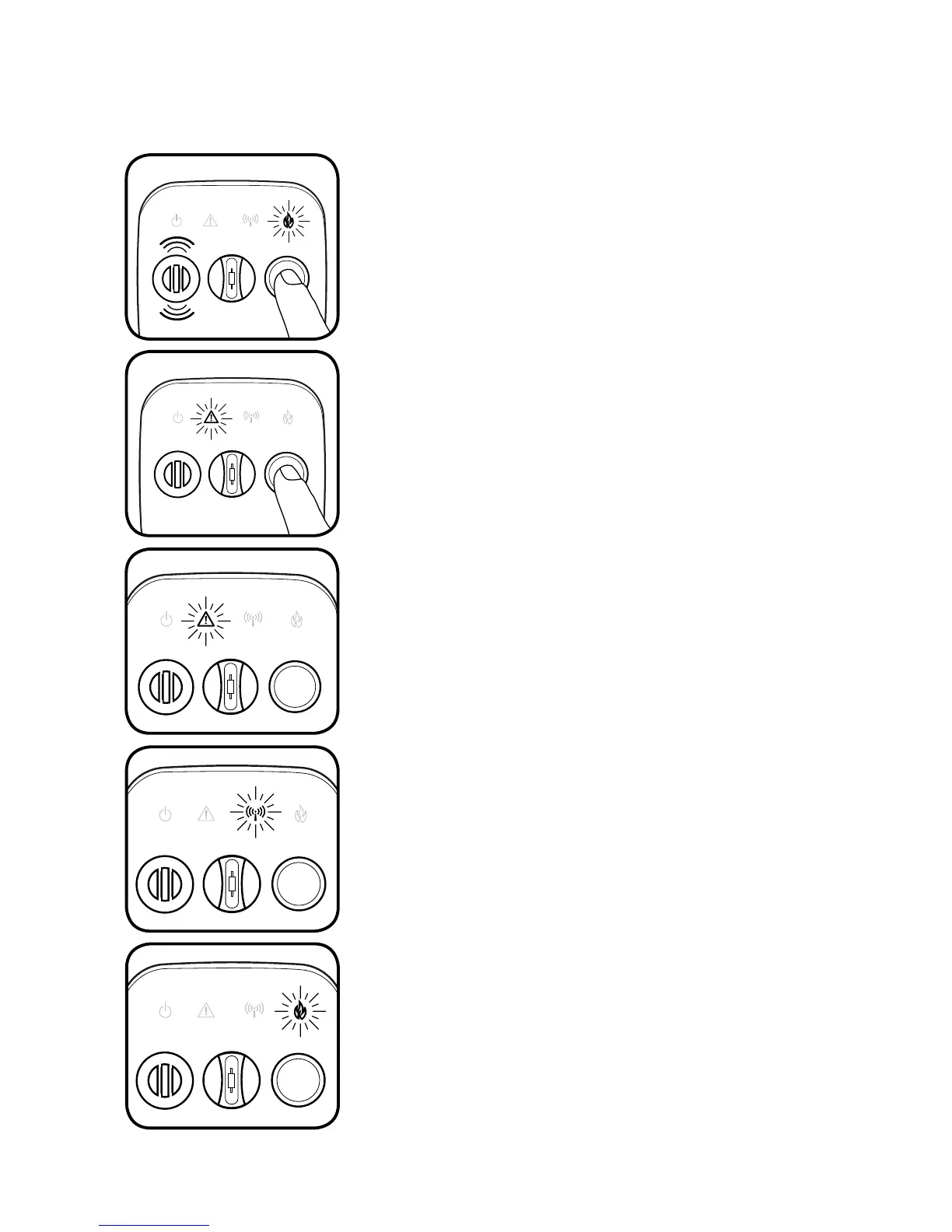
Press and hold the button on the front cover of
the Heat Alarm. The red FIRE light will flash rapidly
and the alarm will sound three tones.
Next, the yellow WARNING light will flash slowly.
Count to
3 flashes of the yellow WARNING light
and release the button.
If done correctly, either the yellow WARNING, blue
WIRELESS or red FIRE light will now be on.
Press and release the button again, and the next
available temperature setting is 135°F (57°C).
If not, wait about 15 seconds and carefully repeat
these steps.
The factory Fixed Temperature Setting is 117°F
(47°C). To change to the higher settings, simply
press and release the button.
The 135°F is set when the blue WIRELESS light
is displayed.
The 117°F is set when the yellow WARNING light is
displayed.
Press and release the button again, and the next
available temperature setting is 175°F (79°C).
The 175°F is set when the red FIRE light is displayed.
This operation can be repeated until the desired
temperature has been selected. After a few seconds,
the light will go out and the temperature is set.


 To Next Page