20
Clip SGD
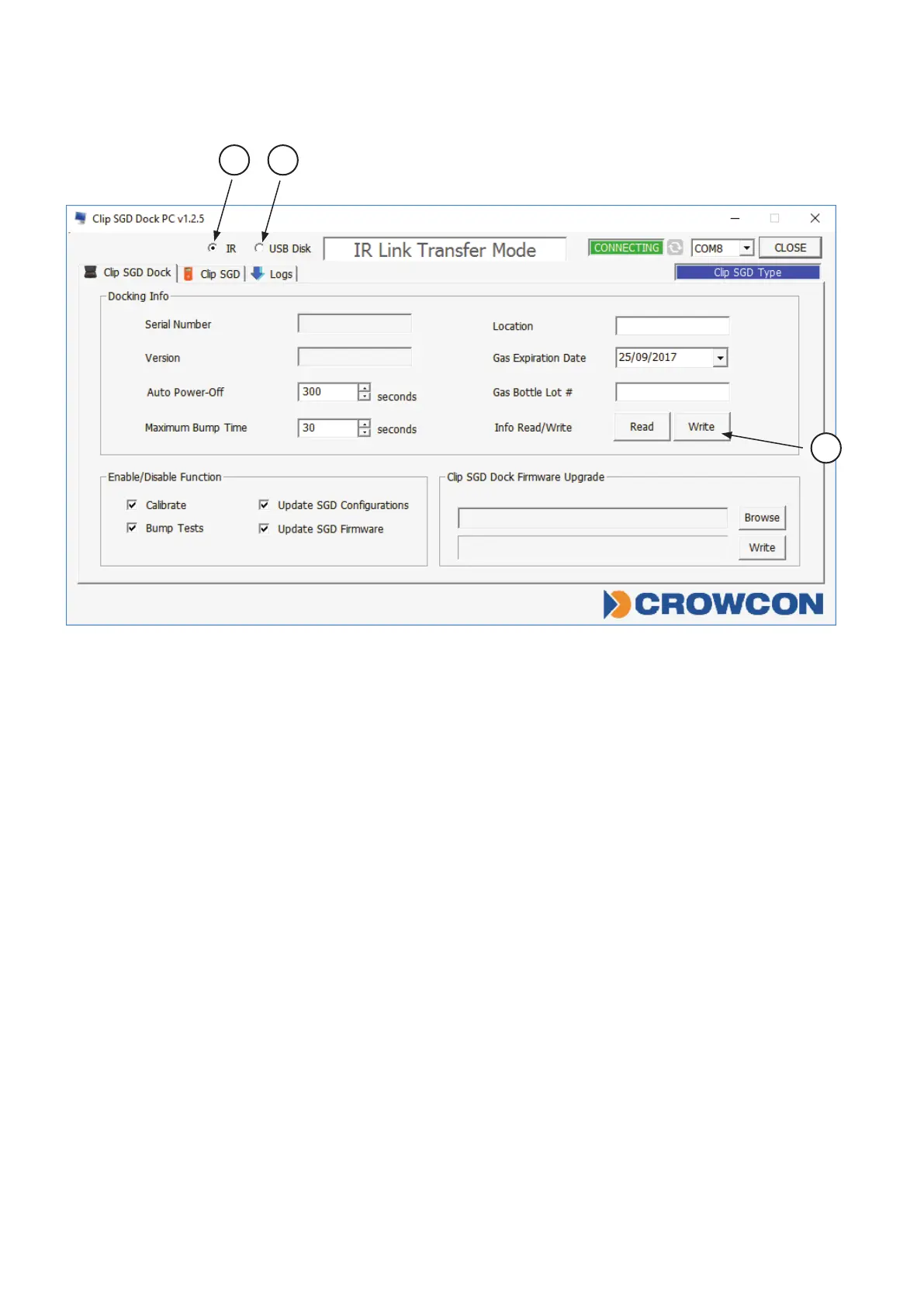
Figure 1: Clip SGD Dock PC Application
IR / USB Disk
ChoseeitherIRLinkorUSBSticktotransfercongurationtoandfromDockingStation.
• Click‘IR’➀tocongureDockingStationviatheClipSGDIRLink.
• Click‘USBDisk’➁toselectUSBStickconnectedtoPCandtransfercongurationto
theUSBStick–thiscanthenbeinsertedintotheDockingStationandtheconguration
uploaded.
• InfoRead/Write:Selectto‘Read’or‘Write’conguration➂toDockingStationviaIRlink
ortoUSBStick
Docking Station
ThelayoutoftheClipSGDDockPCApplicationisshownaboveFigure1.
• TointeractwithDockingStationviatheClipSGDIRLink,itmustbeturnedon.
• EnsurethePChastheClipSGDDockPCApplicationinstalledandconnecttheClipSGD
IRLinktothePC.
• PlacethetopsideoftheClipSGDIRLinkfacedownindetectorbaylabelled“Unit1”.
N.B.:TheIRlinkonlyinteractswithdetectorbaylabelled“Unit1”.
3
1 2



 To Next Page