21
Clip SGD
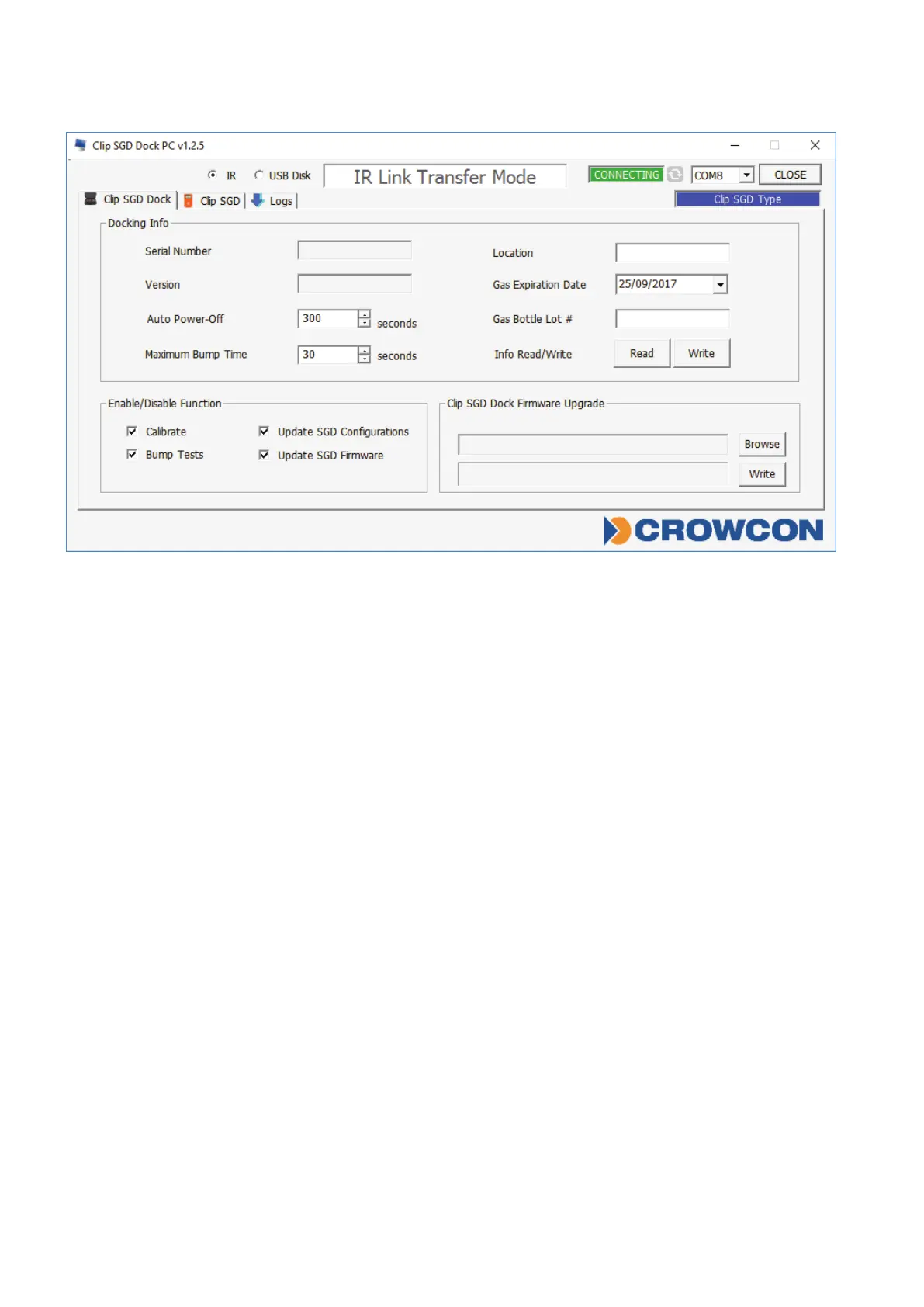
Figure 2
Docking Info
• SerialS/N:Factoryserialnumber
• Version:DockingStationrmwareversion
• AutoPower-Off:DockingStationautomaticpower-offtime(Max3600seconds)
• MaximumBumpTime:Bumptesttime(seconds)–Default:30/Min:20/Max:120
• Location:Conguretheinstalledlocation
• GasExpirationDate:Entertheexpirationdateofthegascylinder.
• GasBottleLot#:Enterthelotnumberofthegascylinder.
• InfoRead/Write:RetrieveorwritesettingsfromDockingStation
Enable/Disable Function
Checkboxtoenableordisablefunctions;atickmeansenabled.
• Calibrate:enables/disablesDockingStation‘Calibration’button.
• Bumptest:enables/disablesDockingStation‘BumpTest’button.
• UpdateSGDConguration:enables/disablesClipSGDcongurationupdatesduring
bumptestorcalibration.
• UpdateSGDFirmware:enables/disablesClipSGDrmwareupdateduringbumptestor
calibration.
Docking Firmware Upgrade
• AllowsDockingStationrmwaretobeupgraded–click‘Browse’tonavigatetole.
• Click‘Write’todownloadle.



 To Next Page