7
Clip SGD
2. Activation
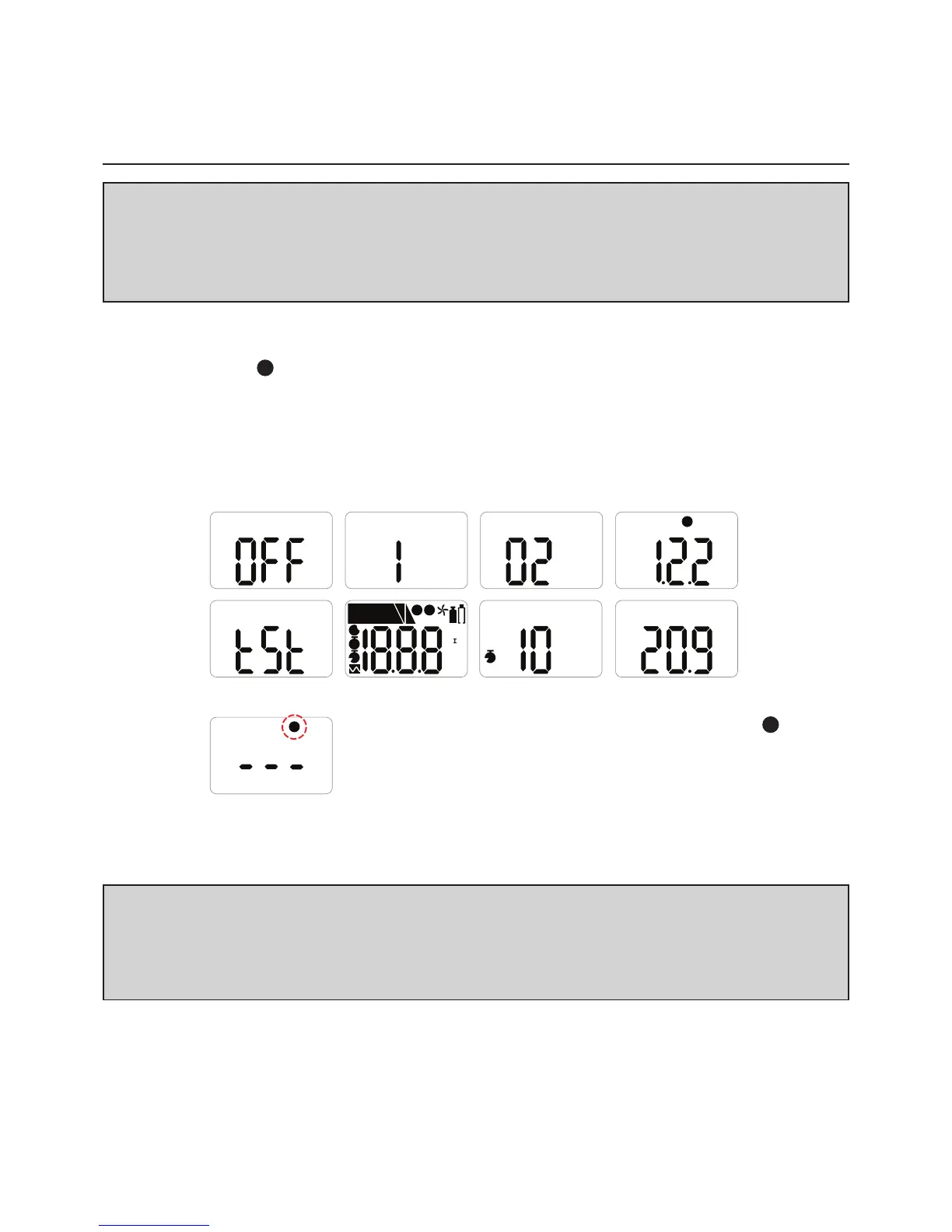
Only activate in a safe environment.Pressthebuttonfor3secs;gastypeandrmware
version(e.g.v2.2)willbedisplayed.Followingthe10secscountdown,thedevicewillbe
fullyactivated,the
V
iconwillashonthedisplayscreenandthedevicewillbeinGas
Measurementmode.
Afterturningonthedevice,theremaininglifeisdisplayed;23monthsoriginally.Afterthe
remaininglifereaches1month,30daysremainingisdisplayed.When1dayisleft,24
hours(T)remainingisdisplayed.
⚠ CAUTION
Beforeuse,checktheactivatebydateonthebox.Iftheactivationdateispast,donot
activatethedevice.
ShelfLifewithin6monthsfrommanufacture.
V
%
D
X
MAX
LEL
PPM
VOL
%
%
MN
I
ALARM
1
V
M
D
T
X
2
%
T
⚠ CAUTION
Appropriatecalibrationofthedeviceisrequiredpriortooperation.Alwaysensurethat
thedevicerespondscorrectlytotherelevantgas.Verifythatforeignmaterialsthatcould
interferewiththedetectionofgasarenotblockingthesensor.
Intheeventthatactivationofthedevicefails,the
X
iconwillappearonthedisplayandGasMeasurement
modewillnotbeentered.Inthiscase,performcalibration
orcontactauthorizedresellerorCrowconDetection
Instrumentscustomersupportat+44(0)1235557711
forrepair/returninformation.


 To Next Page