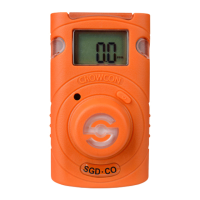
Section 2 Detective+
X. PC interface and software
The Detective+ can be connected to a PC using the serial communications link,
to configure, calibrate and monitor the unit. To do this the user will require the
Computer Interface Lead and an installed copy of the Crowcon Portables PC
software, version 1V1.5 or later. The Computer Interface Lead, Part Number
E07394, and Portables PC Software, Part Number C01832, are available from
Crowcon or any of their approved agents. For other available accessories, refer
to section XIII.
Attach the Interface lead to the Detective+ at the “Computer Interface” socket
supplied at the rear of the unit. Attach the other end of the Interface Lead to
an available serial RS232 communications port on the PC.
With the Detective+ switched on, open the Portables PC application and, using
either the Wizard, or the Engineers Form, select “Detective+” and upload the
configuration. For more information on using the Crowcon Portables PC soft-
ware, refer to the interactive help file installed with the software.


 To Next Page