Appendix 6 – Alarm Tone Setting
on the IS-mA3 Sounder
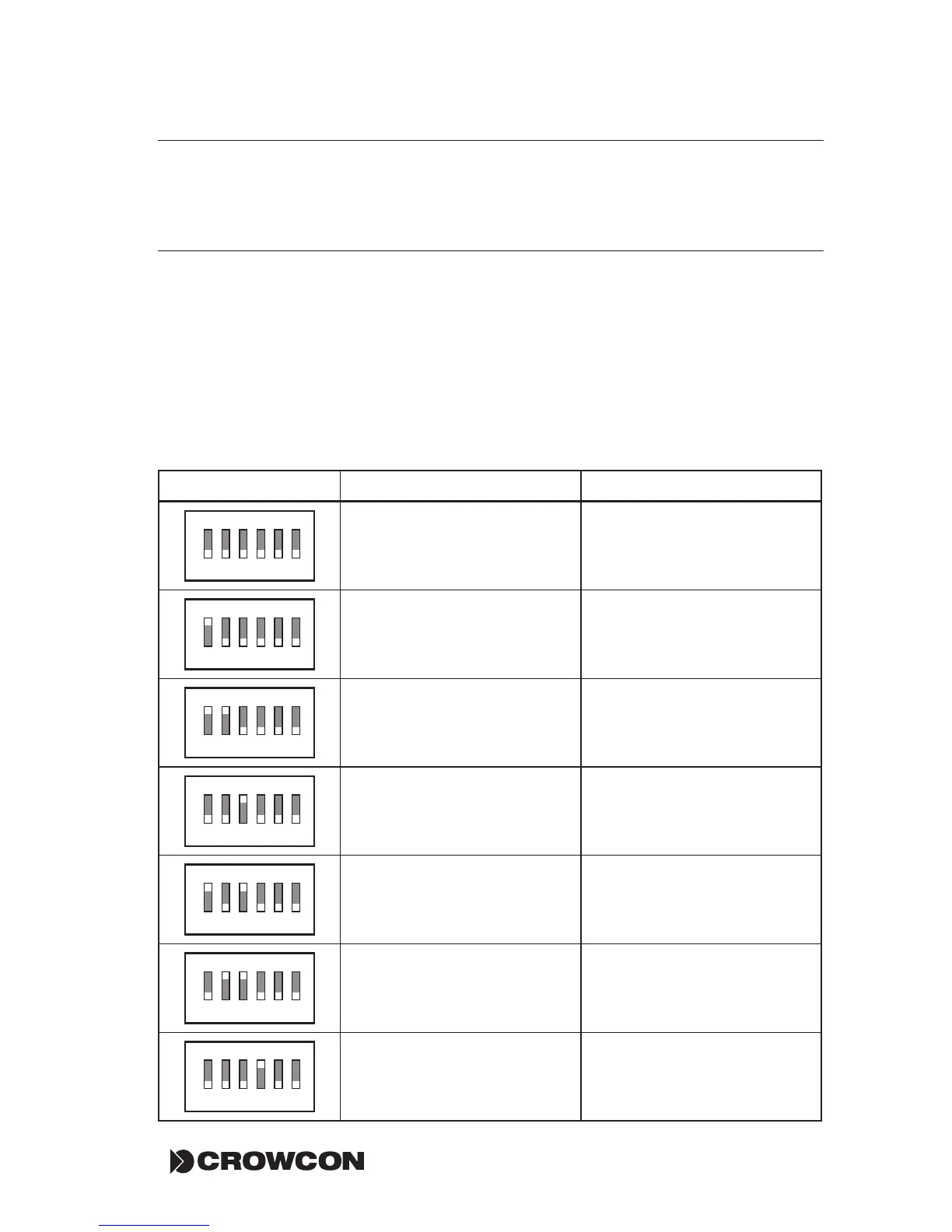
When fitted with the red IS-mA3 sounder, the tone of the audible alarm on
the Detective+ can be selected by means of a DIP switch within the sounder.
The default tone, selected during manufacture, is an alternating 2400/2900 Hz
signal with a period of 2 Hz. To gain access to the DIP switch, loosen the single
securing screw on the side of the sounder and twist the end of the sounder
anticlockwise. Be careful not to detach the connecting lead. Select the required
tone from the list below and set the DIP switch accordingly. Replace the end of
the sounder and tighten the securing screw.
Dip Switch Setting Alarm Tone Low Battery Tone
ON
1 2 3 4 5 6
Alternating 800/1000 Hz
@ 0.25 s Intervals
Continuous 2400 Hz
ON
1 2 3 4 5 6
Alternating 554 Hz
(100 mS)/440Hz (400 mS) –
NFS 32-001
Continuous 2400 Hz
ON
1 2 3 4 5 6
Sweeping 2400/2900 Hz
@ 7 Hz
Continuous 2400 Hz
ON
1 2 3 4 5 6
Slow Whoop 500/1200 Hz
@ 0.3 Hz with 0.5 s
gap repeated
Continuous 660 Hz
ON
1 2 3 4 5 6
Sweeping 2400/2900Hz
@ 1Hz
Continuous 2400 Hz
ON
1 2 3 4 5 6
Alternating 2400/2900 Hz
@ 2 Hz
Continuous 2400 Hz
ON
1 2 3 4 5 6
Continuous 800 Hz
Alternating 800/1000 Hz
@ 0.25 s Intervals


 To Next Page