Quickstart Guide
Overview
Turn ON
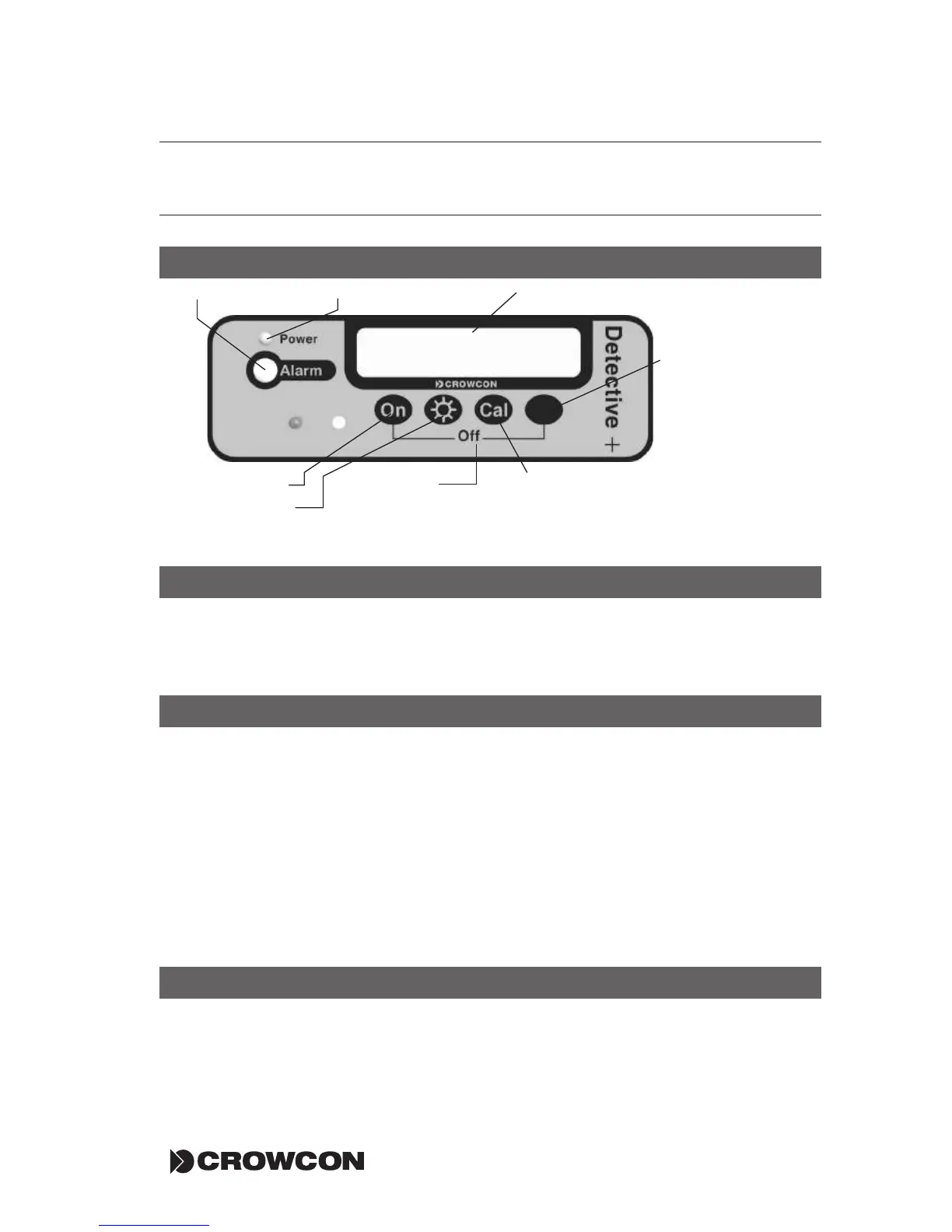
Press ON, press the UNMARKED button to reset alarm, green LED flashes and
display will show gas levels or display 'MONITORING' if the instrument is in the
GO/NO-GO mode (see SETTING UP).
In Alarm condition
Alarm sounds and the red LEDs flash. Press the UNMARKED button to silence
the sounder, the red LED will continue to flash if gas is present.
Gas display mode: 'ALARM' flashes next to the hazardous gas name.
GO/NO-GO mode: display reads 'GAS HAZARD, EVACUATE AREA'.
Instantaneous and TWA alarms: Alarm is triggered when the instanta-
neous threshold is reached. Press the UNMARKED button to silence the
sounder, the red LEDs will continue to flash if gas is present. The sounder
will be triggered again if a new alarm threshold is reached.
Reset Alarm
Press the UNMARKED button.
Detective+ Quickstart Guide
Operator screen
ON button
BACKLIGHT
button
CAL button:
use this button to
perform calibration
and access unit's
configuration
UNMARKED button:
use this button to
silence sounder, reset
alarm and select
options from the
Menu
Switch-off:
press the ON button
and UNMARKED
button together to
switch off
Power On LEDAlarm LED


 To Next Page