Quickstart guide Gasman
4
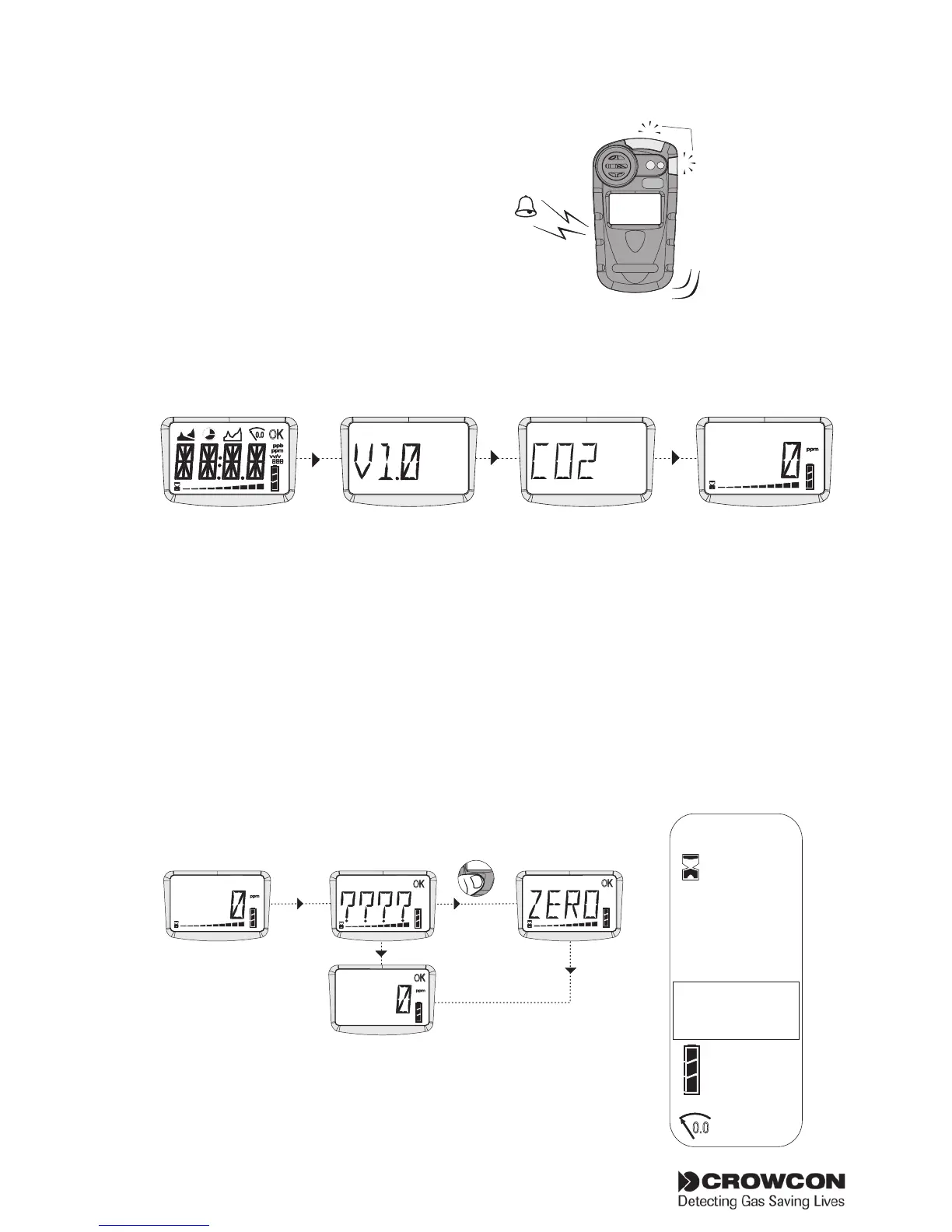
Gasman warm up sequence
a) The Gasman will demonstrate
the alarm LEDs, sounder,
vibration alerts, and the
operator display screen. The
sounder may be silenced by
pressing the button.
The Gasman screen will show the following display during the
warm up sequence. This will take approximately 20 seconds.
Note: these screens may differ depending on what sensor is being used.
b) Autozero
If Autozero is enabled (default), the unit will display the Autozero
confirm screen: the display will alternate between ‘ZERO’ and
‘????’. Press the operator button with a single click to confirm
Zero. If the operator button is not pressed within the 10 second
time out, Gasman will proceed directly to Run mode without
performing Zero.
Sounder
Alarm test
Vibrator Alarm test
LEDs Alarm test
HS
2
OK
vv/v
ppm
ppb
0.0
ppm
OK
ppm
Autozero confirm
OK
No Autozero
OK
ppm
Flashing
icon -
Gasman
running
normally
Battery life
Screen Icons
Autozero
Warm up
AL -1
AL -2
Alarms
0.0
OK



 To Next Page