Choose a 8Ω external speaker with 3.5 mm mono connector.
(1)
Long press key to enter menu list.
(2)
Short press microphone [
UP
] or [
DN
] or or
to choose menu
to be.
(3)
Short press key to enter function setting parameter of the chosen
function, the parameter blinks on LCD.
(4)
Short press microphone [
UP
] or [
DN
] or or
to choose
wanted setting.
3.11
Install External Speaker
..............................................................
3.12
Menu Operations
..........................................................................
(5)
Short press key to validate the mode and exit setting.
(6)
Long press key or wait 10 seconds to store exit MENU.
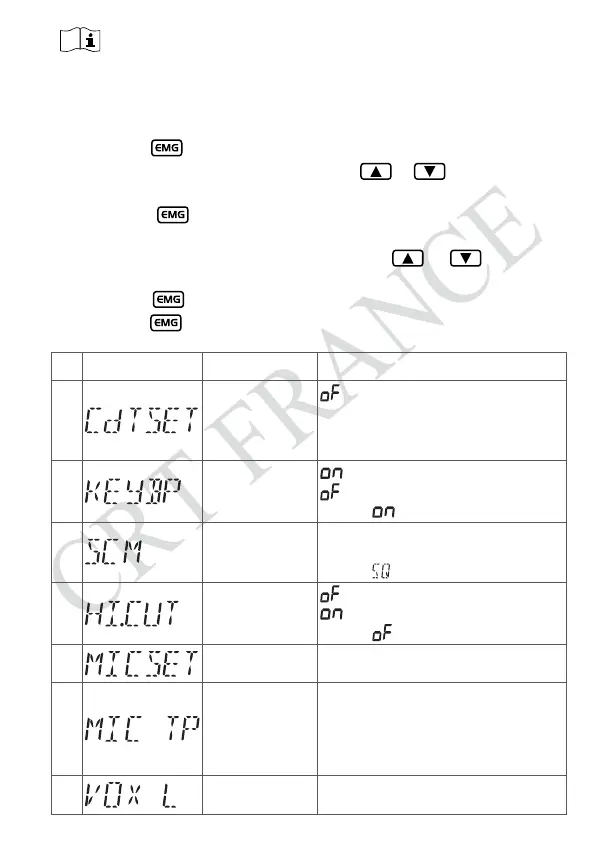
NO. LCD display Function detail Setting details
1
CTCSS/DCS
encode/decode
:
CTCSS/DCS is OFF;
CT: 67.0Hz~250.3Hz
;
DT: D023N~D754N
;
Note: This function is optional.
2
Beep sound
: turn on beep sound
: turn off beep sound
Default:
3 Scan type setting
Sq: squelch scan
tI: time scan
Default:
4 HI-CUT setting
: turn off HI-CUT function
: turn on HI-CUT function
Default:
5
Microphone gain
1~9, Total 9 levels
Default: 6
6
Microphone type
EL: Electronic
dy: Dynamic
Default: EL
Note: Speak into microphone and watch
the S-meter to choose wanted mic gain.
7
VOX Sensitivity
1~9: total 9 levels
Default: 3
- 9 -


 To Next Page