www.cryptoelectronics.com
3 Remote control
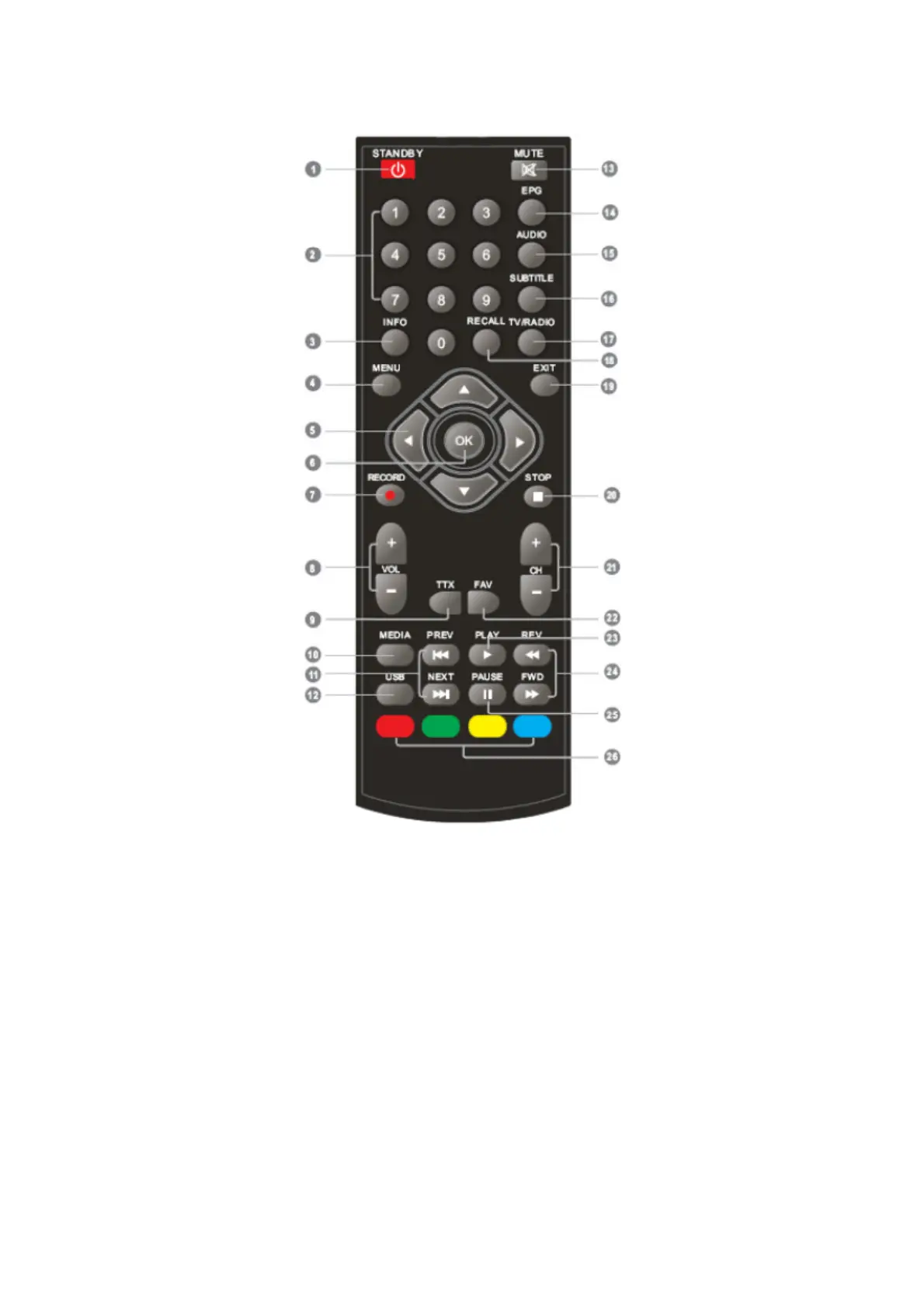
1. STANDBY (Switch the STB on and standby)
2. Numeric entry (Enter numeric values and select the channel directly by entering
it's number)
3. INFO (Press for current channel information)
4. Menu (Open and close the menu screen)
5. Cursor: Navigation buttons used to navigatemenus items
6. OK button (Confirm a selection within a menu)
7. RECORD (Record the TV program)
8. VOL+,- (VOL+/-:Volume Up and Down)
9. TTX (Open interactive service)
10. MEDIA (Enter Record menu)
11. Previous/Next
12. USB (Enter Music menu)
13. MUTE (Turn off/on the volume)
14. EPG (Open up Electronic Program Guide Menu)
15. AUDIO (Select audio mode and audio track)
16. SUBTITLE (On/Off Subtitle)


 To Next Page