Lens Cleaning
Two lenses are fitted in the smokehead, one at either end.
The Smokemeter checks the cleanliness of the lenses at the start of each test, and the PC
will provide a warning when cleaning is required.
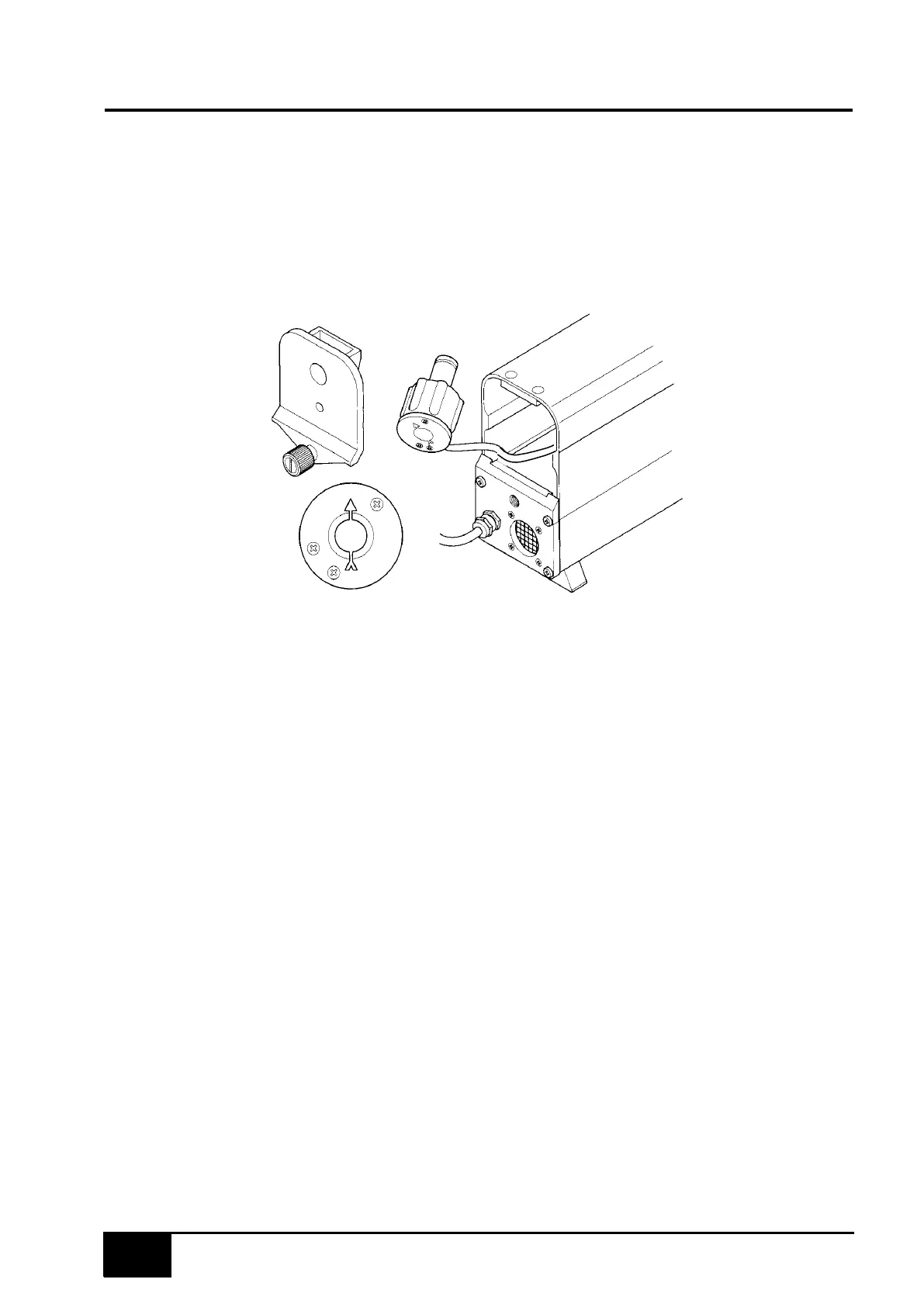
Note orientation of lens housing
(arrow up)
Accessing a lens
The cleaning procedure is as follows.
1.
If fitted, remove the sampling pipe.
2.
Unscrew the knurled knob at the sampling pipe end of the sampling head and remove the
end cap.
3.
Carefully pull out the lens housing and wipe the lens with a soft cloth (if required, a little
methylated spirit will assist cleaning).
4.
Refit the lens housing with the arrow pointing upwards (a little silicon grease on the 'O'
ring will assist fitment –but do not get on lens!).
5.
Refit the end cap and tighten the knurled knob.
NOTE: Ensure the end cap locates fully against the body of the sampling head before
tightening the knob. If not correctly located, the lens housing is probably not
fully home.
6. Clean the lens at the other end of the smokehead in the same way.
NOTE: The end cap for the sampling pipe must be fitted at the end away from the sampling
head cable.


 To Next Page