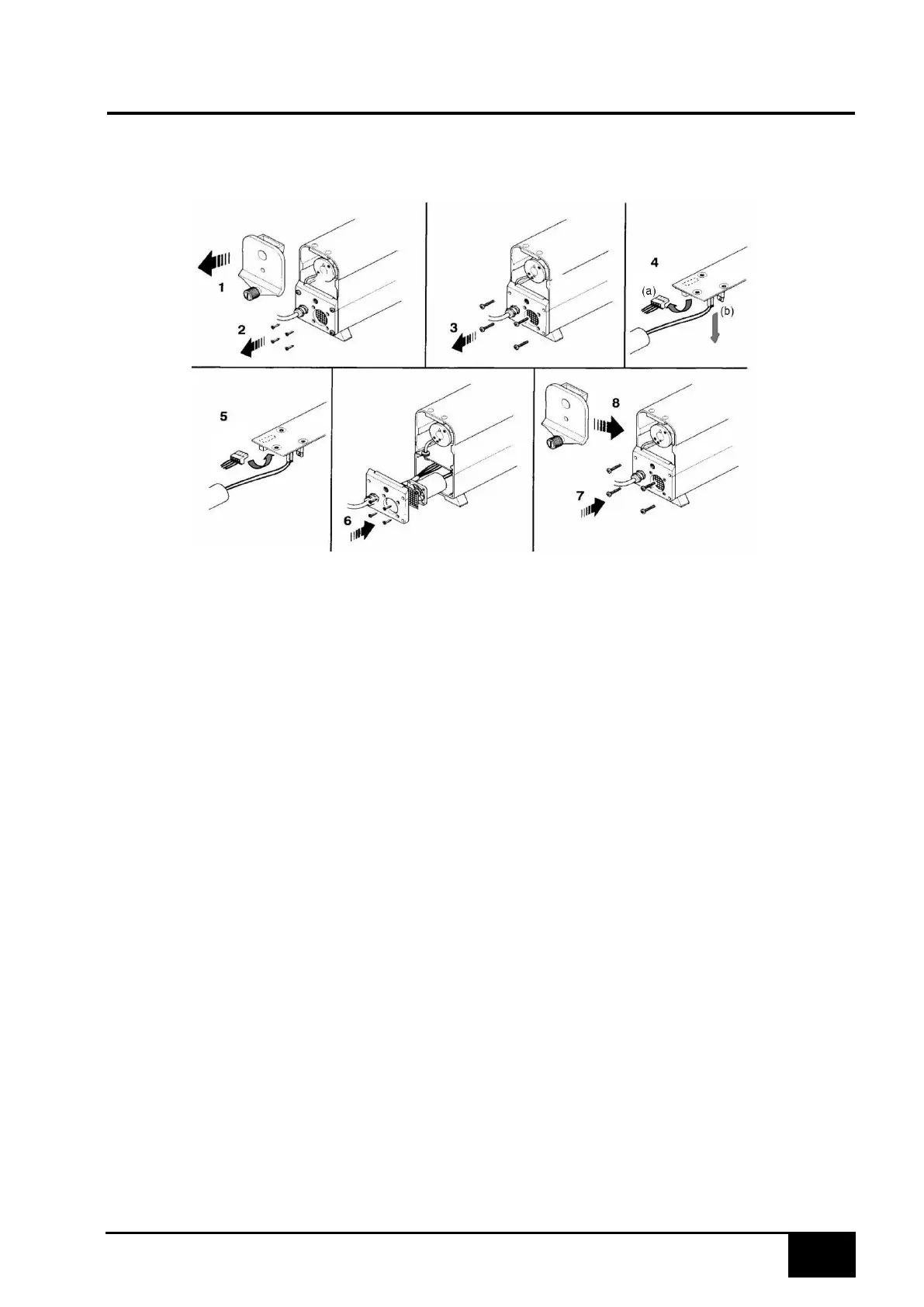
Smokehead Cable And Fan Renewal
Should the cable become damaged and require renewal, the procedure is as follows.
1.
Unscrew the knurled knob (1) and remove the end cap.
2.
Remove the four countersunk screws (2) which secure the internal fan and grille to the
smokehead end plate.
3.
Remove the four panhead screws (3) securing the end plate and carefully ease the plate
clear of the housing.
4.
Disconnect the 4-pin multiplug (4a). If carrying out a fan replacement disconnect the 2-pin
plug (4b) and replace the fan. Carefully fit the fan and fan grille to the end plate (4
countersunk screws).
5.
Remove the 4 wires from the 4-way plug. Undo the metal cable clamp from the end plate.
Loosen the cable gland strain relief and remove the cable from the end plate.
6.
Re-fit the new cable through the cable gland strain relief and secure to the end plate with the
metal clamp (Important: secure the clamp on the earth braid of the cable). Re-fit the 4-way
plug. Ensure the cable gland strain relief is tightened.
7.
Connect the 4-pin multiplug (4a) and the 2-pin plug (4b).
8.
Locate the end plate to the smokehead (cable on left hand side) and loosely secure with the
four panhead screws.
9.
Check that the lens housing is fully in, then fit the end cap and secure with the knurled knob.
Fully tighten the knurled knob then slacken half a turn.
10.
Push the end plate upwards as far as it will go, and then fully tighten the 4 panhead screws.
11.
Fully tighten the knurled knob on the end cap.


 To Next Page