Smokehead Battery Replacement
(DX260-1BT ONLY)
Should the battery pack require renewal, the procedure is as follows.
1.
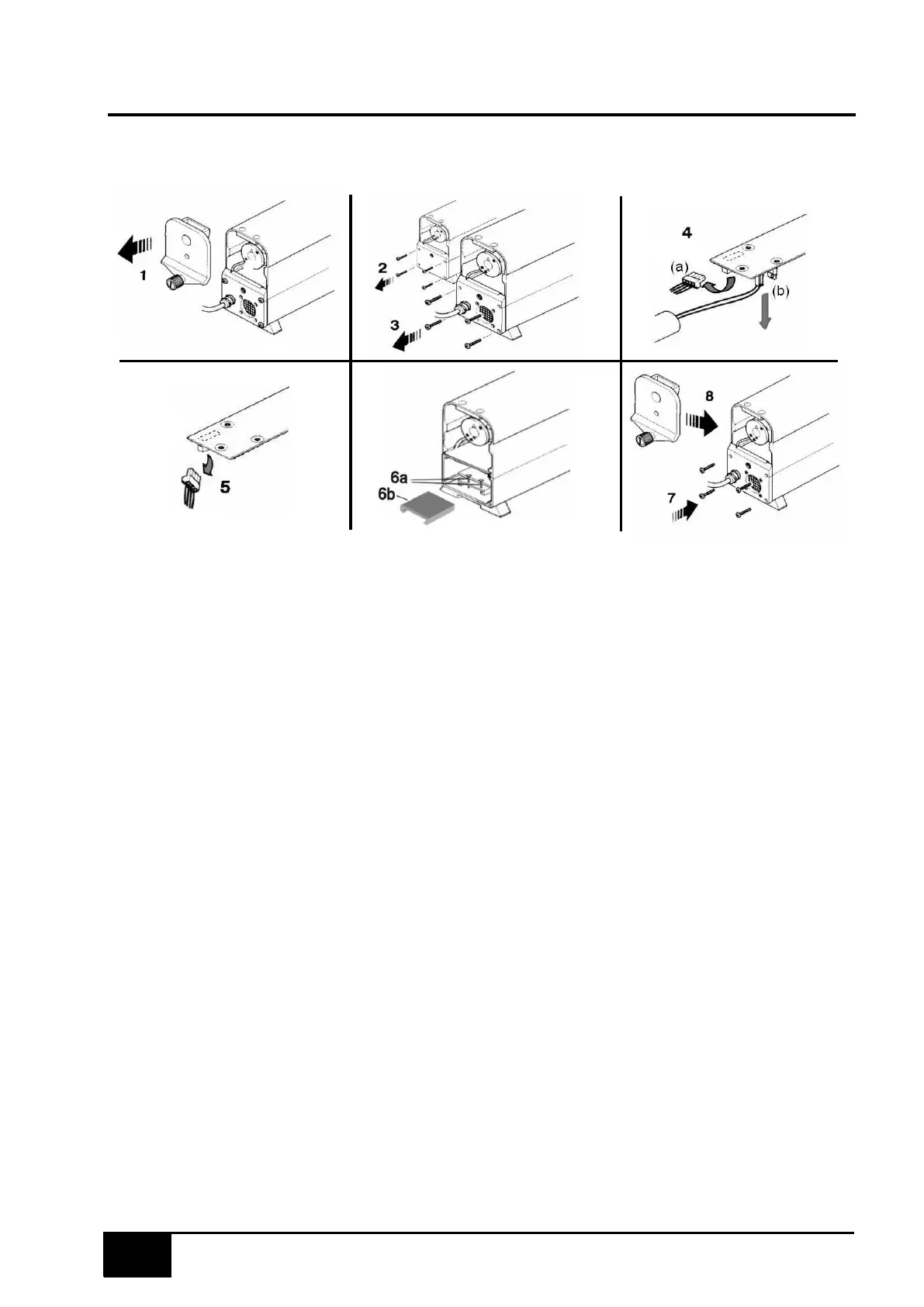
Unscrew the knurled knob (1) and open up both end caps.
2.
Remove the four panhead screws (2) & (3) securing the end plates and carefully ease the
plates clear of the housing.
3.
At the fan end, disconnect the 2-pin plug (4a) and also the 2-pin plug (4b) connected to the
fan.
4.
At the probe end, disconnect the 3-pin plug (5).
5.
Depending on which version - loosen the two screws (6a) or the plastic spacer (6b) securing
the battery pack and remove old battery pack, do not remove by pulling the cables. Ensure
the connectors do not foul any components during removal/replacement of the board.
6.
Replace with new battery pack (note orientation). Discard the two securing screws
(earlier versions) or the plastic spacer (later versions)– no longer required.
7.
Re-connect the 2-pin plug (4a), the 2-pin plug (4b). and the 3-pin plug (5).
8.
Relocate the end plates to the smokehead and loosely secure with 4 panhead screws (7).
9.
Check that the lens housing is fully in, then fit the end caps and secure with the knurled
knob. Fully tighten the knurled knob then slacken half a turn (8).
10.
Push the end plate upwards as far as it will go, and then fully tighten the 4 panhead screws.
11.
Fully tighten the knurled knob on the end caps.
NOTE: Ensure the battery is disposed of in accordance with current rules and regulations
applicable and enforced in your area. When the equipment is first switched on the Smokehead
should be firmly positioned onto its charging base and the unit should be allowed to charge for a
minimum of five to six hours (or preferably left overnight) to fully charge the batteries.


 To Next Page