500-1421E rev1.2 NVeDVR User Guide 1
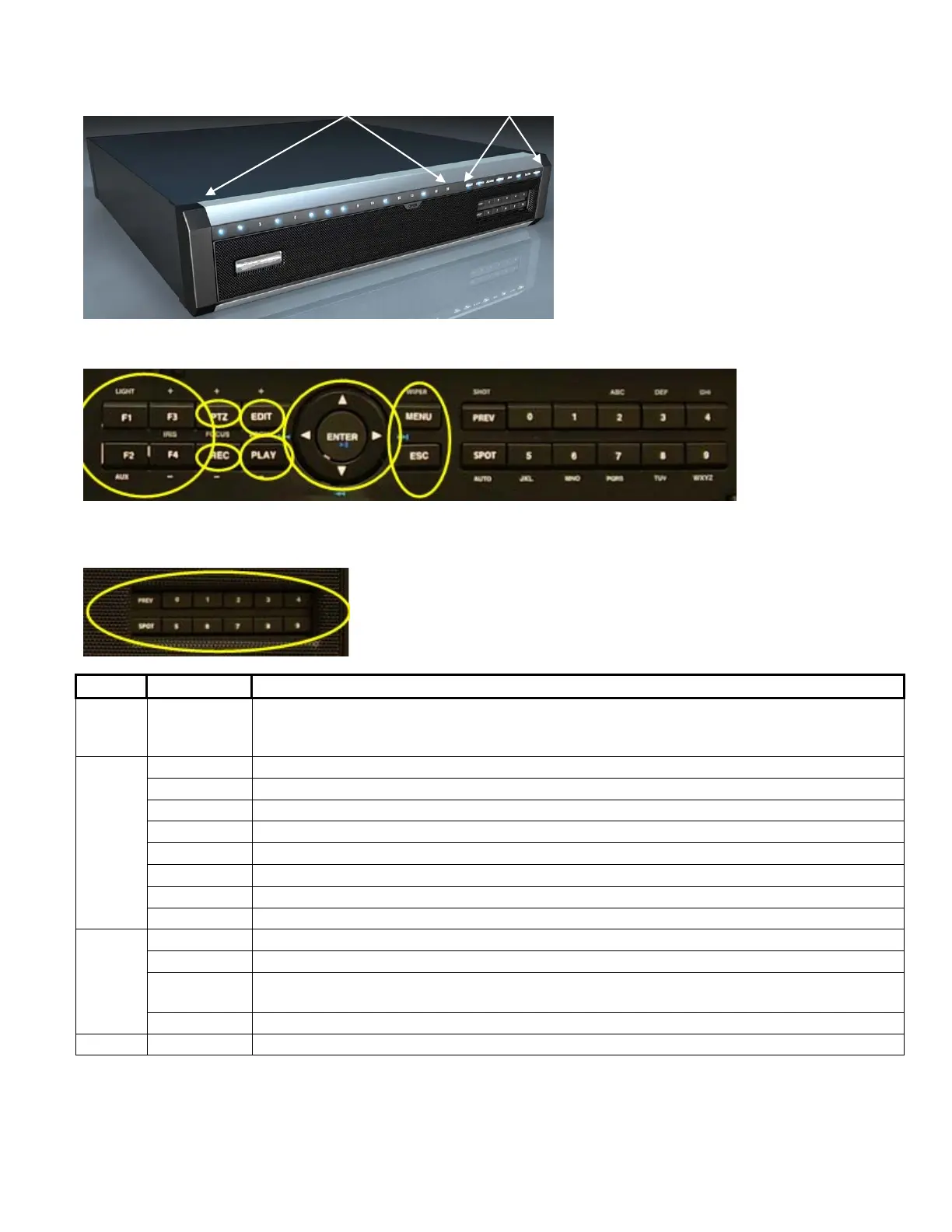
Front Panel Indicators and Controls
1 2
3 4 5 6 7
8 9
10
Index Name Description
1
Camera
Indicator
Lights
Blue = recording, Red = network transmission, Purple = recording and network
transmission.
READY Blue = DVR is ready.
IR Blue = IR remote control is programmed.
ALARM Red = alarm
MODEM Blue = modem connection and dial-up successful
HDD Flashing red = reading or writing HDD
LINK Blue = network connection is OK
Tx/Rx Flashing Blue = data is being transmitted over the network.
2
Activity
Lights
POWER Blue =Unit Power On or Red = Stand-by.
F1 LIGHT in PTZ control.
F2 AUX in PTZ control.
F3
Input switch (number, lower case, upper case and symbol). “IRIS+” in PTZ control. Preview
Mode: hide or display channel status bar.
3
F4 “IRIS –“ in PTZ control
4 PTZ Control Enter into Pan, Tilt, Zoom camera operation. “FOCUS +” in PTZ control.



 To Next Page