INSTRUCTIONS FOR USE
COBRA HD | IFUCOBRAHDEN00
This document is the property of
CSO Costruzione Strumenti Oftalmici srl.
Any reproduction, even partial, it is prohibited.
38/48
4.6 HOW TO CAPTURE THE IMAGE
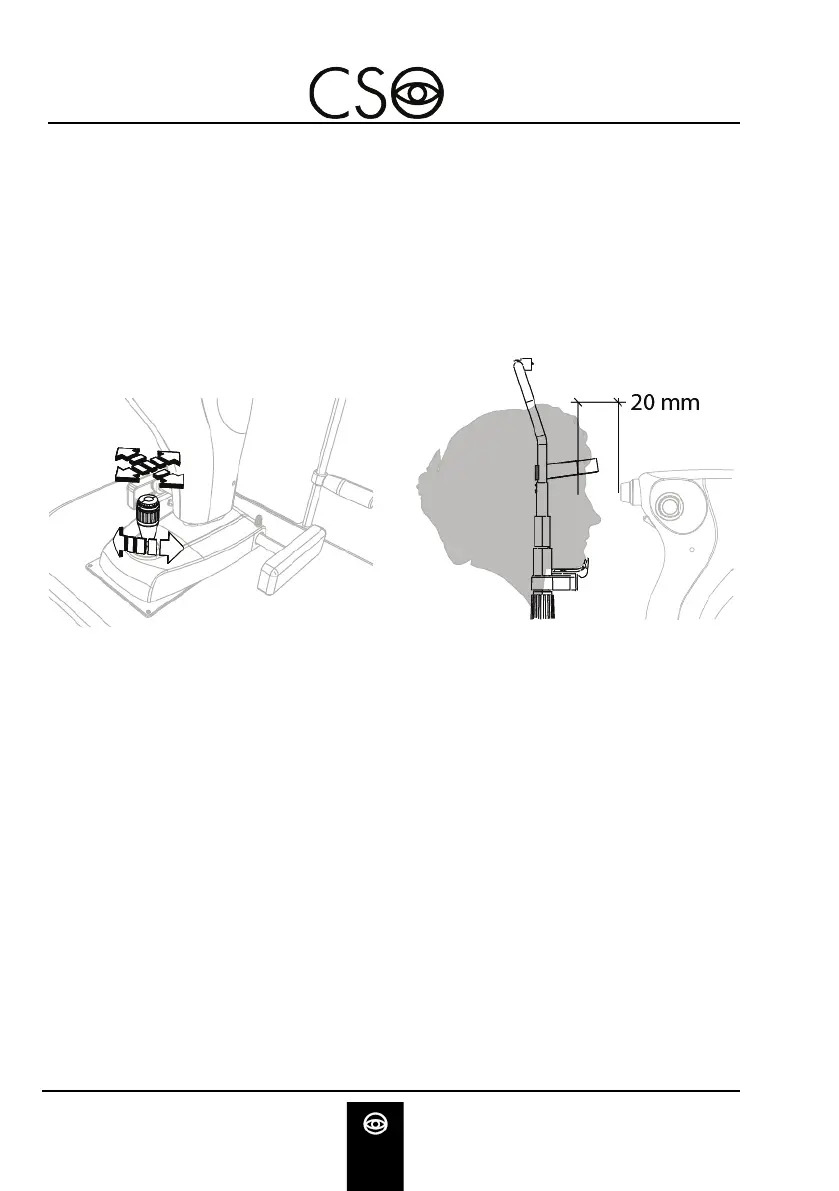
Turn the joystick and align the device with the patient's eye.
Move towards the eye with the tool and align with the retinal
reflection until the image of the retina appears.
Slightly move the joystick in order to obtain the best condition
of the image, for what it concerns the illumination
homogeneity and the field wideness.
Fig 25 - How to place the device
Fig 26 - Distance from the patient
Focus the image by means of the roller on the upper part of
the device Refer to the graphic indicator to focus the image.
Push down the joystick to confirm and capture the image. The
image will be saved in the gallery.


 To Next Page