19
Network Settings
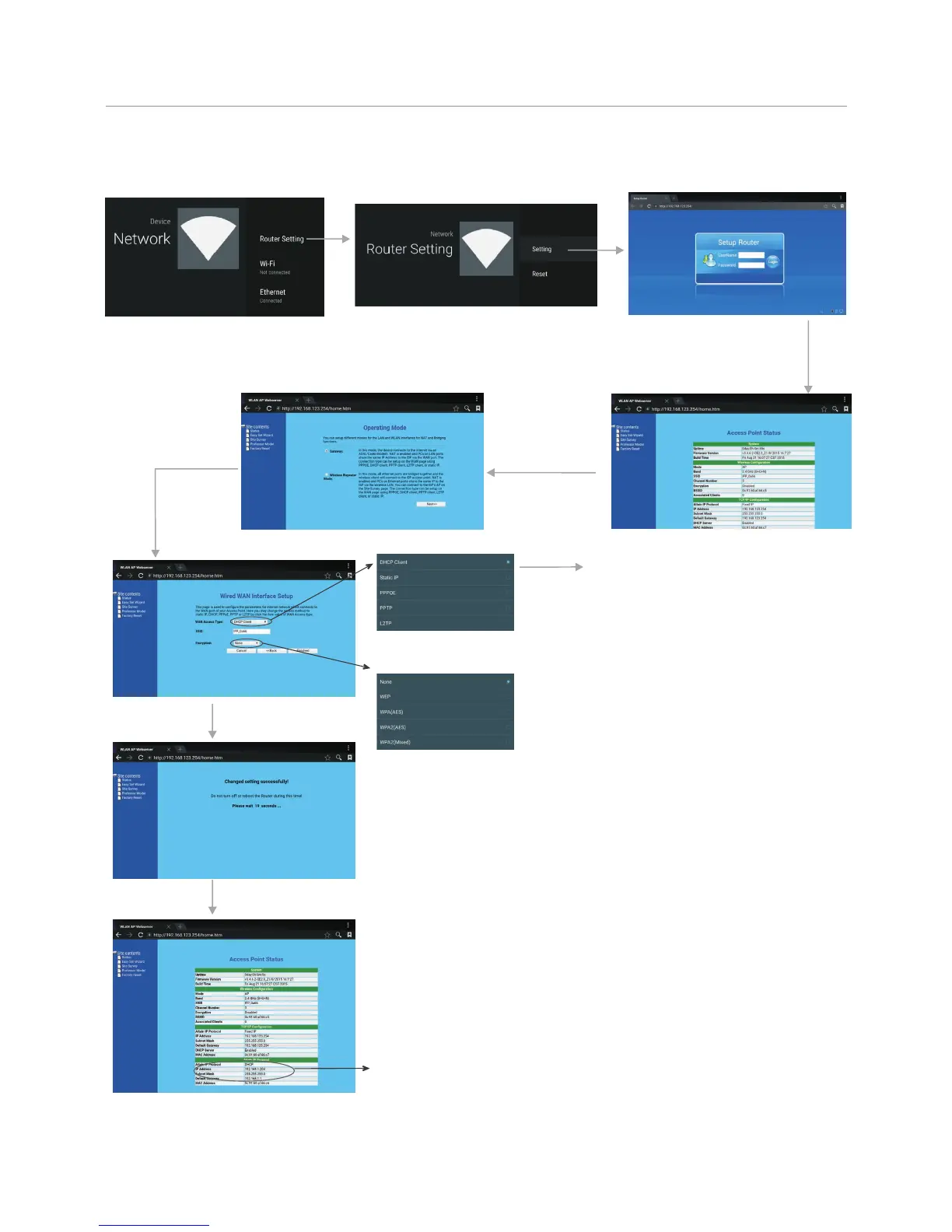
Wired Network Setting ( )Internal router
Select
Easy Set Wizard
Select Gateway
Next
There are five methods to connect with
network, choose your preferred one.
Recommended to select the DHCP
Client connection. Automatically obtain
IP information from your ISP.
Automatically obtain IP
information from your ISP. If your ISP
doesn’t provide a designated IP for
you, then choose DHCP Client.
If all Internet IP information is
provided by your ISP, then choose
Static IP.
Ethernet Point to Protocol.
Your ISP will provide you with Login ID
and password. Usually this option is
applicable to DSL service.
Point to Point Tunneling
Protocol. Your ISP will provide you with
Login ID and password.
Layer 2 Tunneling Protocol. Your
ISP will provide you with Login ID and
password. Usually this option is
applicable to DSL service.
DHCP Client:
Static IP:
PPPOE:
PPTP:
L2TP:
Passward Setting Format
Method 1: Easy Set Wizard
Input the default UserName: admin, skip the default
password setting as there is no default password,
then press Login button login.
Finished
WiFi Password of Internal
Router in the CTOUCH
interactive display.
(Password should be set at
least 8 characters. )
Get IP address,
Setting successfully.



 To Next Page