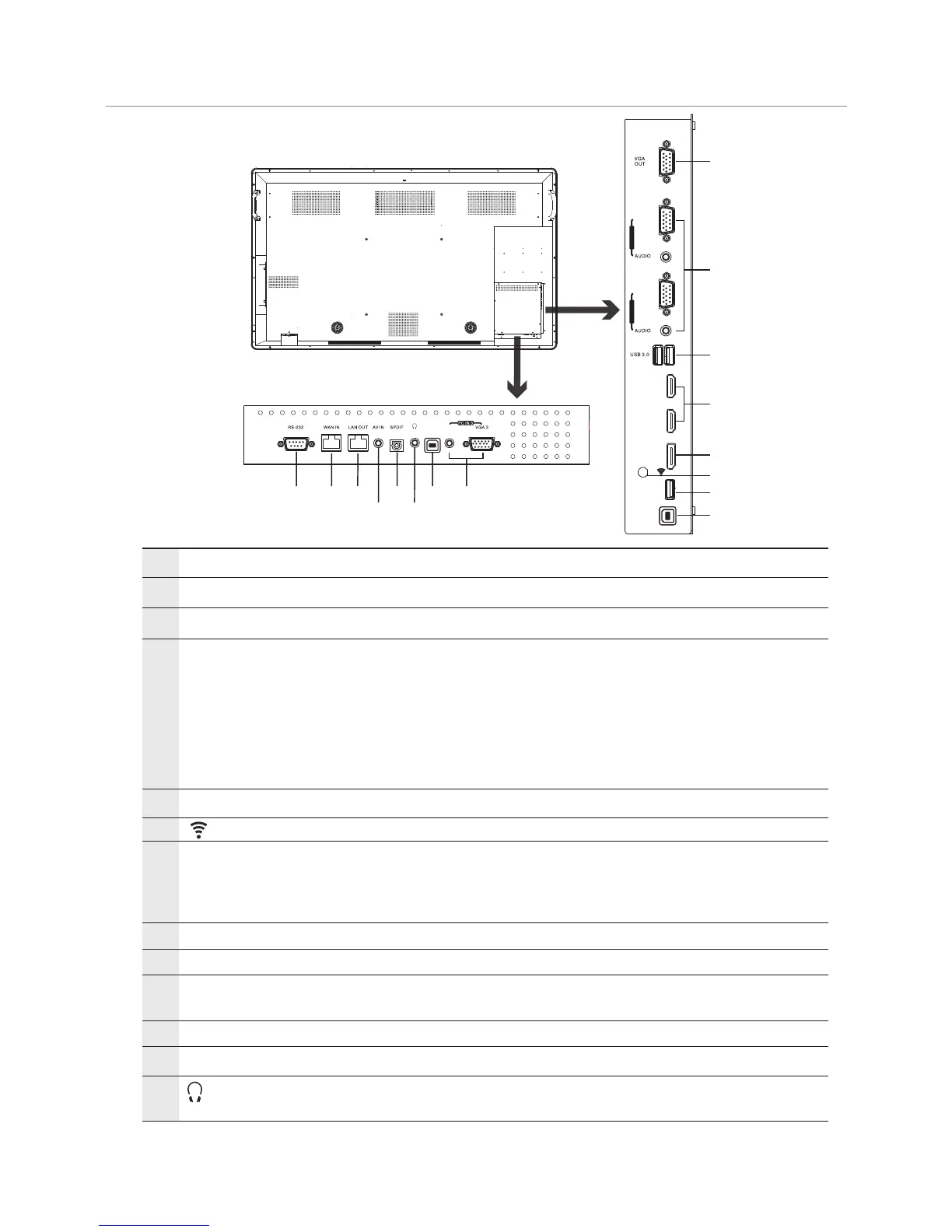
Viewing the connection panel
7
Identification of Controls
Wi-Fi antenna .
1
2
USB2.0/3.0
Connect USB devices to these ports.
3
HDMI1/2 Input
To connect with those equipments with HDMI or DVI interface. (A
HDMI-to-DVI adapter cable is required when you are connecting a
DVI-equipped device to the .)
HDMI1(MHL): Connect an MHL - enabled device such as a cell
phone to this jack to view the external device’s screen on your
screen.
HDMI2(ARC): Connect an ARC-enabled home theater receiver to
this jack.
CTOUCH interactive display
4
5
6
7
8
9
10
11
12
VGA OUT
Output the currently selected PC IN 1/2/3 signal.
PC IN1/2/3
TOUCH OUT1/2
Output the touch for external devices connected to PCx or HDMIx
port which support touch system.
Note: TOUCH OUT 2 takes precedence over TOUCH OUT 1 in
default. You can define it to in Lock menu.
Input port for composite video.
Connect a digital sound system to this jack.
Connect headphones to this jack. The
is the current audio output.
CTOUCH interactive display
The built-in router output port. Connection to another computer or
other Internet enabled devices.
The built-in router input port. Connect to the external network.
For service, software upgrades and the other uses.
Connect the video/audio for a computer to these ports.
AV IN
S/PDIF digital audio output
LAN OUT
WAN IN
RS232
AUDIO
TOUCH
OUT 2
29 10
11
12
13
7
1
2
3
4
5
6
7
8
DP(DisplayPort) Input Connect an external device to DP out jack.
13
(Antenna)
3
HDMI 1
(MHL)
HDMI 2
(ARC)
VGA 1
PC IN 1
VGA 2
PC IN 2
DP IN
USB 2.0
TOUCH
OUT 1


 To Next Page