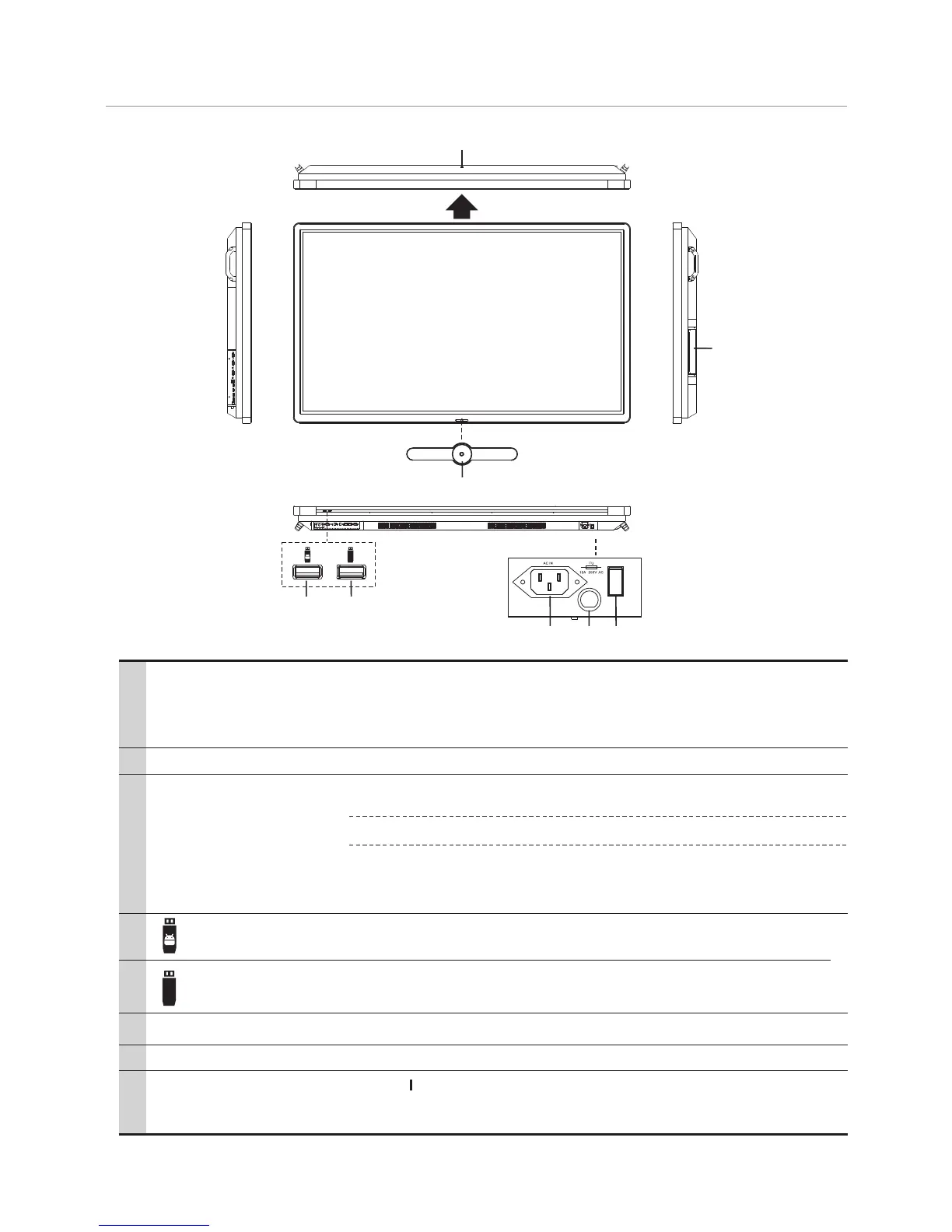
Identification of Controls
Viewing the control panel
6
5
6 7 8
1
2
3
4
2
USB(2.0)(for camera) This port is connected to PC when current source is PC (internal OPS) , but
is changed to TV (Android) if current source is ATV, AV, USB or in Home
page.
Note: Please open the dust cover before being used.
1
3
4
5
6
7
8
Internal PC module slot
Insert the CTOUCH (Optional)internal PC module
Power LED
Remote control sensor
Power Switch
Red: In standby mode.
White: In power on mode.
Aim the remote control towards this spot on the CTOUCH interactive display.
Push to ( ) to connect the power, push to (O) to cut off.
Note: Power switch can not be covered, and should keep the power switch
can be conveniently operated.
USB for OPS.
Note: If no OPS, the USB port has no function.
USB for CTOUCH interactive display.
AC IN
Plug the AC cord into this jack .(AC 100-240V 50/60Hz)
Switch the power on or off.CTOUCH interactive display
Fuse
Power
Note: When the CTOUCH
to turn off the and put the in standby mode.
interactive display is turn on, press to display the bar, if this button
is pressed about two seconds CTOUCH display
navigation
12A 250V
PC
PC


 To Next Page