Laser Air Plus | User Manual Laser Air Plus | User Manual
1211
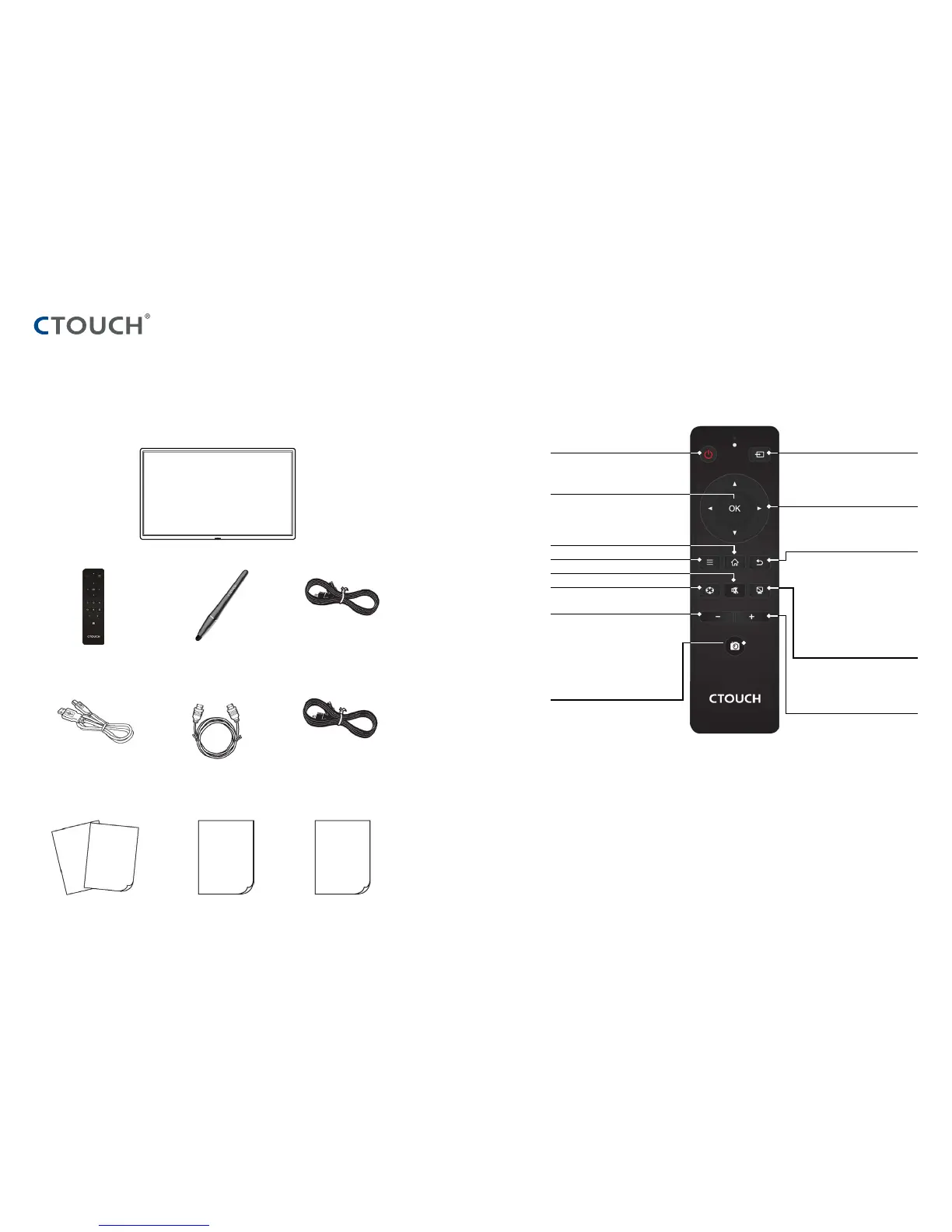
STANDARD ACCESSORIES
UNPACKING
The following items are included in your
product box.
CTOUCH INTERACTIVE DISPLAY
REMOTE CONTROL TOUCH PEN AC POWER CORD
HDMI CABLE USB CABLE UK AC POWER CORD
QUICK START GUIDE WARRANTY CARD WELCOME LETTER
Notes:
The illustrations may differ slightly from the items shipped with your product.
REMOTE CONTROL
Switch the CTOUCH interactive display power
on or off
Display or exit input source menu
Use Arrow buttons to navigate in on-screen
menu.
To confirm or enter a sub-menu or toggle
between options during menu operation.
Display desktop (Home page) on the screen
Display or exit the setting menu screen
Mute the sound
Freeze the current picture
Volume down
Return to previous menu or exit the on-
screen menu
Turn off the backlight, the screen will go
black but the processes will continue (like
playing music).
Press any button on the remote controle
again or touch the CTOUCH internative
display glass plate with two fingers in order
to turn on the backlight again.
Volume up
Take a screenshot. The screenshot will show
all content displayed on the screen and will
be stored on the build-in-storage.
Note: When a external USB storage device is
connect, screenshots will be stored (only) on
the USB storage device.



 To Next Page