Laser Air Plus | User Manual Laser Air Plus | User Manual
1817
BASIC OPERATIONS
TURNING THE CTOUCH INTERACTIVE DISPLAY ON OR OFF
1. Plug the power cord into an AC power outlet.
2. Press Power Switch on the CTOUCH interactive display.
3. Now the CTOUCH is in standby mode. Wait a moment until the power indicator lights
up, then press
button to turn on the CTOUCH interactive display.
4. Press
button again to turn the CTOUCH interactive display into stand-by mode.
5. To cut off the power completely, use the Power Switch.
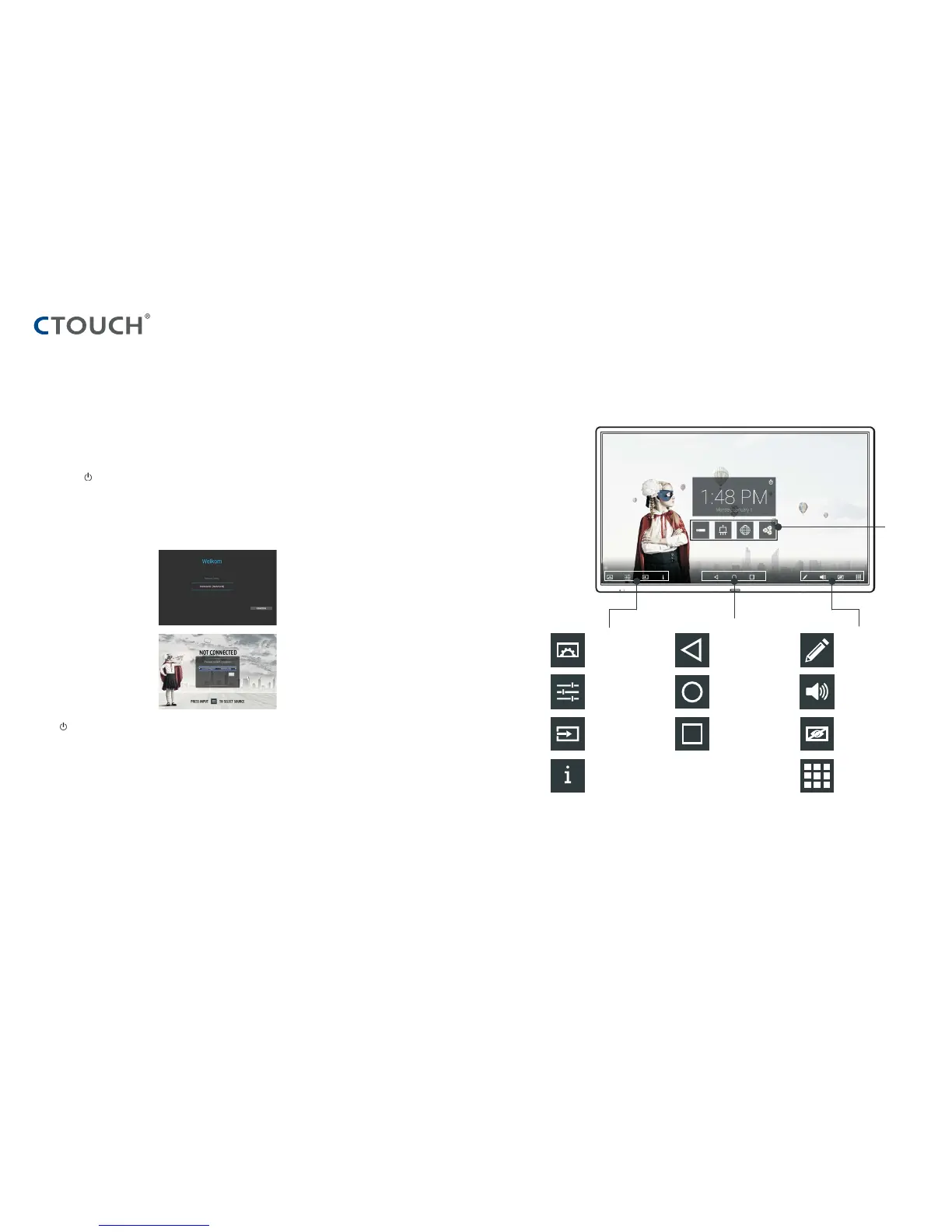
OPERATING THE NAVIGATION BAR
IN CASE OF FIRST TIME INSTALLATION
a. Select desired menu language, then
press START and go to the next page.
b. Select location and go to the next page.
Display menu
Settings menu
Source menu
User Manual
Previous screen
Homepage
(Android Interface)
Application history
Annotation
Volume bar
Turn off the backlight
Applications list
Shortcuts
of favorite
application



 To Next Page