4
GETTING TO KNOW YOUR CONTROL PANEL
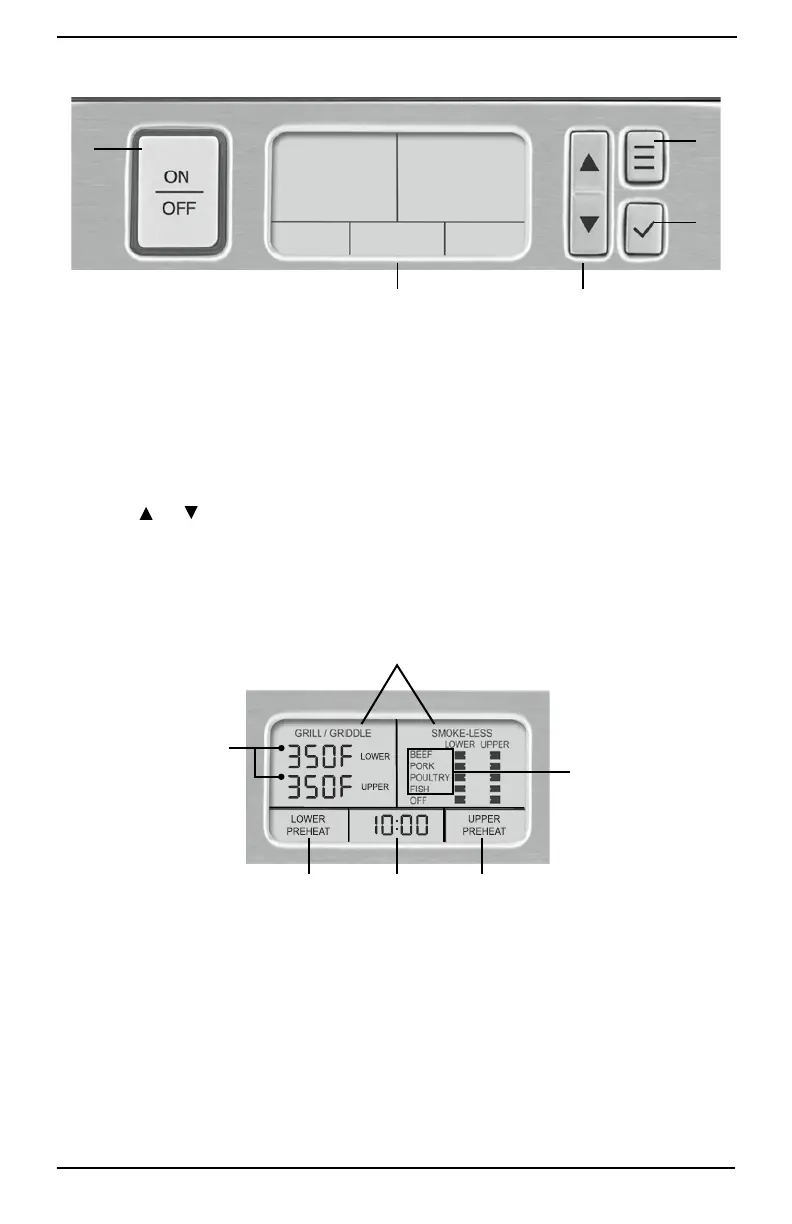
1. ON/OFF Button
Press to turn unit on and off.
2. Large LCD
The backlit LCD screen is easy to read; it
displays the cooking function (Grill/Griddle or
Smoke-less), Upper Plate Temperature, Lower
Plate Temperature, Timer, Sear, Upper and
Lower Preheat, and food selections.
3. Up and Down Arrow Buttons
Use the
and buttons to increase or
decrease the upper and lower plate
temperatures, select food while in Smoke-less
Mode and to set the timer if using.
4. Select Button
Use to Select cooking function; Grill/Griddle or
Smoke-less Mode.
5. Confirm Button
Use to confirm your cooking function (Grill/
Griddle or Smoke-less Mode), confirm the
temperature(s), food(s) and start the timer.
A. Cooking Function
Grill/Griddle or Smoke-less.
B. Upper and Lower
Plate Temperatures 175˚F (80°C) – Sear in 25˚
increments.
C. Timer
Set to count up or count down.
See Operating Instructions.
D. Lower Plate Preheat
Appears in LCD when Lower Plate is
preheating.
E. Upper Plate Preheat
Appears in LCD when Upper Plate is
preheating.
F. Food Selections for Upper and Lower Plates
Appear in LCD while in Smoke-less Mode.
START-UP SCREEN
D C E
A
F
B
32
4
1
5



 To Next Page