OPERATION
Heating Water
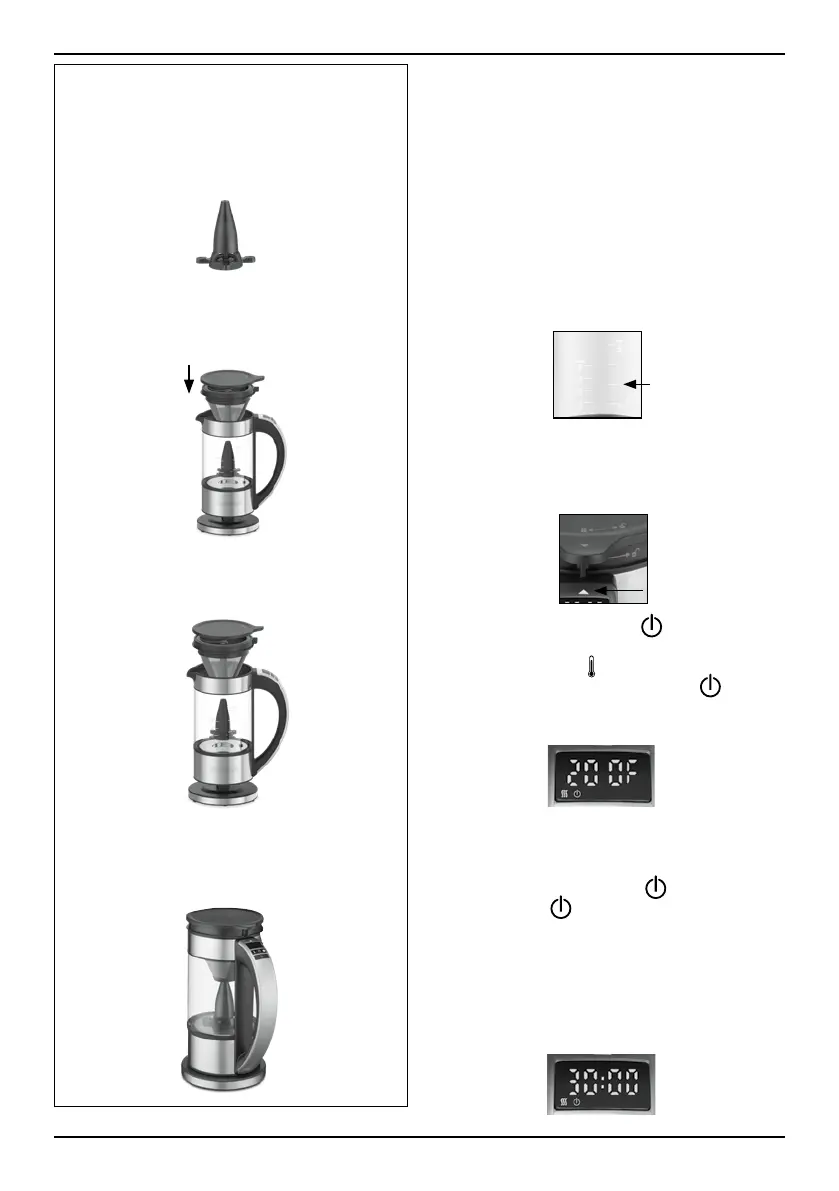
Remove the magnetic drive system and
coffee filter basket for kettle feature.
NOTE: The Time Control and Brew Strength
selection functions are deactivated while
using the appliance as a kettle.
1. Lift the kettle from the base and unlock the lid
by turning counterclockwise to remove from
kettle. Add the desired amount of water using
the water level markings for heating water.
2. Place lid back on and turn clockwise to the
locked position, aligning arrows on lid and
handle. Return the kettle to the base and
plug in.
3. Turn kettle on by pressing . The LED
display will show the actual water
temperature. Press
to scroll through and
select desired temperature. Press
to
begin heat-up process. Selected temperature
will flash during heating.
4. Once the water reaches the selected
temperature, a beep will sound indicating
that the kettle is ready. To stop heating
process at any time, press
. To start
heating, press
again.
5. When the heating process
is completed, and the timer reaches 0:00,
the Keep W
arm preset temperature and start
time will engage. The temperature will be
maintained for 30 minutes. Countdown will
show on LED display.
INSTALL COFFEE BASKET
1. Insert the magnetic drive into the
center of the bottom of the kettle.
The magnetic drive will automatically
stay in place.
2. Place the coffee filter basket in the
glass kettle.
3. Turn coffee filter basket clockwise to
lock in place, aligning the filter
basket knob with arrow on handle.
4. Place lid on and turn lid clockwise to
the locked position, aligning arrows
on lid and handle.
7



 To Next Page