Parking and manoeuvringAutomatic parking system
Selecting a parking type
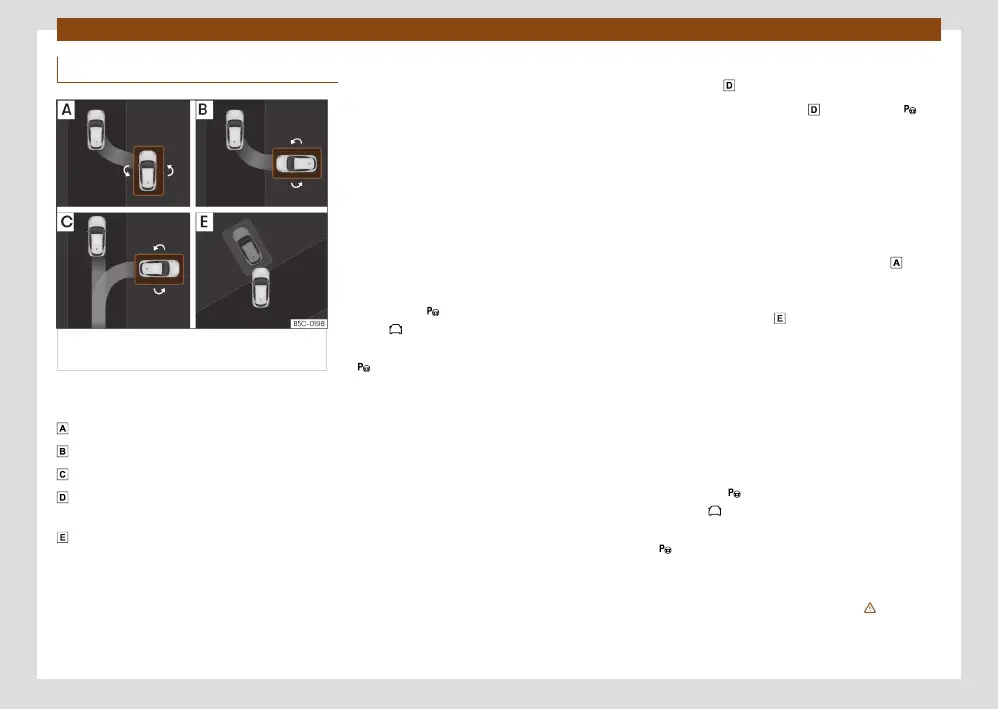
Fig. 150 On the infotainment system
display: parking modes indication.
Automatic parking includes the following 5
types of parking:
Reverse parallel parking.
Reverse angle parking.
Forward angle parking.
Reverse parallel parking without driving
past rst: “Help me”.
Forward or reverse parking in a parking bay
without driving past rst.
Selecting a parking type after passing in
front of the space
After activating the automatic parking system
and after detecting a parking space, the info-
tainment system display proposes a type of
parking. The automatic parking system selects
the parking type automatically. The selected
type is shown on the infotainment system dis-
play is shown on the instrument panel display
››› Fig. 150.
•
The prerequisites for parking with the
automatic parking system must be met
››› page 198.
•
Press the button in the infotainment sys-
tem, > Assistants.
•
When the system is switched on, the symbol
on the infotainment system display is high-
lighted. The selected type of parking is also
displayed. You can change the type of parking
on the infotainment system display.
•
If there are more spaces available, another
space can be selected by clicking on it on the
infotainment system display.
•
Follow the instructions displayed on the info-
tainment system display while paying attention
to traic and drive the vehicle past the parking
space.
Reverse parallel parking without driving past
rst (type )
With this type of parking , press button
so that the system completes the parking that
has already been started. The system will only
switch on if suicient progress has been made
with the manoeuvre (the side sensor must be
able to detect the reference vehicle). If it is
impossible to successfully complete the ma-
noeuvre that has been started, the system it-
self will drive out of the parking space before
starting parking in a similar way to type .
Special case of forward or reverse parking
into a parking bay without driving past
rst.
•
The prerequisites for parking with the
automatic parking system must be met
››› page 198.
•
Move forward towards the parking space
while paying attention to traic and stop the
vehicle with the front part partially inside the
parking space.
•
Press the button once in the infotainment
system, > Assistants.
•
When the system is switched on, the symbol
on the infotainment system display is high-
lighted. The selected parking mode without a
reduced view is also displayed.
•
Let go of the steering wheel
›››
in Intro-
duction on page 196.



 To Next Page