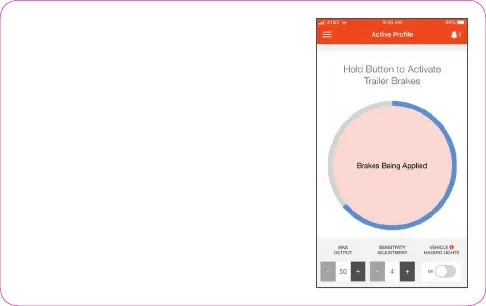
ACTIVE PROFILE SCREEN SETTINGS
1. Manual Brake Activation:
Activate manual braking,
press and hold the orange button.
2. Brake Output Indicator:
The blue ring indicates
current brake output level.
3. Max Output:
The maximum level of the brake controller
(adjustable in increments of five).
4. Sensitivity Level:
The sensitivity of the braking power
(adjustable in increments of one).
5. Vehicle Hazard Lights:
Turn on any time the vehicle's
hazard lights are active.
6. Screen Theme:
Change from light to dark (see settings menu).
1
2
3 4 5



 To Next Page