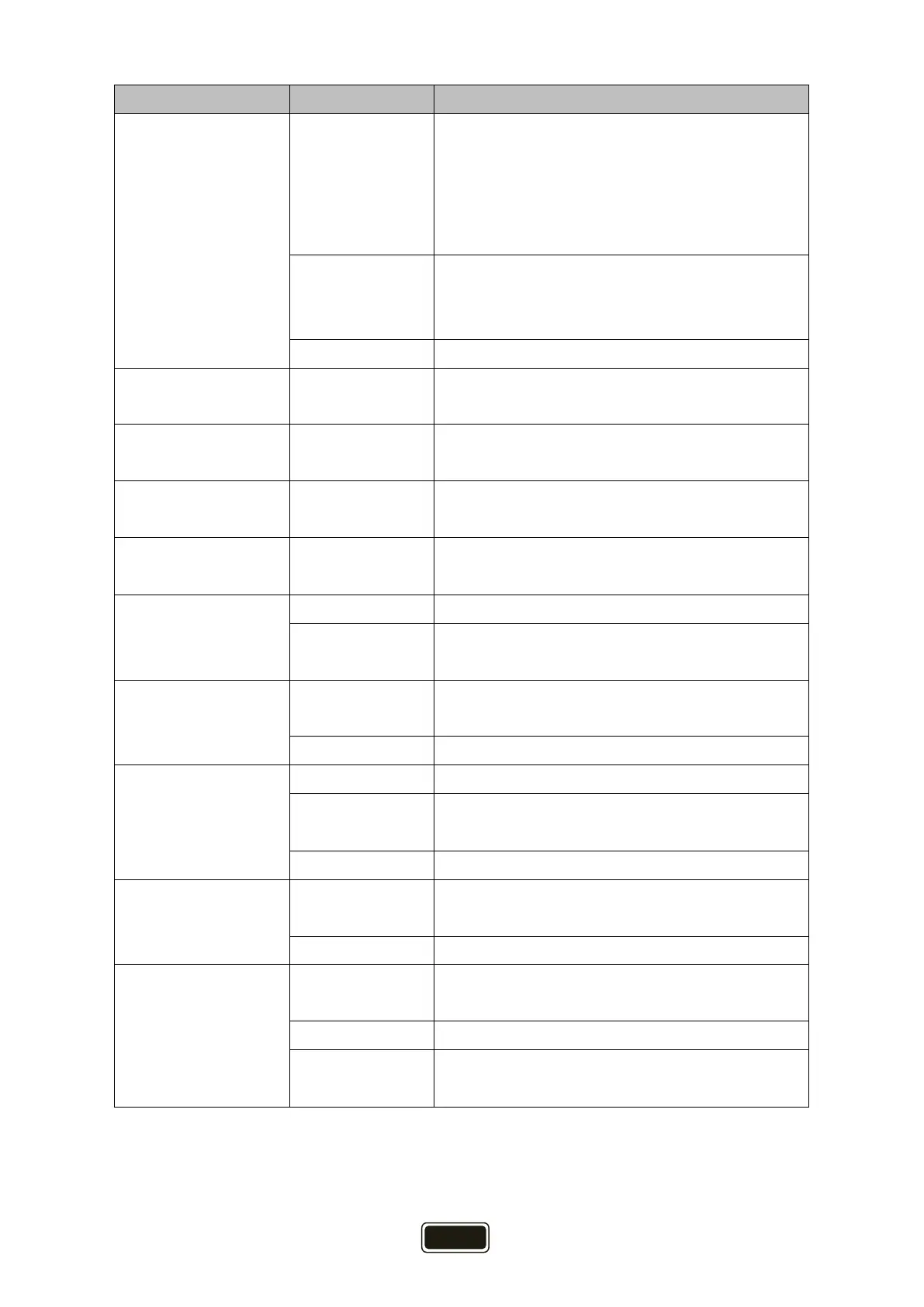
Main menu Submenu Description
Charge Source
PV first
(default)
Solar energy will charge battery as first priority.
Utility (during utility’s charging time) will
charge battery only when solar energy is not
available.
PV & UTI Solar energy and utility (during utility’s
charging time) charge the battery at the same
time.
PV Only Solar energy charges the battery only.
UTI out start
xxH
(default 0H)
The time when utility start to power the load.
Setting range from 0H to 23H.
UTI out end
xxH
(default 0H)
The time when utility end
Setting range from 0H to 23H.
UTI Charge Start
xxH
(default 0H)
The time when utility start to charge the
battery. Setting range from 0H to 23H.
UTI Charge End
xxH
(default 0H)
The time when utility start to charge the
battery. Setting range from 0H to 23H.
PV Input Mode
Parallel Two solar input parallel.
Independent
(default)
Two solar input independent.
AC Input Mode
APL:90-280VAC
(default)
Common application. (APL: Appliances)
UPS:170-280VAC UPS application.
AC Output Volt
208VAC AC output voltage 208VAC.
230VAC
(default)
AC output voltage 230VAC.
240VAC AC output voltage 240VAC.
AC Output Freq
50Hz
(default)
AC output frequency 50Hz.
60Hz AC output frequency 60Hz.
OverLoad Restart
YES
(default)
Enable auto restart when overload occurs.
NO Disable auto restart when overload occurs.
Swith to UTI
If overload occurs in battery discharge mode,
utility provides power to the load.


 To Next Page