This document is the User's Manual for the CyberPower MBP60AHVIEC82U Manual Bypass PDU (Power Distribution Unit). It provides essential information for the installation, operation, and maintenance of the device.
Function Description
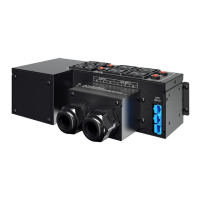
The CyberPower MBP60AHVIEC82U is a Manual Bypass PDU designed to facilitate the maintenance or replacement of an Uninterruptible Power Supply (UPS) without disrupting power to connected equipment. It acts as a switch, allowing the load to be transferred directly to the AC power source (bypass mode) while the UPS is serviced, or to be supplied by the UPS under normal operation. This ensures continuous power availability for critical systems during UPS maintenance.
The device incorporates a manual bypass rotary switch with two positions:
- UPS: In this position, the load is supplied by the UPS.
- BYPASS: In this position, the load is supplied directly by the AC power source, bypassing the UPS.
The PDU includes connectors for UPS input and output cables, as well as input/output terminal blocks for connecting to utility power and the equipment load. It also features output sockets for direct power distribution.
Important Technical Specifications
- Electrical Specifications (Line Input):
- Phase: Single
- Voltage: 220~240Vac
- Frequency: 50/60Hz
- Rated Current: 60A
- Electrical Specifications (Output):
- Voltage: 220~240Vac
- Frequency: 50/60Hz
- Rated Current: 60A
- Operating Environment:
- Temperature: 0°C~40°C
- Humidity: <95%
- Storage Temperature: -15°C~50°C
- Physical Dimensions:
- Dimensions (W×H×D): 288mm × 88mm × 141mm
- Net Weight: 2.8 kg
Usage Features
The MBP60AHVIEC82U is designed for ease of integration and operation within a UPS system. Key usage features include:
- Manual Bypass Switch: A prominent rotary switch allows for quick and clear selection between UPS power and direct AC bypass. This is crucial for planned maintenance without downtime.
- Clear Connection Points: The PDU provides clearly labeled UPS Input Connector, UPS Output Connector, and Input/Output Terminal Blocks, simplifying the wiring process.
- Rackmount Option: The inclusion of rackmount ears and screws indicates that the PDU can be installed in a standard equipment rack, ensuring a tidy and organized setup in data centers or server rooms.
- Safety Instructions: The manual emphasizes critical safety precautions, such as proper grounding, ensuring upstream circuit breaker accessibility, and the importance of qualified personnel for electrical connections. It also warns against operating the bypass switch if the UPS is not in bypass mode, highlighting the potential for hazardous voltage and lost load risk.
- Installation Flexibility: The manual illustrates both rear installation (presumably behind a UPS) and rack installation, offering flexibility in deployment.
Maintenance Features
The primary purpose of this Manual Bypass PDU is to facilitate UPS maintenance without interrupting power to the connected load. Its maintenance-related features and procedures are detailed as follows:
- Hot-Swappable UPS Capability: The PDU enables qualified personnel to remove the detachable Manual Bypass Module from the UPS for routine maintenance or replacement without disrupting power to connected equipment. This is achieved by transferring the load to the utility power via the bypass switch.
- Step-by-Step Removal Procedure: The manual provides a clear, sequential guide on how to safely remove the UPS with the Manual Bypass Module:
- Put the UPS in internal "Bypass mode" (refer to the UPS user manual).
- Verify the UPS is in Bypass mode by checking the UPS Display Panel.
- Set the Manual Bypass Switch to the "BYPASS" position after opening the Switch Cover.
- Set the UPS Input Breaker to "OFF" and wait a few minutes for the UPS to shut down.
- Disconnect the Battery Cable from the Battery module.
- Disconnect the UPS Input/Output Cables from the Manual Bypass Module.
- The UPS can then be safely replaced.
- Step-by-Step Return Procedure: Similarly, the manual outlines the process for returning the UPS with the Manual Bypass Module to normal operation:
- Install the UPS Input, Output, and Battery Cables to the UPS terminals.
- Open the Switch Cover and ensure the Manual Bypass Switch is in the "BYPASS" position.
- Connect the cables to the corresponding connectors on the PDU.
- Set the UPS Input Breaker to the "ON" position.
- Verify the UPS is in Bypass mode by checking the display panel.
- Set the Manual Bypass Switch to the "UPS" position.
- Turn on the UPS.
- Check that the UPS is in Normal mode.
- Safety Warnings for Maintenance: Crucial warnings are provided to prevent accidental power loss or electrical hazards during maintenance, such as "DO NOT OPERATE THE MANUAL BYPASS SWITCH IF THE UPS IS NOT IN BYPASS MODE" and "Hazardous voltage and lost load risk: do not manipulate the Manual Bypass Switch without UPS connected the Input and Output cables."
- Non-User Serviceable Parts: The manual explicitly states that "All repairs and service should be performed by Authorized Service Personnel only. There are no user serviceable parts inside the Manual Bypass Module," reinforcing the need for professional handling of internal components.
The CyberPower MBP60AHVIEC82U is a robust and essential component for any critical power infrastructure utilizing a UPS, ensuring high availability and simplified maintenance procedures.

 Need help?
 General







 To Next Page