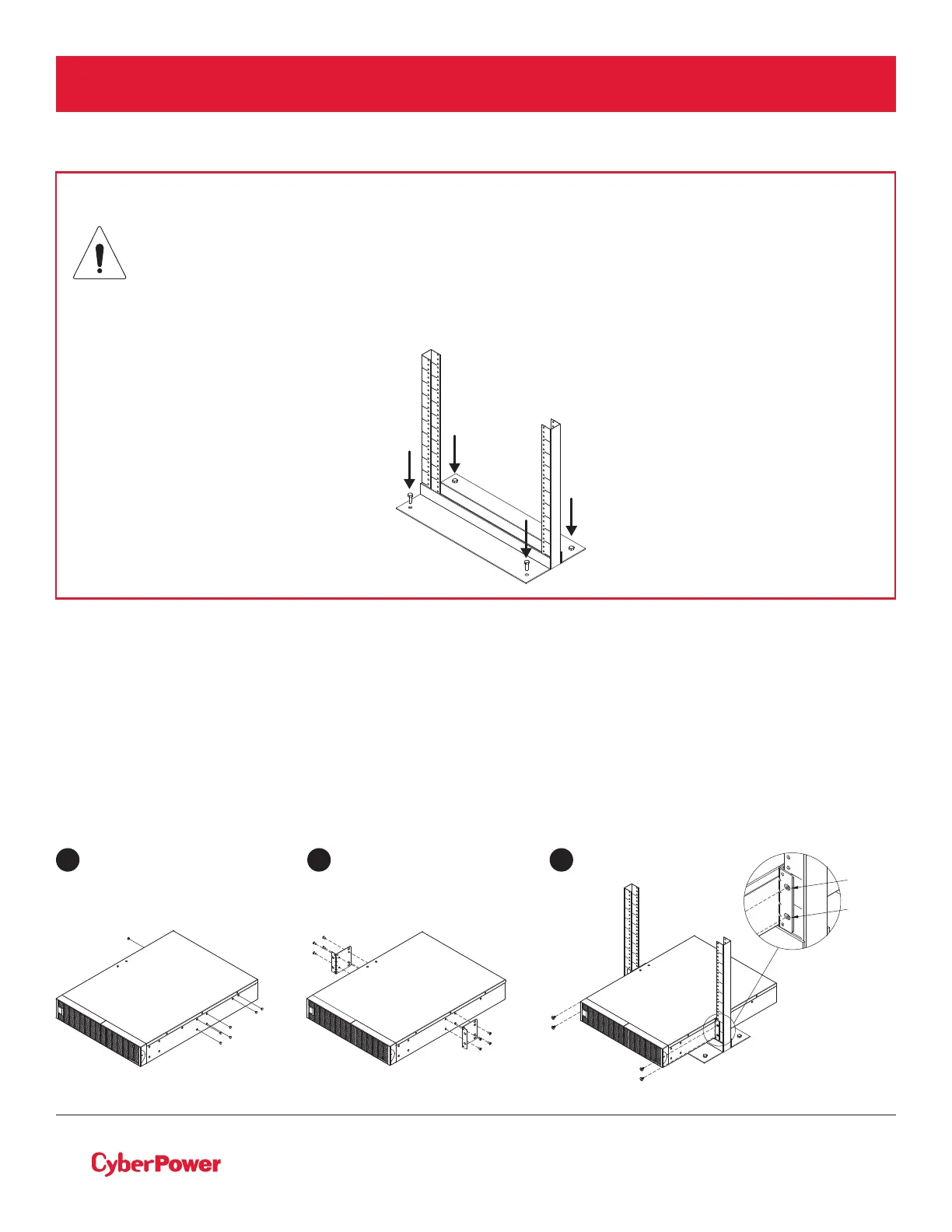
CAUTION! Due to the weight of this unit, it is strongly recommended to install it at the
bottom of the rack.
CAUTION! It is strongly recommended to have 2-3 people to assist during the installation
process.
CAUTION! It is strongly recommended that the 2 post rack be bolted to the floor prior to
the installation of the UPS.
©2019 Cyber Power Systems (USA), Inc. All rights reserved. All other trademarks are the property of their respective owners.
6
HARDWARE INSTALLATION CONT.
RACKMOUNT INSTALLATION FOR 2-POST RACK
Step 1: Remove side dust covers
Remove five dust covers from screw holes as shown below.
Step 2: Rackmount ears installation
Attach the included rackmount ears to the center holes on the sides of the UPS using eight black M5X7L
screws as shown below.
Step 3: Secure the UPS to the rack
Secure the UPS to your rack with four black M5X12L screws at the front of the rack (square holes 2 and 5 as
shown below)
1 32
position 5
position 2



 To Next Page