
 Need help?
Do you have a question about the CyberPower P4WSU and is the answer not in the manual?
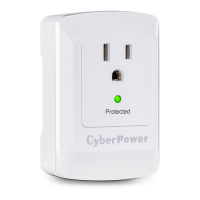
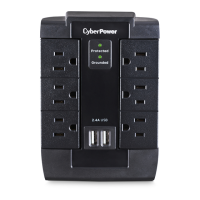
Indicator light status for surge protection functionality.
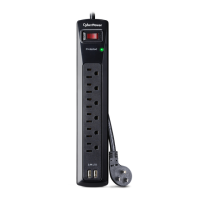
Description of the four standard AC outlets provided.
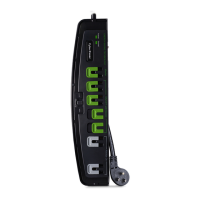
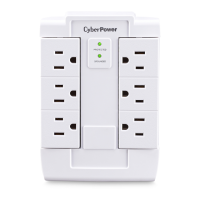
Features pivoting outlets for improved user convenience and space utilization.
Connect and charge up to four USB devices via protected ports.
Details about who provides the warranty and what it covers for the product and connected equipment.
Step-by-step guide on initiating a claim for connected equipment damage.
Explains CyberPower's process for addressing product defects and connected equipment damage.
Clarifies responsibility for shipping costs related to warranty claims.
Lists exclusions from the warranty coverage, such as software or improper use.
Outlines other restrictions and conditions that apply to the warranty terms.
Provides contact details for obtaining further information or assistance.
The CyberPower P4WSU is a 4-outlet surge protector designed to safeguard your electronic devices from power surges and spikes, while also providing convenient USB charging capabilities. This device is intended for use in dry, indoor locations and is not suitable for outdoor or wet environments.
The primary function of the P4WSU is to provide surge protection for your connected equipment. It features an internal protection mechanism that will disconnect the surge protective component at the end of its useful life, ensuring that your devices are not exposed to unprotected power. However, it's important to note that even after the surge protection component has disconnected, the device will continue to supply unprotected power to the load.
In addition to surge protection, the P4WSU offers four standard AC outlets for plugging in your electronic devices. These outlets are designed to accommodate a variety of plugs and provide a reliable power connection. For added convenience, the device also includes four USB charging ports. These ports allow you to connect and charge up to four USB-powered devices simultaneously, such as smartphones, tablets, or other gadgets. It's crucial to understand that these USB outlets are solely for charging and cannot function as a USB hub; they do not transfer data.
The P4WSU is designed with user convenience in mind. One notable feature is its pivoting outlets. These outlets can be rotated, making it easier to plug in bulky adapters or multiple devices without obstructing adjacent outlets. This flexibility helps optimize space and manage cables more effectively, especially in tight spaces.
The device includes a "Surge Protected Indicator" light. When this indicator is illuminated, it signifies that the surge protection feature is actively working and protecting your connected equipment. If this light does not illuminate, it indicates that the surge protector's AC lines are no longer protected from surges. This typically happens after the device has absorbed a significant power surge or spike that exceeded its specified limits, causing the protection circuitry to become inactive. In such cases, the surge protector has fulfilled its purpose by sacrificing itself to protect your equipment, but it will no longer offer future surge protection and should be replaced.
For optimal performance and safety, it is essential to plug the P4WSU directly into a properly wired and grounded wall outlet. It should not be "daisy-chained" with other surge protectors, power strips, or extension cords. The device is not intended for use with medical or life support equipment, aquariums, or any items not designed or intended for use with a surge protector, such as laser printers or large appliances. Always ensure that the total wattage of connected devices does not exceed the maximum rated wattage of the surge protector.
While the P4WSU is designed to be a low-maintenance device, understanding its operational indicators is key to ensuring continuous protection for your electronics. The "Surge Protected Indicator" serves as the primary maintenance feature, alerting you to the status of the surge protection. If this light goes out, it's a clear signal that the surge protector has reached the end of its protective life and needs to be replaced. There are no user-serviceable parts inside the device, and any attempt to open or modify it will void the warranty and could pose a safety risk.
In the event of a power surge that causes the protected indicator to go out, the device has performed its intended function by protecting your connected equipment. Although it will continue to supply power, it will no longer offer surge protection, making replacement necessary to maintain the safety of your electronics.
For any installation, troubleshooting, or general product questions, CyberPower offers technical support via phone and email. This support system is in place to assist users with any issues they might encounter, ensuring proper usage and addressing concerns about the device's functionality. It's recommended to contact technical support if you experience any problems or have questions about the device's operation or the status of its surge protection.
The product also comes with a limited lifetime warranty and a connected equipment guarantee. This warranty covers defects in materials and workmanship under normal use and conditions, and also covers equipment damaged due to the product's failure. To open a connected equipment claim, users must follow a specific procedure, including contacting CyberPower, providing purchase details, and submitting the product and damaged equipment for inspection. This process ensures that users can seek recourse if their equipment is damaged due to a failure of the surge protector. However, the warranty does not cover misuse, modification, operation outside environmental limits, or damage during transit or storage. It also explicitly excludes coverage for damaged software, lost data, or the restoration of data or records.
 General
| Type | Surge Protector |
|---|---|
| Outlets | 4 |
| USB Ports | 2 |
| Surge Protection Rating | 900 Joules |
| Response Time | Less than 1 nanosecond |
| Warranty | Lifetime |
| Voltage Rating | 120V |


 To Next Page