Workout Mode
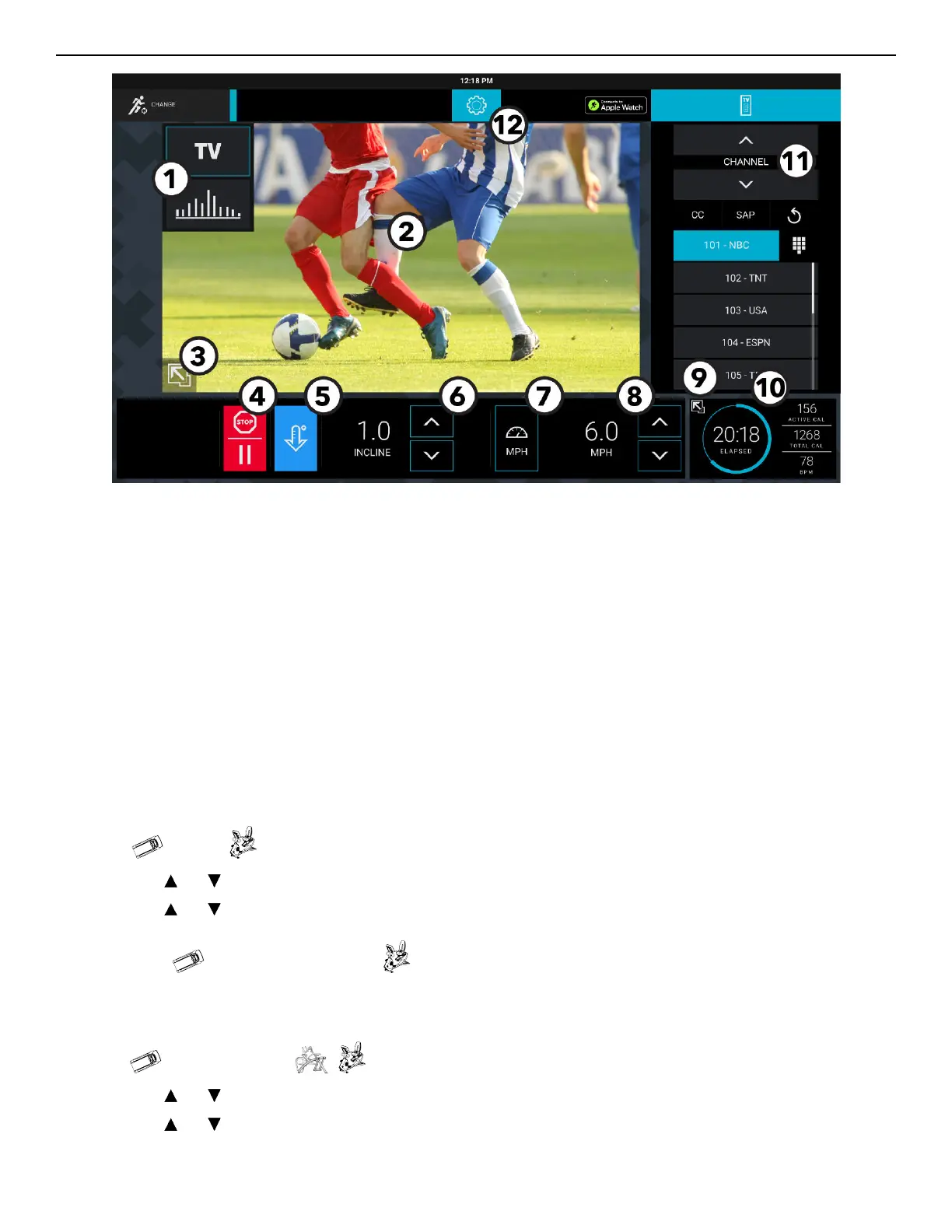
1. Workout Profile
• Choose the TV view or Classic view.
• A colored frame surrounding a workout profile view represents the current view.
2. Current Workout Profile
NOTE: TV view is shown.
3. Screen Size
• Press the icon to toggle between Standard view screen (shown) and Full Workout view screen sizes.
4. Stop / Pause
• Press to stop or pause a workout.
• Choose Cool Down, Resume, or End Workout.
5. Cool Down
• Press during workout to begin a cool down period.
• Choose Cool Down, Resume, or End Workout.
6. Incline or Level
• Press the and to increase incline and decrease incline by 0.5% intervals.
• Press the and to increase levels and decrease levels by 1.
7. Preset Speed or Preset Resistance Level
• Press to select a preset speed.
• Press to select present resistance level.
8. Speed
or Resistance Level
• Press the and to increase speed and decrease speed by 0.1 MPH intervals.
• Press the and to increase SPM and decrease SPM by 1.
• Displays speed in MPH.
Page 33 of 80


 To Next Page