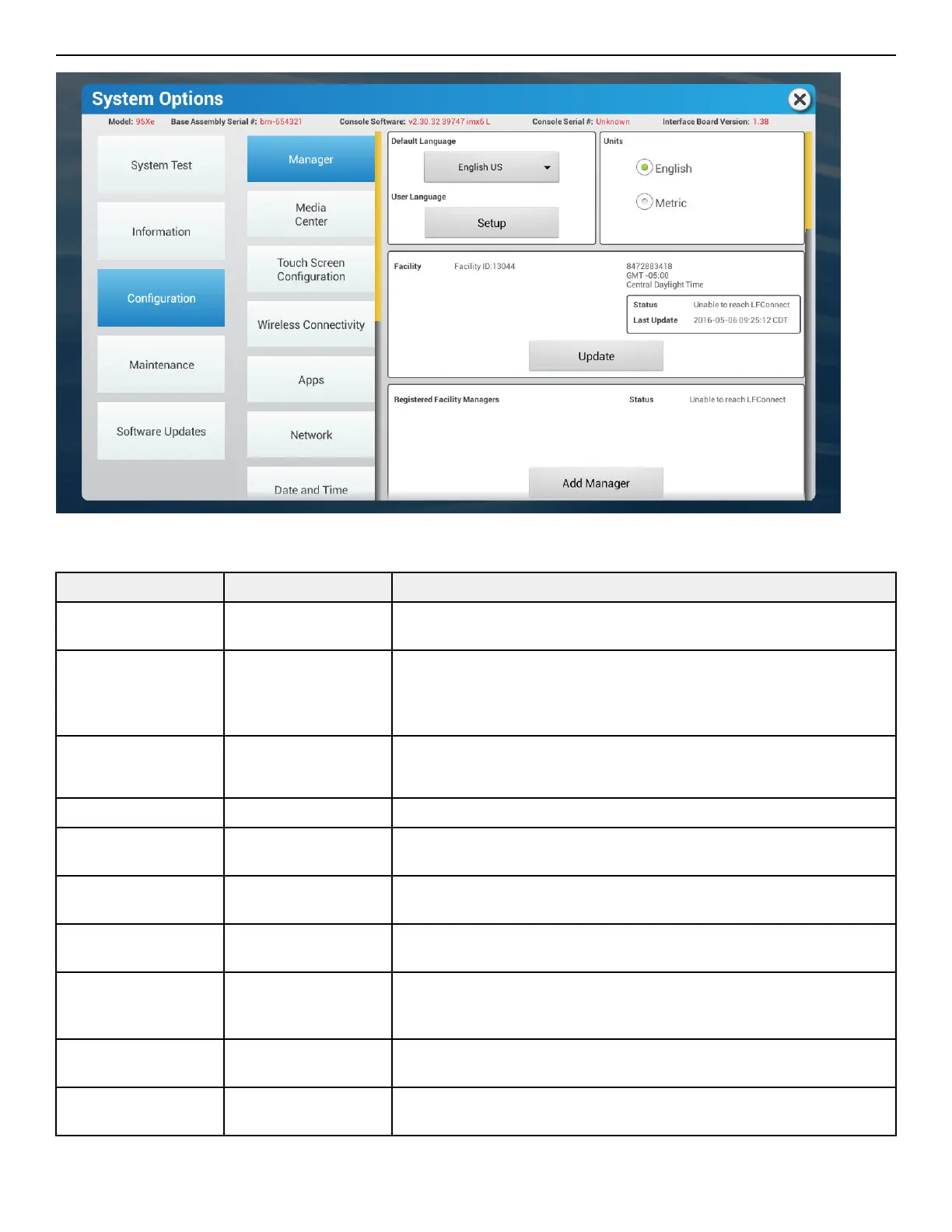
Manager - Default Settings
70T Console Cardio Products
Setting Default Description
Default Language English US This option sets a new default language. Choices include: English, Spanish, and
French.
User Language English US This option sets the language of user messages and service messages. Choices
include: English, Japanese, Italian, Turkish, Arabic, English UK, Dutch, French,
Polish, Catalan, Simplified Chinese, Traditional Chinese, Spanish, Russian,
Finnish, Basque, German, Portuguese, Korean, Hungarian, Hebrew and Welsh.
Units English Set the measurement unit type for weight, distance, height, and speed.
NOTE: Metric available.
Facility On This option creates facility information.
Registered Facility
Manager
On This option creates facility management information.
Workout Duration
Configuration
60 minute max Set maximum workout duration limits. 99 minutes maximum.
Pause Time 1 minute Set the maximum time during which a workout can remain in pause mode. 99
minutes maximum.
Program Timeout 30 seconds The amount of time, ranging from 0 - 255 seconds, a user can go without
touching the LCD touch screen during workout setup before the unit returns to
the Home Screen.
InActivity Timer On, 2 hours Set the desired amount of time of inactivity before the system automatically
turns o the LCD touch screen backlight.
Auto O / Auto On O Set the time of day for the system to automatically turn o the LCD touch
screen backlight.
Page 46 of 80


 To Next Page