DTV
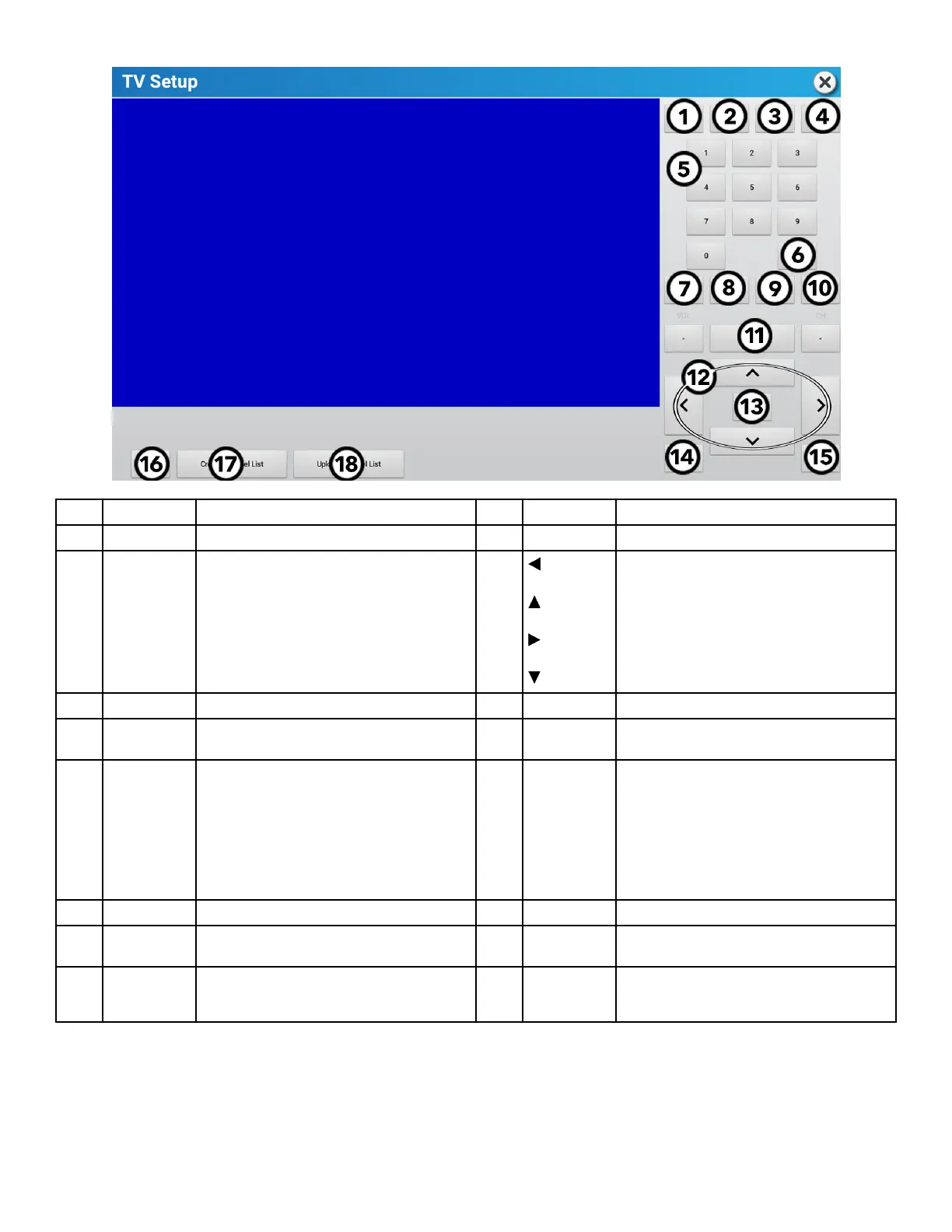
1 PMode Set Picture Mode. 10 CH Press + and - to change channels.
2 Zoom Picture Size. 11 Display Current channel information is shown.
3 EPG (if
available)
Lists current and upcoming programs for selected
channels.
12 Press to navigate the TV Setup menu options.
4 Mute Silence TV audio. 13 Enter Make Selections.
5 Keypad Use for manual channel input. Use the hyphen (-) to
input major-minor channel numbering.
14 Exit Press to exit the TV Setup menu.
6 Prev Press to view previous channel. 15 Menu
Press to access:
• Channel settings
• Picture settings
• Sound settings
• Time settings
• Lock settings
• Setup settings
7 VOL Press + and - to change audio volume. 16 Reset Resets tuner to default state.
8 SAP (if
available)
Press to activate Secondary Audio Programming
(SAP).
17 Create Channel
List
Create a list of channels for users to access during
workouts.
9 CC Press to turn Closed Caption (or Subtitles) On / O. 18 Upload Channel
List
Uploads channel list to Halo Fitness Cloud (if
connected) and instantly to all other units in the
facility if units are connected to the internet.
Page 49 of 80


 To Next Page